It’s done, but thanks!
Hi, new Vaillant 7kWh ASHP recently installed through HeatGeek generally happy with the install apart from unreasonably high COP, presumably temp probe related but looking to get more data. Adapter shield C6 arriving shortly. I have HA and the myVaillant integration running but may look to Node Red or maybe n8n to get the data somewhere visual.
The first of I expect many questions, here’s the current electronics:
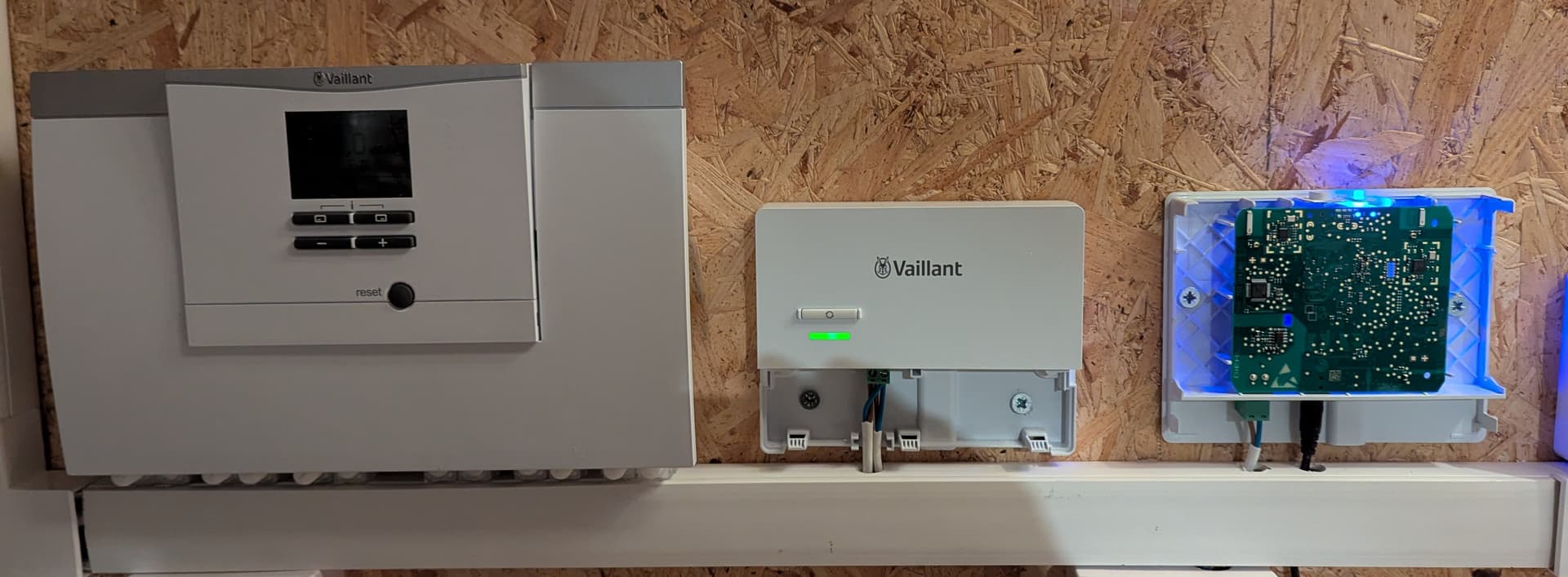
Any issues in just extending the ebus by connecting to the gateway on the right or should I make the connection further to the left?
Thanks
Really does not matter - I’d suggest to connect where most convenient (as long as you’re not running tens of meters of cable).
Thanks. Far right is easiest, shortest and nearest to a power socket.
Think I’ve wasted an afternoon trying to use Gemini 3 Pro to get me set up with using an ebusd adapter Stick C6 to send data to heatpumpmonitor.org. It tried to write me a python program running in a docker container to do the job but it never really worked.
Can anyone help a newbie out? I have the stick working and online. easi> shows that it is running and online on my wifi network, and it’s connected to the ebus network of my Vaillant Arotherm Plus. So… how do I go from here to data on heatpumpmonitor.org?! I did read this entire thread but got lost a few times 
OK maybe I was a bit too quick to judge Gemini; we seem to be sending data to emoncms.org in the form of:
https://emoncms.org/input/post?node=vaillant&apikey=[apireadandwritekeyremoved]&fulljson={"flow_temp":36.86,"return_temp":35.54,"elec_power":511.73,"outside_temp":5.67,"inside_temp":18.94,"target_temp":19.0,"dhw_temp":53.0,"heat_output":1311.73}
I just have no idea what to do next (and my brain is fried)
For the record, this is my docker compose.yaml
services:

  ebusd:
    image: john30/ebusd:latest
    container_name: ebusd
    restart: always
    network_mode: host
    command: >
      --scanconfig
      -d ens:10.0.1.23:9999
      --accesslevel=*
      --httpport=8080

  hpm_bridge:
    image: python:3.9-slim
    container_name: hpm_bridge
    restart: always
    network_mode: host
    depends_on:
      - ebusd
    volumes:
      - ./heatpump-monitor/main.py:/app/main.py
    command: sh -c "pip install requests && python -u /app/main.py"
And this is the python program main.py Gemini wrote:
import requests
import time
import json
import sys

# --- CONFIGURATION ---
EBUSD_URL = "http://localhost:8080/data"
API_KEY = "[read&writeAPIkey removed]"
EMONCMS_URL = "https://emoncms.org/input/post"
NODE_NAME = "vaillant"
INTERVAL = 30

# --- SENSORS MAP ---
# Format: "EmonCMS_Name": ("Circuit", "Register_Name")
SENSORS = {
    # 1. Physics (Temps & Power)
    "flow_temp":    ("hmu", "RunDataFlowTemp"),
    "return_temp":  ("hmu", "RunDataReturnTemp"),
    "elec_power":   ("hmu", "RunDataElectricPowerConsumption"),

    # 2. Calculation Source (Internal variable, not sent to dashboard)
    "env_yield":    ("hmu", "CurrentYieldPower"),

    # 3. Environmental
    "outside_temp": ("basv", "DisplayedOutsideTemp"),
    "inside_temp":  ("basv", "Z1RoomTemp"),
    "target_temp":  ("basv", "Z1ActualRoomTempDesired"),
    "dhw_temp":     ("basv", "HwcStorageTemp"),
}

def fetch_value(circuit, name):
    """Fetches a value from ebusd, handling caching rules."""
    try:
        # Force a fresh read (maxage=0) for Yield to ensure accurate Physics
        # Use cache (maxage=60) for Temps to reduce bus load
        is_yield = (name == "CurrentYieldPower")
        maxage = "0" if is_yield else "60"

        url = f"{EBUSD_URL}/{circuit}/{name}?def&maxage={maxage}"
        r = requests.get(url, timeout=5)
        if r.status_code != 200: return None
        data = r.json()

        # Recursive finder for "value"
        def find_val_recursive(d):
            if isinstance(d, dict):
                if "value" in d:
                    v = d["value"]
                    if isinstance(v, (int, float)) and not isinstance(v, bool):
                        return float(v)
                for item in d.values():
                    res = find_val_recursive(item)
                    if res is not None: return res
            return None

        return find_val_recursive(data)
    except:
        return None

def main():
    print("--- Vaillant Bridge (Final Clean) ---")

    while True:
        payload = {}
        raw_data = {}

        # 1. Fetch All Sensors
        for key, (circuit, reg_name) in SENSORS.items():
            val = fetch_value(circuit, reg_name)
            if val is not None:
                raw_data[key] = val
                # Add to payload automatically, unless it's a calc variable
                if key != "env_yield":
                    payload[key] = val

        # 2. Calculate True Heat Output (Physics)
        # Total Heat (W) = Environmental Yield (kW * 1000) + Electrical Input (W)
        elec = raw_data.get("elec_power", 0.0)
        env_yield_kw = raw_data.get("env_yield", 0.0)

        if env_yield_kw > 0:
            payload["heat_output"] = (env_yield_kw * 1000.0) + elec
        else:
            payload["heat_output"] = 0.0

        # 3. Safety Defaults
        if "elec_power" not in payload: payload["elec_power"] = 0.0

        # 4. Upload
        if len(payload) > 1:
            try:
                params = {
                    "node": NODE_NAME,
                    "fulljson": json.dumps(payload),
                    "apikey": API_KEY
                }
                requests.post(EMONCMS_URL, params=params, timeout=10)
                print(f"Uploaded: {payload}")
            except Exception as e:
                print(f"Upload failed: {e}")
        else:
            print("Waiting for valid data...")

        sys.stdout.flush()
        time.sleep(INTERVAL)

if __name__ == "__main__":
    main()
Edit: see the updated main.py in my reply below, and follow the replies for the next steps
Just add your system with an emoncms link to heatpumpmonitor.org - it ingests data from emoncms.org. You’re basically 90% done.
1 Like
I don’t think I’ve done the emoncms .org bit right though. I have a screen that looks like this, with live numbers that look right (although I don’t trust that heat output as the number from ebusd is in kilowatts and only to 1 d.p.), and I’m not sure what to do next.
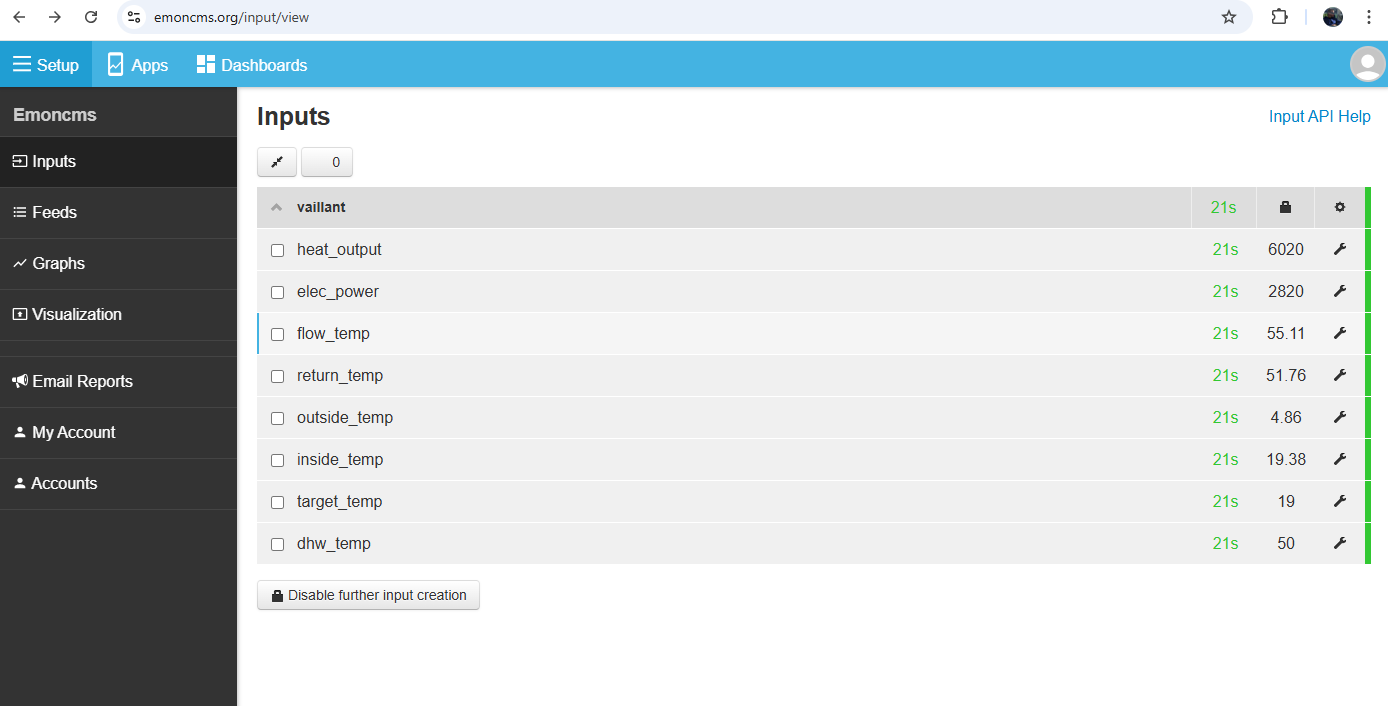
Ah, OK. So now you’ve got inputs (momentary values) which you have to store into feeds (data over time, potentially with transforms). Then the feeds can be used in a MyHeatpump app in emoncms which takes the feeds and visualizes your heatpump performance.
2 Likes
@Dan_Grey
Bear in mind the emonCMS you are running locally is almost the same as emoncms.org, but the two are completely separate, and have different API keys and passwords.
1 Like
Rob this is the emonCMS website, I’m not running a local copy
Through some more poking and prodding with assistance from Gemini I found the flow rate. So my main.py code is now:
import requests
import time
import json
import sys

# --- CONFIGURATION ---
EBUSD_URL = "http://localhost:8080/data"
API_KEY = "[key removed!]"
EMONCMS_URL = "https://emoncms.org/input/post"
NODE_NAME = "vaillant"
INTERVAL = 30

# --- SENSORS MAP ---
SENSORS = {
    # --- USER REQUESTED REGISTERS ---
    "flow_temp":    ("hmu", "RunDataFlowTemp"),
    "return_temp":  ("hmu", "RunDataReturnTemp"),
    "inside_temp":  ("basv", "Z1RoomTemp"),

    # --- OTHER ESSENTIALS ---
    "elec_power":   ("hmu", "RunDataElectricPowerConsumption"),
    "flow_rate":    ("hmu", "BuildingCircuitFlow"),       # Confirmed working
    "env_yield":    ("hmu", "CurrentYieldPower"),         # Used for Heat Output calc

    # --- AUXILIARY ---
    "outside_temp": ("basv", "DisplayedOutsideTemp"),
    "target_temp":  ("basv", "Z1ActualRoomTempDesired"),
    "dhw_temp":     ("basv", "HwcStorageTemp"),
}

def fetch_value(circuit, name):
    """Fetches a value from ebusd."""
    try:
        # Force a fresh read (maxage=0) for dynamic data (Flow/Yield)
        # Use cached (maxage=60) for Temps to save bus traffic
        is_dynamic = (name in ["BuildingCircuitFlow", "CurrentYieldPower"])
        maxage = "0" if is_dynamic else "60"

        url = f"{EBUSD_URL}/{circuit}/{name}?def&maxage={maxage}"
        r = requests.get(url, timeout=5)
        if r.status_code != 200: return None
        data = r.json()

        # Recursive finder for "value"
        def find_val_recursive(d):
            if isinstance(d, dict):
                if "value" in d:
                    v = d["value"]
                    if isinstance(v, (int, float)) and not isinstance(v, bool):
                        return float(v)
                for item in d.values():
                    res = find_val_recursive(item)
                    if res is not None: return res
            return None

        return find_val_recursive(data)
    except:
        return None

def main():
    print("--- Vaillant Bridge (Final Production) ---")

    while True:
        payload = {}
        raw_data = {}

        # 1. Fetch All Sensors
        for key, (circuit, reg_name) in SENSORS.items():
            val = fetch_value(circuit, reg_name)
            if val is not None:
                raw_data[key] = val
                # Add to payload (except internal calc variables)
                if key != "env_yield":
                    payload[key] = val

        # 2. Calculate True Heat Output
        # Total Heat = Environmental Yield (kW * 1000) + Electrical Input (W)
        elec = raw_data.get("elec_power", 0.0)
        env_yield_kw = raw_data.get("env_yield", 0.0)

        if env_yield_kw > 0:
            payload["heat_output"] = (env_yield_kw * 1000.0) + elec
        else:
            payload["heat_output"] = 0.0

        # 3. Defaults
        if "elec_power" not in payload: payload["elec_power"] = 0.0

        # 4. Upload
        if len(payload) > 1:
            try:
                params = {
                    "node": NODE_NAME,
                    "fulljson": json.dumps(payload),
                    "apikey": API_KEY
                }
                requests.post(EMONCMS_URL, params=params, timeout=10)
                print(f"Uploaded: {payload}")
            except Exception as e:
                print(f"Upload failed: {e}")
        else:
            print("Waiting for valid data...")

        sys.stdout.flush()
        time.sleep(INTERVAL)

if __name__ == "__main__":
    main()
This is run in a docker container as set out here. For how I went from this point to using the data on emonCMS .org and then on to heatpumpmonitor .org, see this post
1 Like
.. and @championc .. A year further on, did you get any feedback here? I confused the names (they are very similar) so got the v6.3 thinking it was the same as the shield C6. I’ve been using it for nearly a year without apparent problems but the other night my Vaillant controller put up messages about communication problems so I was about to swap over to the Shield C6 when I saw that it would need a separate power supply, a real pain in my layout. My worry was also that it might drag down the eBus though that seems to cater for much larger devices than the ebus card (the SensoComfort is quoted as drawing 50 mW @ 18 volts.
I just hooked up my spare ebus shield to the heatpump and have it running in micro-ebusd (standalone) mode, which does not require a separate RPi to parse the messages. Here are my first impressions. You need a license to access the features - I activated my trial license today and hence can test things out until Feb. 10. I’m taking requests :).
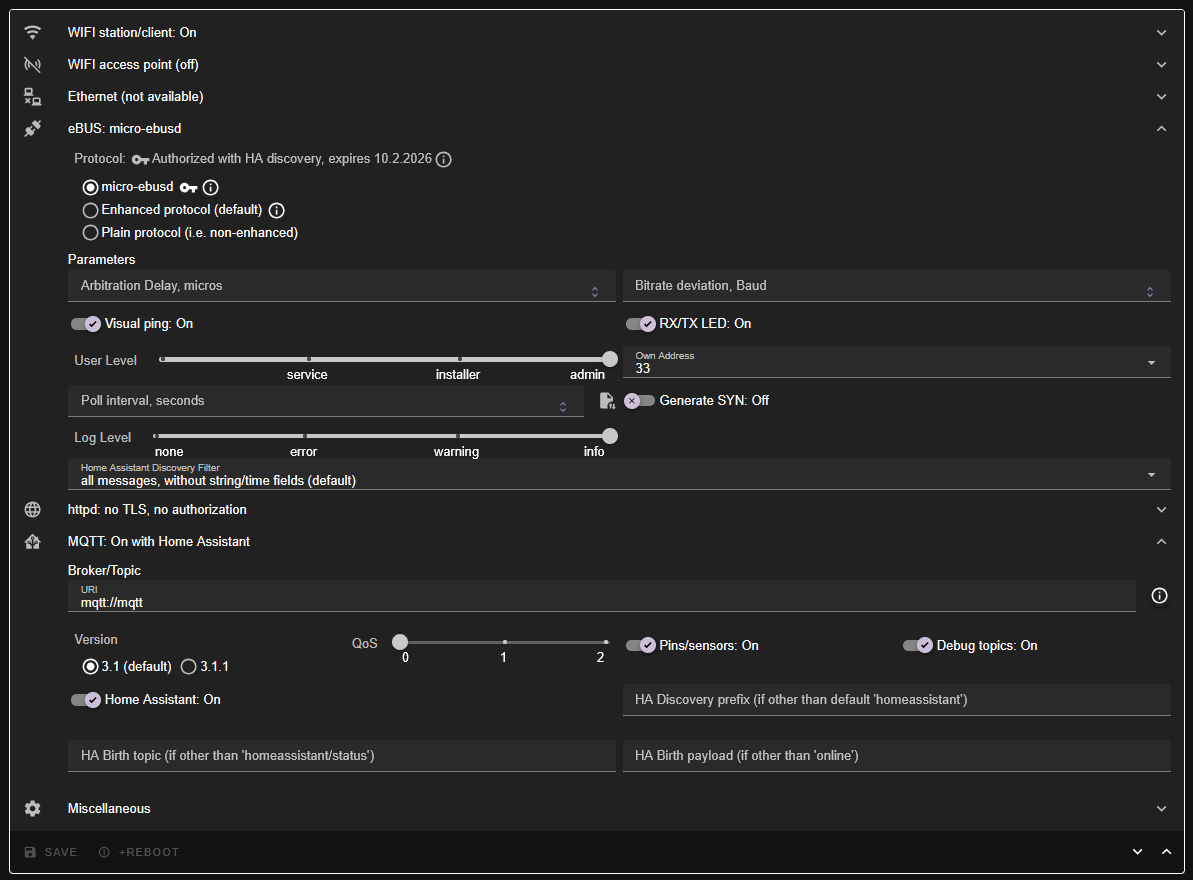
Installation was super easy - connect to the shield’s WiFi, put in details of my home Wifi and then update to the latest firmware.
I then picked micro-ebusd as protocol and put in my MQTT broker details (fresh broker instance on Proxmox to not mess anything up in prod)
You can see detected devices in the web UI and also configs that are loaded:
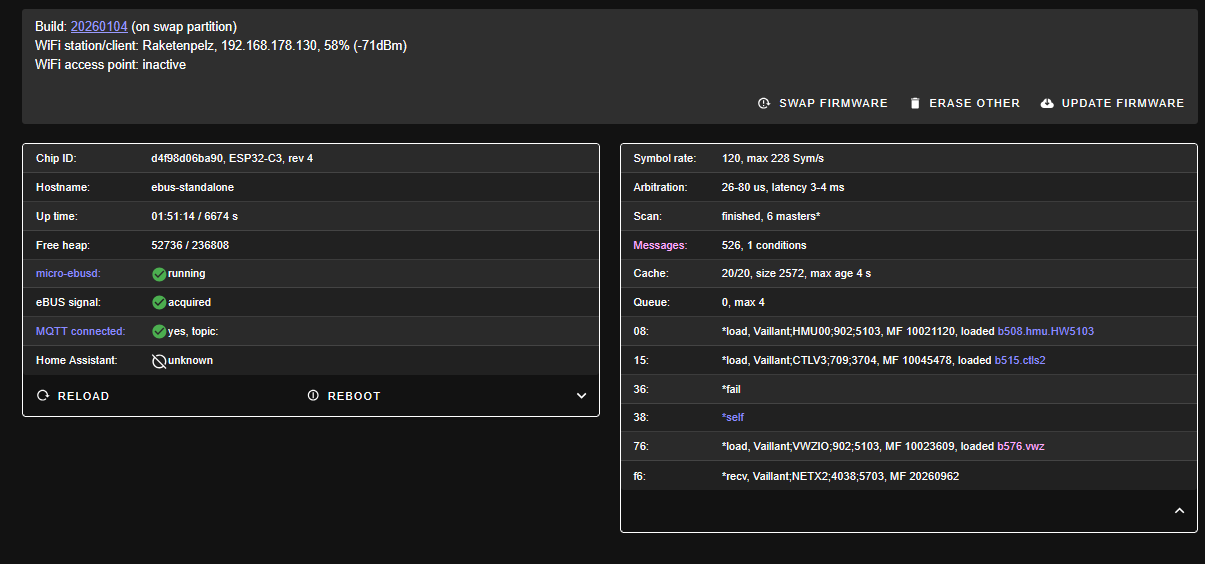
There is now a “Messages” tab in the shield’s web UI where you can see everything that the loaded config supports and can tick whether to poll for this message (poll interval can be globally configured, default 60s)
Here’s everything that got detected on my system (warning, long table):
Table of detected values
| Circuit | Name | R/W | Fields |
|---|---|---|---|
| broadcast | Datetime | u | 3 |
| broadcast | Error | u | 1 |
| broadcast | HwcStatus | u | 3 |
| broadcast | Id | r | 4 |
| broadcast | IdAnswer | u | 4 |
| broadcast | IdQuery | w | 0 |
| broadcast | Load | u | 1 |
| broadcast | Outsidetemp | u | 1 |
| broadcast | Queryexistence | w | 0 |
| broadcast | Signoflife | u | 0 |
| broadcast | Vdatetime | w,u | 2 |
| ctlv3 | AdaptHeatCurve | r,w | 1 |
| ctlv3 | CcTimer_Config | r | 1 |
| ctlv3 | CcTimer_Friday | w | 5 |
| ctlv3 | CcTimer_Friday0 | r | 4 |
| ctlv3 | CcTimer_Friday1 | r | 4 |
| ctlv3 | CcTimer_Friday2 | r | 4 |
| ctlv3 | CcTimer_Monday | w | 5 |
| ctlv3 | CcTimer_Monday0 | r | 4 |
| ctlv3 | CcTimer_Monday1 | r | 4 |
| ctlv3 | CcTimer_Monday2 | r | 4 |
| ctlv3 | CcTimer_Saturday | w | 5 |
| ctlv3 | CcTimer_Saturday0 | r | 4 |
| ctlv3 | CcTimer_Saturday1 | r | 4 |
| ctlv3 | CcTimer_Saturday2 | r | 4 |
| ctlv3 | CcTimer_Sunday | w | 5 |
| ctlv3 | CcTimer_Sunday0 | r | 4 |
| ctlv3 | CcTimer_Sunday1 | r | 4 |
| ctlv3 | CcTimer_Sunday2 | r | 4 |
| ctlv3 | CcTimer_Thursday | w | 5 |
| ctlv3 | CcTimer_Thursday0 | r | 4 |
| ctlv3 | CcTimer_Thursday1 | r | 4 |
| ctlv3 | CcTimer_Thursday2 | r | 4 |
| ctlv3 | CcTimer_Timeframes | r | 9 |
| ctlv3 | CcTimer_Tuesday | w | 5 |
| ctlv3 | CcTimer_Tuesday0 | r | 4 |
| ctlv3 | CcTimer_Tuesday1 | r | 4 |
| ctlv3 | CcTimer_Tuesday2 | r | 4 |
| ctlv3 | CcTimer_Wednesday | w | 5 |
| ctlv3 | CcTimer_Wednesday0 | r | 4 |
| ctlv3 | CcTimer_Wednesday1 | r | 4 |
| ctlv3 | CcTimer_Wednesday2 | r | 4 |
| ctlv3 | Clearerrorhistory | w | 1 |
| ctlv3 | ContinuousHeating | r,w | 1 |
| ctlv3 | Currenterror | r | 5 |
| ctlv3 | CylinderChargeHyst | r,w | 1 |
| ctlv3 | CylinderChargeOffset | r,w | 1 |
| ctlv3 | Date | r,w | 1 |
| ctlv3 | DisplayedOutsideTemp | r | 2 |
| ctlv3 | Errorhistory | r | 5 |
| ctlv3 | FrostOverRideTime | r,w | 1 |
| ctlv3 | Hc1ActualFlowTempDesired | r | 2 |
| ctlv3 | Hc1AutoOffMode | r,w | 1 |
| ctlv3 | Hc1CircuitType | r | 3 |
| ctlv3 | Hc1ExcessTemp | r,w | 1 |
| ctlv3 | Hc1FlowTemp | r | 2 |
| ctlv3 | Hc1HeatCurve | r,w | 1 |
| ctlv3 | Hc1HeatCurveAdaption | r | 2 |
| ctlv3 | Hc1MaxFlowTempDesired | r,w | 1 |
| ctlv3 | Hc1MinCoolingTempDesired | r,w | 1 |
| ctlv3 | Hc1MinFlowTempDesired | r,w | 1 |
| ctlv3 | Hc1MixerMovement | r | 2 |
| ctlv3 | Hc1PumpStatus | r,w | 1 |
| ctlv3 | Hc1RoomTempSwitchOn | r,w | 1 |
| ctlv3 | Hc1Status | r,w | 1 |
| ctlv3 | Hc1SummerTempLimit | r,w | 1 |
| ctlv3 | Hc2ActualFlowTempDesired | r | 2 |
| ctlv3 | Hc2AutoOffMode | r,w | 1 |
| ctlv3 | Hc2CircuitType | r | 3 |
| ctlv3 | Hc2ExcessTemp | r,w | 1 |
| ctlv3 | Hc2FlowTemp | r | 2 |
| ctlv3 | Hc2HeatCurve | r,w | 1 |
| ctlv3 | Hc2HeatCurveAdaption | r | 2 |
| ctlv3 | Hc2MaxFlowTempDesired | r,w | 1 |
| ctlv3 | Hc2MinCoolingTempDesired | r,w | 1 |
| ctlv3 | Hc2MinFlowTempDesired | r,w | 1 |
| ctlv3 | Hc2MixerMovement | r | 2 |
| ctlv3 | Hc2PumpStatus | r,w | 1 |
| ctlv3 | Hc2RoomTempSwitchOn | r,w | 1 |
| ctlv3 | Hc2Status | r,w | 1 |
| ctlv3 | Hc2SummerTempLimit | r,w | 1 |
| ctlv3 | Hc3ActualFlowTempDesired | r | 2 |
| ctlv3 | Hc3AutoOffMode | r,w | 1 |
| ctlv3 | Hc3CircuitType | r | 3 |
| ctlv3 | Hc3ExcessTemp | r,w | 1 |
| ctlv3 | Hc3FlowTemp | r | 2 |
| ctlv3 | Hc3HeatCurve | r,w | 1 |
| ctlv3 | Hc3HeatCurveAdaption | r | 2 |
| ctlv3 | Hc3MaxFlowTempDesired | r,w | 1 |
| ctlv3 | Hc3MinCoolingTempDesired | r,w | 1 |
| ctlv3 | Hc3MinFlowTempDesired | r,w | 1 |
| ctlv3 | Hc3MixerMovement | r | 2 |
| ctlv3 | Hc3PumpStatus | r,w | 1 |
| ctlv3 | Hc3RoomTempSwitchOn | r,w | 1 |
| ctlv3 | Hc3Status | r,w | 1 |
| ctlv3 | Hc3SummerTempLimit | r,w | 1 |
| ctlv3 | HcStorageTempBottom | r | 2 |
| ctlv3 | HcStorageTempTop | r | 2 |
| ctlv3 | HwcBankHolidayEndPeriod | r,w | 1 |
| ctlv3 | HwcBankHolidayStartPeriod | r,w | 1 |
| ctlv3 | HwcFlowTemp | r | 2 |
| ctlv3 | HwcHolidayEndPeriod | r,w | 1 |
| ctlv3 | HwcHolidayStartPeriod | r,w | 1 |
| ctlv3 | HwcLockTime | r,w | 1 |
| ctlv3 | HwcMaxFlowTempDesired | r,w | 1 |
| ctlv3 | HwcOpMode | r,w | 1 |
| ctlv3 | HwcParallelLoading | r,w | 1 |
| ctlv3 | HwcSFMode | r,w | 1 |
| ctlv3 | HwcStorageTemp | r | 2 |
| ctlv3 | HwcStorageTempBottom | r | 2 |
| ctlv3 | HwcStorageTempTop | r | 2 |
| ctlv3 | HwcTempDesired | r,w | 1 |
| ctlv3 | HwcTimer_Config | r | 1 |
| ctlv3 | HwcTimer_Friday | w | 5 |
| ctlv3 | HwcTimer_Friday0 | r | 4 |
| ctlv3 | HwcTimer_Friday1 | r | 4 |
| ctlv3 | HwcTimer_Friday2 | r | 4 |
| ctlv3 | HwcTimer_Monday | w | 5 |
| ctlv3 | HwcTimer_Monday0 | r | 4 |
| ctlv3 | HwcTimer_Monday1 | r | 4 |
| ctlv3 | HwcTimer_Monday2 | r | 4 |
| ctlv3 | HwcTimer_Saturday | w | 5 |
| ctlv3 | HwcTimer_Saturday0 | r | 4 |
| ctlv3 | HwcTimer_Saturday1 | r | 4 |
| ctlv3 | HwcTimer_Saturday2 | r | 4 |
| ctlv3 | HwcTimer_Sunday | w | 5 |
| ctlv3 | HwcTimer_Sunday0 | r | 4 |
| ctlv3 | HwcTimer_Sunday1 | r | 4 |
| ctlv3 | HwcTimer_Sunday2 | r | 4 |
| ctlv3 | HwcTimer_Thursday | w | 5 |
| ctlv3 | HwcTimer_Thursday0 | r | 4 |
| ctlv3 | HwcTimer_Thursday1 | r | 4 |
| ctlv3 | HwcTimer_Thursday2 | r | 4 |
| ctlv3 | HwcTimer_Timeframes | r | 9 |
| ctlv3 | HwcTimer_Tuesday | w | 5 |
| ctlv3 | HwcTimer_Tuesday0 | r | 4 |
| ctlv3 | HwcTimer_Tuesday1 | r | 4 |
| ctlv3 | HwcTimer_Tuesday2 | r | 4 |
| ctlv3 | HwcTimer_Wednesday | w | 5 |
| ctlv3 | HwcTimer_Wednesday0 | r | 4 |
| ctlv3 | HwcTimer_Wednesday1 | r | 4 |
| ctlv3 | HwcTimer_Wednesday2 | r | 4 |
| ctlv3 | HydraulicScheme | r,w | 1 |
| ctlv3 | Installer1 | r,w | 1 |
| ctlv3 | Installer2 | r,w | 1 |
| ctlv3 | KeyCodeforConfigMenu | r,w | 1 |
| ctlv3 | MaintenanceDate | r,w | 1 |
| ctlv3 | MaintenanceDue | r | 2 |
| ctlv3 | MaxCylinderChargeTime | r,w | 1 |
| ctlv3 | MaxRoomHumidity | r,w | 1 |
| ctlv3 | MultiRelaySetting | r,w | 1 |
| ctlv3 | OutsideTempAvg | r,w | 1 |
| ctlv3 | PhoneNumber1 | r,w | 1 |
| ctlv3 | PhoneNumber2 | r,w | 1 |
| ctlv3 | PrEnergySum | r,w | 1 |
| ctlv3 | PrEnergySumHc | r,w | 1 |
| ctlv3 | PrEnergySumHcLastMonth | r,w | 1 |
| ctlv3 | PrEnergySumHcThisMonth | r,w | 1 |
| ctlv3 | PrEnergySumHwc | r,w | 1 |
| ctlv3 | PrEnergySumHwcLastMonth | r,w | 1 |
| ctlv3 | PrEnergySumHwcThisMonth | r,w | 1 |
| ctlv3 | PrFuelSum | r,w | 1 |
| ctlv3 | PrFuelSumHc | r,w | 1 |
| ctlv3 | PrFuelSumHcLastMonth | r,w | 1 |
| ctlv3 | PrFuelSumHcThisMonth | r,w | 1 |
| ctlv3 | PrFuelSumHwc | r,w | 1 |
| ctlv3 | PrFuelSumHwcLastMonth | r,w | 1 |
| ctlv3 | PrFuelSumHwcThisMonth | r,w | 1 |
| ctlv3 | PumpAdditionalTime | r,w | 1 |
| ctlv3 | SolarYieldTotal | r,w | 1 |
| ctlv3 | SystemFlowTemp | r | 2 |
| ctlv3 | Time | r,w | 1 |
| ctlv3 | WaterPressure | r | 2 |
| ctlv3 | YieldTotal | r,w | 1 |
| ctlv3 | Z1ActualRoomTempDesired | r,w | 1 |
| ctlv3 | Z1BankHolidayEndPeriod | r,w | 1 |
| ctlv3 | Z1BankHolidayStartPeriod | r,w | 1 |
| ctlv3 | Z1CoolingTemp | r,w | 1 |
| ctlv3 | Z1DayTemp | r,w | 1 |
| ctlv3 | Z1HolidayEndPeriod | r,w | 1 |
| ctlv3 | Z1HolidayStartPeriod | r,w | 1 |
| ctlv3 | Z1HolidayTemp | r,w | 1 |
| ctlv3 | Z1Name1 | r,w | 1 |
| ctlv3 | Z1Name2 | r,w | 1 |
| ctlv3 | Z1NightTemp | r,w | 1 |
| ctlv3 | Z1OpMode | r,w | 1 |
| ctlv3 | Z1QuickVetoDuration | r,w | 1 |
| ctlv3 | Z1QuickVetoEndDate | r | 2 |
| ctlv3 | Z1QuickVetoEndTime | r | 2 |
| ctlv3 | Z1QuickVetoTemp | r,w | 1 |
| ctlv3 | Z1RoomTemp | r | 2 |
| ctlv3 | Z1RoomZoneMapping | r,w | 1 |
| ctlv3 | Z1SFMode | r,w | 1 |
| ctlv3 | Z1Shortname | r,w | 1 |
| ctlv3 | Z1Timer_Config | r | 1 |
| ctlv3 | Z1Timer_Friday | w | 5 |
| ctlv3 | Z1Timer_Friday0 | r | 4 |
| ctlv3 | Z1Timer_Friday1 | r | 4 |
| ctlv3 | Z1Timer_Friday2 | r | 4 |
| ctlv3 | Z1Timer_Monday | w | 5 |
| ctlv3 | Z1Timer_Monday0 | r | 4 |
| ctlv3 | Z1Timer_Monday1 | r | 4 |
| ctlv3 | Z1Timer_Monday2 | r | 4 |
| ctlv3 | Z1Timer_Saturday | w | 5 |
| ctlv3 | Z1Timer_Saturday0 | r | 4 |
| ctlv3 | Z1Timer_Saturday1 | r | 4 |
| ctlv3 | Z1Timer_Saturday2 | r | 4 |
| ctlv3 | Z1Timer_Sunday | w | 5 |
| ctlv3 | Z1Timer_Sunday0 | r | 4 |
| ctlv3 | Z1Timer_Sunday1 | r | 4 |
| ctlv3 | Z1Timer_Sunday2 | r | 4 |
| ctlv3 | Z1Timer_Thursday | w | 5 |
| ctlv3 | Z1Timer_Thursday0 | r | 4 |
| ctlv3 | Z1Timer_Thursday1 | r | 4 |
| ctlv3 | Z1Timer_Thursday2 | r | 4 |
| ctlv3 | Z1Timer_Timeframes | r | 9 |
| ctlv3 | Z1Timer_Tuesday | w | 5 |
| ctlv3 | Z1Timer_Tuesday0 | r | 4 |
| ctlv3 | Z1Timer_Tuesday1 | r | 4 |
| ctlv3 | Z1Timer_Tuesday2 | r | 4 |
| ctlv3 | Z1Timer_Wednesday | w | 5 |
| ctlv3 | Z1Timer_Wednesday0 | r | 4 |
| ctlv3 | Z1Timer_Wednesday1 | r | 4 |
| ctlv3 | Z1Timer_Wednesday2 | r | 4 |
| ctlv3 | Z1ValveStatus | r,w | 1 |
| ctlv3 | Z2ActualRoomTempDesired | r,w | 1 |
| ctlv3 | Z2BankHolidayEndPeriod | r,w | 1 |
| ctlv3 | Z2BankHolidayStartPeriod | r,w | 1 |
| ctlv3 | Z2CoolingTemp | r,w | 1 |
| ctlv3 | Z2DayTemp | r,w | 1 |
| ctlv3 | Z2HolidayEndPeriod | r,w | 1 |
| ctlv3 | Z2HolidayStartPeriod | r,w | 1 |
| ctlv3 | Z2HolidayTemp | r,w | 1 |
| ctlv3 | Z2Name1 | r,w | 1 |
| ctlv3 | Z2Name2 | r,w | 1 |
| ctlv3 | Z2NightTemp | r,w | 1 |
| ctlv3 | Z2OpMode | r,w | 1 |
| ctlv3 | Z2QuickVetoDuration | r,w | 1 |
| ctlv3 | Z2QuickVetoEndDate | r | 2 |
| ctlv3 | Z2QuickVetoEndTime | r | 2 |
| ctlv3 | Z2QuickVetoTemp | r,w | 1 |
| ctlv3 | Z2RoomTemp | r | 2 |
| ctlv3 | Z2RoomZoneMapping | r,w | 1 |
| ctlv3 | Z2SFMode | r,w | 1 |
| ctlv3 | Z2Shortname | r,w | 1 |
| ctlv3 | Z2Timer_Config | r | 1 |
| ctlv3 | Z2Timer_Friday | w | 5 |
| ctlv3 | Z2Timer_Friday0 | r | 4 |
| ctlv3 | Z2Timer_Friday1 | r | 4 |
| ctlv3 | Z2Timer_Friday2 | r | 4 |
| ctlv3 | Z2Timer_Monday | w | 5 |
| ctlv3 | Z2Timer_Monday0 | r | 4 |
| ctlv3 | Z2Timer_Monday1 | r | 4 |
| ctlv3 | Z2Timer_Monday2 | r | 4 |
| ctlv3 | Z2Timer_Saturday | w | 5 |
| ctlv3 | Z2Timer_Saturday0 | r | 4 |
| ctlv3 | Z2Timer_Saturday1 | r | 4 |
| ctlv3 | Z2Timer_Saturday2 | r | 4 |
| ctlv3 | Z2Timer_Sunday | w | 5 |
| ctlv3 | Z2Timer_Sunday0 | r | 4 |
| ctlv3 | Z2Timer_Sunday1 | r | 4 |
| ctlv3 | Z2Timer_Sunday2 | r | 4 |
| ctlv3 | Z2Timer_Thursday | w | 5 |
| ctlv3 | Z2Timer_Thursday0 | r | 4 |
| ctlv3 | Z2Timer_Thursday1 | r | 4 |
| ctlv3 | Z2Timer_Thursday2 | r | 4 |
| ctlv3 | Z2Timer_Timeframes | r | 9 |
| ctlv3 | Z2Timer_Tuesday | w | 5 |
| ctlv3 | Z2Timer_Tuesday0 | r | 4 |
| ctlv3 | Z2Timer_Tuesday1 | r | 4 |
| ctlv3 | Z2Timer_Tuesday2 | r | 4 |
| ctlv3 | Z2Timer_Wednesday | w | 5 |
| ctlv3 | Z2Timer_Wednesday0 | r | 4 |
| ctlv3 | Z2Timer_Wednesday1 | r | 4 |
| ctlv3 | Z2Timer_Wednesday2 | r | 4 |
| ctlv3 | Z2ValveStatus | r,w | 1 |
| ctlv3 | Z3ActualRoomTempDesired | r,w | 1 |
| ctlv3 | Z3BankHolidayEndPeriod | r,w | 1 |
| ctlv3 | Z3BankHolidayStartPeriod | r,w | 1 |
| ctlv3 | Z3DayTemp | r,w | 1 |
| ctlv3 | Z3HolidayEndPeriod | r,w | 1 |
| ctlv3 | Z3HolidayStartPeriod | r,w | 1 |
| ctlv3 | Z3HolidayTemp | r,w | 1 |
| ctlv3 | Z3Name1 | r,w | 1 |
| ctlv3 | Z3Name2 | r,w | 1 |
| ctlv3 | Z3NightTemp | r,w | 1 |
| ctlv3 | Z3OpMode | r,w | 1 |
| ctlv3 | Z3QuickVetoDuration | r,w | 1 |
| ctlv3 | Z3QuickVetoEndDate | r | 2 |
| ctlv3 | Z3QuickVetoEndTime | r | 2 |
| ctlv3 | Z3QuickVetoTemp | r,w | 1 |
| ctlv3 | Z3RoomTemp | r | 2 |
| ctlv3 | Z3RoomZoneMapping | r,w | 1 |
| ctlv3 | Z3SFMode | r,w | 1 |
| ctlv3 | Z3Shortname | r,w | 1 |
| ctlv3 | Z3Timer_Config | r | 1 |
| ctlv3 | Z3Timer_Friday | w | 5 |
| ctlv3 | Z3Timer_Friday0 | r | 4 |
| ctlv3 | Z3Timer_Friday1 | r | 4 |
| ctlv3 | Z3Timer_Friday2 | r | 4 |
| ctlv3 | Z3Timer_Monday | w | 5 |
| ctlv3 | Z3Timer_Monday0 | r | 4 |
| ctlv3 | Z3Timer_Monday1 | r | 4 |
| ctlv3 | Z3Timer_Monday2 | r | 4 |
| ctlv3 | Z3Timer_Saturday | w | 5 |
| ctlv3 | Z3Timer_Saturday0 | r | 4 |
| ctlv3 | Z3Timer_Saturday1 | r | 4 |
| ctlv3 | Z3Timer_Saturday2 | r | 4 |
| ctlv3 | Z3Timer_Sunday | w | 5 |
| ctlv3 | Z3Timer_Sunday0 | r | 4 |
| ctlv3 | Z3Timer_Sunday1 | r | 4 |
| ctlv3 | Z3Timer_Sunday2 | r | 4 |
| ctlv3 | Z3Timer_Thursday | w | 5 |
| ctlv3 | Z3Timer_Thursday0 | r | 4 |
| ctlv3 | Z3Timer_Thursday1 | r | 4 |
| ctlv3 | Z3Timer_Thursday2 | r | 4 |
| ctlv3 | Z3Timer_Timeframes | r | 9 |
| ctlv3 | Z3Timer_Tuesday | w | 5 |
| ctlv3 | Z3Timer_Tuesday0 | r | 4 |
| ctlv3 | Z3Timer_Tuesday1 | r | 4 |
| ctlv3 | Z3Timer_Tuesday2 | r | 4 |
| ctlv3 | Z3Timer_Wednesday | w | 5 |
| ctlv3 | Z3Timer_Wednesday0 | r | 4 |
| ctlv3 | Z3Timer_Wednesday1 | r | 4 |
| ctlv3 | Z3Timer_Wednesday2 | r | 4 |
| ctlv3 | Z3ValveStatus | r,w | 1 |
| hmu | BuildingCircuitFlow | r | 2 |
| hmu | Clearerrorhistory | w | 1 |
| hmu | CompressorBlocktime | r | 2 |
| hmu | CompressorHc | r | 3 |
| hmu | CompressorHwc | r | 3 |
| hmu | CopCooling | r | 2 |
| hmu | CopCoolingMonth | r | 2 |
| hmu | CopHc | r | 2 |
| hmu | CopHcMonth | r | 2 |
| hmu | CopHwc | r | 2 |
| hmu | CopHwcMonth | r | 2 |
| hmu | CurrentCompressorUtil | r | 2 |
| hmu | CurrentConsumedPower | r | 2 |
| hmu | Currenterror | r | 5 |
| hmu | CurrentYieldPower | r | 2 |
| hmu | DateTime | r | 4 |
| hmu | EnergyIntegral | r | 2 |
| hmu | Errorhistory | r | 5 |
| hmu | FlowPressure | r | 2 |
| hmu | FlowTemp | r | 2 |
| hmu | PowerConsumptionHmu | r | 2 |
| hmu | RunDataAirInletTemp | r | 2 |
| hmu | RunDataBuildingCPumpPower | r | 2 |
| hmu | RunDataCompressorInletTemp | r | 2 |
| hmu | RunDataCompressorOutletTemp | r | 2 |
| hmu | RunDataCompressorSpeed | r | 2 |
| hmu | RunDataEEVOutletTemp | r | 2 |
| hmu | RunDataEEVPositionAbs | r | 2 |
| hmu | RunDataFan1Speed | r | 2 |
| hmu | RunDataFan2Speed | r | 2 |
| hmu | RunDataHighPressure | r | 2 |
| hmu | RunDataStatuscode | r | 2 |
| hmu | RunStats4PortValveHours | r | 2 |
| hmu | RunStats4PortValveSwitches | r | 2 |
| hmu | RunStatsBuildingCPumpStarts | r | 2 |
| hmu | RunStatsBuildingPumpHours | r | 2 |
| hmu | RunStatsCompressorHours | r | 2 |
| hmu | RunStatsCompressorStarts | r | 2 |
| hmu | RunStatsFan1Hours | r | 2 |
| hmu | RunStatsFan1Starts | r | 2 |
| hmu | RunStatsFan2Hours | r | 2 |
| hmu | RunStatsFan2Starts | r | 2 |
| hmu | RunStatsHcHours | r | 2 |
| hmu | RunStatsHMUHours | r | 2 |
| hmu | RunStatsHwcHours | r | 2 |
| hmu | SetMode | w,uw | 12 |
| hmu | Status | r | 5 |
| hmu | Status01 | r | 6 |
| hmu | Status02 | r | 5 |
| hmu | Status16 | r | 1 |
| hmu | StatusCirPump | uw | 1 |
| hmu | SupplyTempWeighted | r | 2 |
| hmu | TotalEnergyUsage | r | 2 |
| hmu | YieldCoolDay | r | 2 |
| hmu | YieldCooling | r | 2 |
| hmu | YieldCoolingMonth | r | 2 |
| hmu | YieldHc | r | 2 |
| hmu | YieldHcDay | r | 2 |
| hmu | YieldHcMonth | r | 2 |
| hmu | YieldHwc | r | 2 |
| hmu | YieldHwcDay | r | 2 |
| hmu | YieldHwcMonth | r | 2 |
| scan | Id | r | 1 |
| scan | Valuerange | r | 6 |
| vwzio | EnableTestHwcTemp | w | 1 |
| vwzio | EnableTestOutdoorTemp | w | 1 |
| vwzio | EnableTestThreeWayValve | w | 1 |
| vwzio | TestHwcTemp | r | 2 |
| vwzio | TestOutdoorTemp | r | 2 |
| vwzio | TestThreeWayValve | r | 2 |
There is definitely less info than I get with my local setup. Most importantly - I don’t see return temperature anywhere. This setup seems to fetch all its configs from a central CDN so it appears there is no way to manually add entries or point this to a different source of information.
I like the general standalong approach, but being completely dependent on a cloud CDN for configuration files is a showstopper for me. I don’t want to wait for random strangers to fight over a pull request just to see my return temperature. Message definitions are compiled into the firmware as of release but new definitions require internet access.
Here’s more info on the approach:
The token to access micro-ebusd costs some money, depending on how long after payment you want to get updates:
- F: free trial token for 1 month with all features: €0 plus tax
- XS: token with updates for 1 month: €10 plus tax
- S: token with updates for 1 year: €30 plus tax
- M: token with updates for 2 years: €40 plus tax
- HA: Home Assistant MQTT Discovery for eBUS messages (add-on option for a token): €10 plus tax
Supported messages for each the supported devices can be read on Github in the src folder:
Once this supports all required datasets we need to inspect our heat pumps, this will be a nice setup for anyone wanting to run without an extra Pi. I for my part have the shield plugged into a Pi running emoncms anyways and thus am going to continuerelying on my setup.
@Zarch @ectoplasmosis - this might be of interest.
2 Likes
Excellent, thank you for being a guinea pig!
Once return temp and flow rate etc are supported with this method, this would indeed be one step closer to a ‘plug and play’ ebusd monitoring solution.
Wonder how long it’ll take for the above to happen…?
Replying to my own post .. What I did was either really stupid or understandable, take your pick .. I hadn’t realised that there are TWO different ebus interface cards - the “eBUS Adapter Shield C6” and the “eBus to WiFi adapter module v6.3”, very similar names, both available from Elecrow, both based on the same technology, similar in appearance but not the same. What I had done was flash the C6 firmware on to the v6.3, which it accepted and would offer status and configuration screens but would not talk to the eBus. Worse, I can’t now get rid of it! I have erased it and flashed the v6.3 back on but it keeps offering the C6 config menu and won’t launch an AP. I’ll try Expressif’s last-ditch erase to factory app but it may be permanently goosed.
As you’ll see from other posts, though the C6 has more coverage it requires a separate power supply whereas the 6.3 doesn’t. This may or may not be a good thing.
Not exactly user-friendly  but thank you for taking a look!
I had thought I was going to go down the micro-ebusd route, but tbh I couldn’t quite get my head around MQTT, and when Google Gemini suggested a method that didn’t need it, I jumped at it. While I do like learning about things, usually my desire for things to “just work” wins out.
FWIW I really do like Docker now. I have a few things running as Docker instances, including ebusd, on the same 1 GB Pi 4B and it seems to work very well.
I find it more user friendly than the “classical” ebus way, and since emoncms comes with an MQTT broker already that you can point it at, this could very well become a plug and play solution at some point. The only missing part besides the missing measurements like return temperature is a sort of router to direct the desired MQTT messages to the emoncms topic so that it can be picked up automatically. If you look at the documentation of micro-ebusd there is also an http api you could leverage similar to the shell scripts you have running now, so MQTT isn’t even necessary.
It won’t be the solution for me either since I’ve got the hardware already, but could very well be a good option for newcomers down the line.
Has anyone been able to set Quiet Mode On/Off, Quiet Mode %age reduction and DHW Mode (Eco/Balanced/Normal) from HAOS via ebusd? Or indeed via ebusd running standalone somewhere else? AroTherm Plus here. Tried various methods but all end up with an error of different kinds.
I’m trying to automate the change in DHW mode depending on if its cold or warm outside (as when its cold I need to be in Normal mode to get back to heating the house ASAP) but when its warmer it can be in ECO mode and take its time about it.
On top of that as I’m on a time-of-use tariff I’d like to adjust the compressor quiet mode %age limit.
Currently set at 30%, but when its 50p+ I’d like to reduce that down to 60% to force it to run as efficiently as possible albeit with cooler temps in the house.
I have a DHW mode switch exposed in Home Assistant with the help of Node-RED addon:

You essentially just send 0, 1 or 2 to the ebusd/hmu/HwcMode/set topic. The DHW Mode Switch creates a dropdown in Home Assistant (Home assistant select entity) that allows selecting Normal, Eco or Balance and the function node converts these strings into 0, 1 and 2.
// Function Node Code
switch (msg.payload) {
    case 'Eco':
        msg.payload = 0;
        break;
    case 'Normal':
        msg.payload = 1;
        break;
    case 'Balance':
        msg.payload = 2;
        break;
    default:
        // If the payload doesn't match any case, you can handle it here
        // For example, you can return null to stop the message from being forwarded
        return null;
}

return msg;