Hey Glyn,
Looking to replicate what you did with the Samsung Gen6 for the Gen7 units.
Struggling to get any sensible data out of it. Cannot get flow rate or outside temp etc.
Any ideas or help appreciated.
Cheers
Hey Glyn,
Looking to replicate what you did with the Samsung Gen6 for the Gen7 units.
Struggling to get any sensible data out of it. Cannot get flow rate or outside temp etc.
Any ideas or help appreciated.
Cheers
Do you have the modbus module installed?
If so, you should be able to use emonHub with an RS485 adaptor
Here’s the emonHub interfacer:
We have the modbus interface installed in the outdoor integrated unit. It is connected onto our network using a Waveshare RS485 to ETH (B) POE device. We use these for all monitoring and metering. Inverters, batteries, remote CT etc.
All we can get out of it is LWT RWT and by accident FR. These are being read from using modbus sensors in HA directly.
name: “samsung_ashp”
type: tcp
host: 192.168.0.135
port: 502
sensors:

* name: “ASHP LWT”
  unique_id: ashp_lwt
  address: 66
  input_type: holding
  unit_of_measurement: “°C”
  device_class: temperature
  state_class: measurement
  scale: 0.1
  precision: 1
  slave: 1

* name: “ASHP RWT”
  unique_id: ashp_rwt
  address: 65
  input_type: holding
  unit_of_measurement: “°C”
  device_class: temperature
  state_class: measurement
  scale: 0.1
  precision: 1
  slave: 1

* name: “ASHP Flow Rate”
  unique_id: ashp_flow_rate
  address: 86
  input_type: holding
  unit_of_measurement: “L/min”
  state_class: measurement
  scale: 0.1
  precision: 1
  slave: 1
They do seem to work but we can’t seem to be able to get other info like Target Water Law temp, Indoor temp, Outside temp, Active Electrical power consumption, Compressor % and Pump % etc.
Any help appreciated.
Cheers
There’s a list of all the modbus registers in this repo: GitHub - glynhudson/samsung-modbus-mim-b19n: Example script to read data from a Samsung Heat Pump or HVAC unit using MIM-B19N Modbus module · GitHub
If you want additional information, then you may need to talk directly to the heat pump bypassing the modbus module. There’s some thread about this on the forum, I don’t have experience of this myself:
e.g
The answer is in this post I think ……….
Thanks for adding the references, @glyn.hudson and @toadhall.
I would add that 1) @pantherale0 has recently added some more options to his excellent HA Integration, and 2) @PeterX has recently improved his (also excellent) NASAmonitor software (Samsung ASHPs: Review of NASAmonitor – an Alternative to SNET-Pro2). Neither of these approaches requires a MIM-B19N (at ~£180 a pop, they are hard to justify).
Are you looking for more information than is available by simply using SNET-Pro2/NASAmonitor? The former may be a bit clunky but allows you to change your FSVs from the comfort of your laptop and get details of the Outdoor Unit (as well as Indoor) operating parameters; the latter is aimed mainly at Indoor info, but is much more visual. All you need for either is a (low cost) RS485-to-Ethernet adapter (per Glyn’s reference above). The same device can also get the serial data from the MIM into HA using the above Integration (and no Modbus programming required at all  ).
).
I realise I haven’t shared my integration here yet.
I started work on this in December, not all data is exposed as entities.
There are talks about the OHF / Home Assistant creating serial proxies (like there are Bluetooth proxies).
Very likely I’ll contribute it as a core integration at some point this half of the year.
Actually you did, Jordan @pantherale0 , in Samsung ASHP NASA Messages - Updated Table…
Hahaha, I forgot about that 
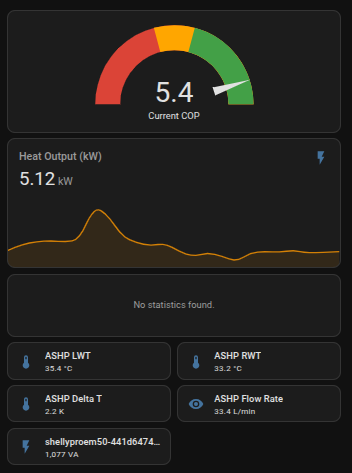
Thanks all for the replies. I have a Gen7 Integrated unit with the cabling from outside to in and into a Waveshare RS485 to ETH (B) POE device. The installer put a Modbus card in it and wired it. Not a 5 minute job to take the case apart and rewire it. I can talk the modbus card but it seems limited and rocket science to try and map the data you are looking for. Specifically flow rate. I can’t seem to find the registers to map for the pump info speed (%) etc. I think I have the compressor % mapped to the outdoor 6000 register space and I can then read it from register 4 and outside temp from register 6. They seem to match what is on the internal remote display.
Its a bit laggy. But usable. If anyone knows what the Pump registers are that would be great.
This is my test dashboard.
Cheers
Have a look at Samsung HTQuiet 8KW Idle power consumption 60W? - #16 by toadhall. (I don’t speak Modbus but the GitHub link @toadhall provides appears to point you some relevant registers.)
@SarahH Many thanks for this but those registers don’t seem to work on a Gen7 Integrated unit. Flow rate is on 0x4012 for instance. Seems weird that Samsung would have different registers per model. maybe its my comms or something shifting bits.But 4012 is not even close to 42E9.
I will continue investigating.
Cheers
Unlikely. The second digit, the 0 in this case, reflects the size of the data, in this case an enumeration, 8 bits. 2 indicates a variable, 16 bits, and most of the engineering unit values, temperature, pressure, flow, etc. are sent in this size data.
Correct, so they don`t, new registers are added for new functionality, so unless there is a good reason to change, they don`t. Gen7 is a superset of Gen6 and I assume Gen6 is a superset of Gen5. Gen7 integrated just means it has the expansion vessel, pump and PRV inside the case, so from a register point of view Gen7s should all be the same.
You may have trouble if you want to read some of the electrical data, because that is carried in 32 bit values and I am not sure if the B19 can cope with that (don`t know for sure, never tried it).
I can assure you the output of register 0x4012 on my system matches the exact values shown on the indoor controller head unit. 0x42E9 shows nothing.
Cheers
And you definitely mean NASA register 0x4012 and not FSV4012?
Yes!
This is what I write to the 7000 block to get the comp freq Flow Rate and OAT.
payload = \[0x42E9, 0x42F1, 0x4012, 0x0406\]
client.write_registers(7001, payload, slave=1)
I had a look at the Gen7 installation manual and it refers to a flow switch rather than a flow sensor. So maybe the Gen7s cannot measure flow like the Gen6s, but just rely on a flow switch to sense flow below the minimum value. The 0x40.. registers can carry a 0-100% value, so maybe 0x4012 is a pump PWM value in %, rather than a flow rate in l/min, and 0x42E9 is not populated because there is no flow measurement (normally the value is set to 0xFFFF if the sensor is not present).
The remote controller head unit shows Lpm the data matches that exactly. The Remote Contoller also shows PWM % and it is different to the flow rate number and I can’y find that data.
Cheers
I had a look at an exploded diagram of a Gen7 integrated and that shows a flow sensor that looks exactly like the Sika one supplied with Gen6 kit, so it is reading a real flow value from that. Why they changed the register number, only Samsung know. It would be interesting to know if you find any others that have changed.