Samsung ASHP NASA Messages - Updated Table

I’ve produced a (slightly updated) table of Samsung NASA message numbers, mainly for my own reference, but which may be useful to others:

NASA_Interpreter.xlsx (71.7 KB)

This table only includes:

  • message numbers included and described in NASA.ptc (a file included with SNET-Pro2 software) and
  • messages that I have detected on my MIM-E03EN F1/F2 data highway

(Not all the NASA.ptc messages appear on F1/F2 – I assume that these have been configured for controllers other than the MIM-E03EN.)

The worksheet includes the following columns:

A NASA message number 0xnnn in alphanumeric order

B Message type (E = enumeration, V = variable (2 bytes), L = long variable (4 bytes), S = structure)

C Whether the message appears in NASA.ptc (and thus accessible to SNET-Pro2)

D Whether reported in default SNET-Pro2 tabulation

E Whether reported in NASAmonitor display

F Message payload content description (fields in quotes refer to SNET-Pro2 tabulation entries)

G Variable name assigned (“Protocol ID”) by NASA.ptc

H Whether 2’s complement applied for payload evaluation (negative numbers)

I Divisor to be applied to payload to derive actual value

J Frequency at which message appears on F1/F2 data highway (seconds) (see note below)

K Payload value ( may be hex 0xn… for enum, integer if constant, V if varying, SNET = appears on SNET start-up or FSV update request)

L Comments

FSVs

Most FSVs have been assigned a message number, with any new values written directly to that number (which is routinely parsed by the controller). However, #4054, #4062/3, and #6022/31/41 are handled slightly differently. Any new values for these are written to 0x4612 (the FSV Information Table, which contains the Min/Max/Default values seen in the User Manual) by changing the Default value in this table. (FSV values are written to EEPROM, which is read by the controller at start-up and updated on demand, e.g. from the remote controller or SNET or Modbus.)

Unverified Message Numbers

Many of the non-NASA.ptc messages received from the MIM-E03N (at least when connected to an HTQ series ASHP) appear to be unvarying and thus unhelpful. However there are some that do vary (e.g. 0x22F7, 0x22FB, 0x22FC, 0x22FE, 0x24FC, 0x8224, 0x824C). Also, although 0x827A appears on NASA.ptc as Desuperheater temperature, and the payload varies, the location of this instrument on the PFD is not obvious. If anybody has any insights on either of these matters it would be very helpful.

The data arrival frequency of some messages varies tremendously (depending on what’s going on in the heat pump), so the figures in the table should be regarded as a guide only.

NASA Packet Decoder

I’ve added a simple worksheet to decode NASA packets and included this on a separate tab. This is based on the EHS Wiki NASA protocol disassembly document (posted elsewhere on this forum).

To use this decoder, simply paste a data packet into cell B3. The worksheet splits the packet into individual NASA messages and evaluates the payload for each.

These packets can be copied from a VCOM monitor output. For example, copying Packet #18 from this VCOM output…
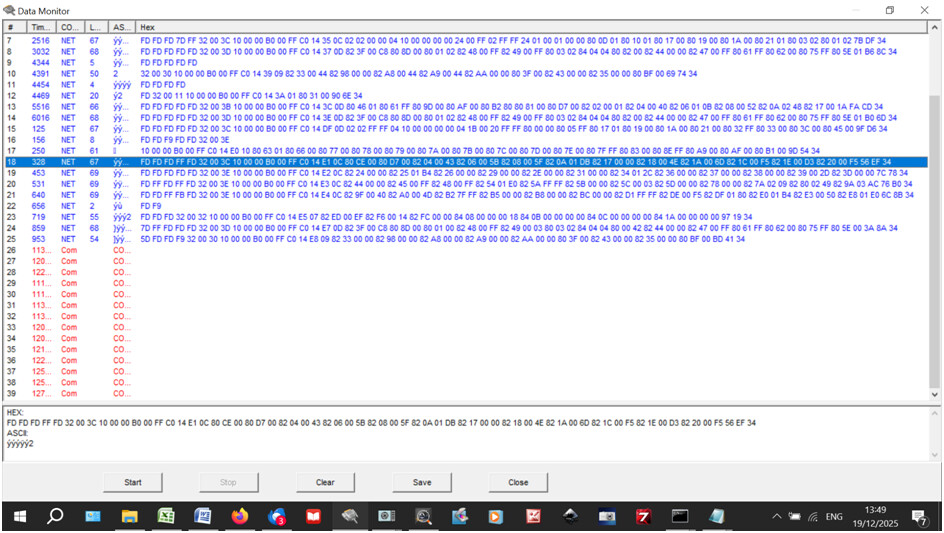
…and pasting it into cell B3 of the worksheet, results in this decoding:
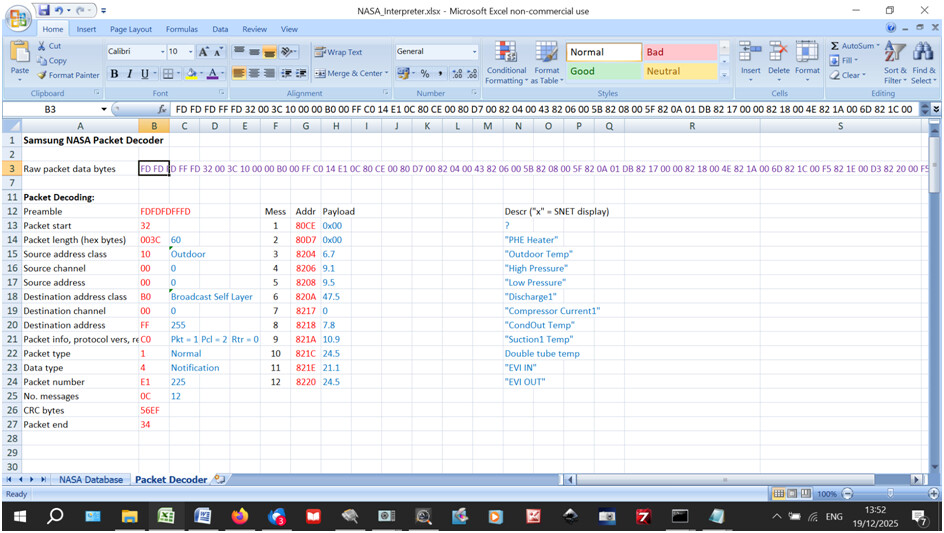
(Obviously the compressor was not running when I took this screenshot – suction and discharge pressures are roughly the same, and the compressor current is zero.)

Any comments on the foregoing would be welcome…

3 Likes

Thank you for all your hard work Sarah.

I have a 12 kWh Samsung A2W that was installed 5 years ago, been trying to monitor it using Home Assistant, and the excellent work done by beormund on github.

Your spreadsheet is a great help in trying to make sense of what is happening.

I have a Victron Multiplus 10kVA with a 32 kWh Fogstar battery, as well as a SolarEdge PV array.

1 Like

Thanks for the positive response, @David_Pritt, and a warm welcome to the forum. (I just wish I’d had this information when I started out a couple of years ago.)

If you have any problems with the database, or the spreadsheet, just post them here…

Just joined to say thank you, this has helped me parse some of the structures.

For context, I’m working on a project to bring a native HVAC/EHS integration into Home Assistant core. A WIP generic python library is already available here GitHub - pantherale0/pysamsungnasa: Samsung NASA implemented in Python

Welcome to the forum, @pantherale0.

I can see that you have been very busy on GitHub, but perhaps you could help me with an idiot’s summary of what all that coding actually does. I’m not at all familiar with GitHub or its jargon (old dog, new tricks etc.), and know very little Python (I only got as far as QBasic in the 1960s), but I am right in gathering that it is basically a tool for managing the NASA message table?

I got ChatGPT to write me some Python code that intercepts the RS485 data packets leaving the MIM, splits it into individual messages, filters them for the occurance of a predefined message number, evaluates the payload, and displays the resulting packets like this example:

[INFO] Filtering for register 0x823B
63831 ms 0x8238 = 28, 0x823C = 255, 0x823B = 180, 0x823F = 200, 0x8240 = 48, 0x8247 = 255, 0x8248 = 255, 0x824B = 0, 0x824C = 26491, 0x8254 = 530, 0x8278 = 160, 0x8280 = 690
199889 ms 0x8238 = 0, 0x823C = 0, 0x823B = 167, 0x823F = 200, 0x8240 = 0, 0x8247 = 255, 0x8248 = 255, 0x824B = 0, 0x824C = 26491, 0x8254 = 460, 0x8278 = 0, 0x8280 = 668

This is useful for extracting instantaneous info, but of little use for producing a time-trended chart. Have you come across anything that does? (Apart from SNET itself, of course, though that refuses to display messages that don’t appear in NASA.ptc.)

Basically all that code, parses packets in a non-blocking structured way.. Synchronous code that is used in existing projects requires one piece of code to execute before the next can, with this, asyncio will let you execute multiple tasks at the same time, reading, writing, parsing etc, which is basically what Home Assistant is built on. There’s a nice post here that goes into some more detail.

Eventually this will be used as part of a core integration with Home Assistant.

There are an awful lot of messages that aren’t used by SNet or advertised on a regular basis by NASA. By doing a bulk read I’ve found some more message numbers that I’ve not seen anywhere before.

I think the MIM stores the historical energy information itself based on what is advertised by the outdoor unit. I can’t see anything yet that would store historical information for other sensors, but given some of the more complicated structure packets that are sent back I would take a guess that it might exist somewhere, or at the least more cumulative readings.

I’m still yet to figure out a lot of these structure messages, SNet doesn’t provide any documentation as to what the actual structure is.

1 Like