Now i bought a WIFI-WVC-Modem. I will sniff the send massage an test it with the HC12.
The Modem arives on Friday (14-02-2020) and I will give you Feedback.
Now i bought a WIFI-WVC-Modem. I will sniff the send massage an test it with the HC12.
The Modem arives on Friday (14-02-2020) and I will give you Feedback.
just to be on the safe side:
1: I would sniff the and log everything . from the moment you plug it in just incase there some sort of commissioning packets as you register the inverter on the modem.
2: once your get a sniffed packet. try sending a packet f2 packet via the serial comport on the r3 modem and see if how much it changed between the two - specifically the return Data send packets. as it might give you an idea if they altered positions or pretranslated some of data info
In my opinion, the communication between inverter an WIFI-modem is handled by the modem itself. No other device is necessary. You have to register the new WIFI-Modem on the homepage “http://kdm.kaidengdg.com/”. Further you have to assign the Inverter to the modem. If everything is done, the modem ask the data at the inverter and after that the modem send the data to the cloud of “http://kdm.kaidengdg.com/”. The user interface for the newer Inverters is not longer the KDMonitoring. So in this case it is not possible to send a string to the WIFI-modem, but sniffing should be possible.
That explain a lot and probably there is some packages before start receiving data.
Sampling2.tar.gz (1.8 KB)
here is sampling file for the wvc r3 modem i wrote in anticipation for the wvc700 i ordered
it runs sample against wvc modem to try to find the correct pattern
it also samples derivatives of the Inverter ID and expands the function scope to from Fx to include Dx Cx Bx and Ax
you will need to install interceptty for it to work
it displays info on screen if you see ff or multiple ff as a reply then your hc-12 has stalled reboot the hc-12
at the end of the process if it finds any functional key it will be found in the file called result.file
sending packets to wvc modem has to be at relative slow rate otherwise the key is dropped if you hammer the modem/inverter
usually it will work fine down to about 0.6 second between sends
there is control send to r2 inverter just to verify things are operational and the HC-12 has not stalled or the rate not to fast that keys are being dropped ( it will not effect you if you do not have a r2 inverter)
it currently scans f2 and f5 function key or you can modify to scan all function keys and it runs the scan twice in case of interference of some form causing a key to be dropped
edit: I forgot to change control word on change of function
apparently someone tried the above script and it found the key
its only in the fX field
so to disable the other fields just edit this line
 chars=( {f..a} )
  n=6
to
  chars=( {f..a} )
  n=1
the inverter ID is is reverse byte ie 12345678 → 21436587
I found the key too. i tried the script, but my Inverter-ID is not reversed.
My Inverter-ID is 20000240 and with the massage f2fe1212d6e91b00002000024065 i got a result like that → f2fe1212d6e91b000020000240650b3a00ee0000029d0000000009c4
Strangely enough i sent the same massage with my python script and i didn´t get a result.
I will figure out why.
that’s weird maybe version difference yours is 2000 and theirs is 4000 but it looks like the data key which is great — now to decipher that… which I can not do until I actually have an inverter
I´ve got it
wrong → send = b’f2fe1212d6e91b00002000024065’
right → send = b’\xf2\xfe\x12\x12\xd6\xe9\x1b\x00\x00\x20\x00\x02\x40\x65’
I tried both of them the last days, but maybe i didn´t try the right combination with hex.
Thanks stephen for your help
Now i can send back the two days ago ordered WiFi-modem 
no worries glad I could help as to deciphering the output key that currently up to you @thalesmaia and others to do. I do not know if it as it says in the pdf or similar to the r2 modem then you need to use the lookup table from my above software . in the case of that they used little endian on the bytes to decimal
and if you figure it out please share
I have to go, but some off the figures i could figuret out:
send = b'\xf2\xfe\x12\x12\xd6\xe9\x1b\x00\x00\x20\x00\x02\x40\x65'
ser.write(send)

output = ser.readline()
if output  != ''.encode():
    data_String = binascii.b2a_hex(output)
    print (data_String)
    print ('Input Voltage:         %s' % (int(data_String[28:32],16)/100)) #Input Voltage
    print ('Output Voltage:      %s' % (int(data_String[32:36],16)/100)) #Output Voltage
    print ('Input Current:         %s' % (int(data_String[36:40],16)/100)) #Input Current
    print ('???:                         %s' % (int(data_String[40:44],16)/100)) #???
    print ('???:                         %s' % (int(data_String[44:48],16)/100)) #???
    print ('Output Power:        %s' % (int(data_String[48:52],16)/10))  #Output Power
    print ('???:                         %s' % (int(data_String[52:56],16)/100)) #???
The Receivmassage was:
b’f2fe1212d6e91b0000200002406509445924003302a20000006f1004’
Input Voltage: 23.72
Output Voltage: 228.2
Input Current: 0.51
???: 6.74
???: 0.0
Output Power: 11.1
???: 41.0
See you tomorrow
Sorry about my delay.
@Rene_Baars you tested as much as I did, but I believe that you need to activate before it start sending messages. In my case, the modem just start to answer when @stephen script send it backwards, in which I got an echo
ModemID = 20001234
F2 43 21 00 02 65
After that I got message and echo stoped. Since you went through @stephen program you didn’t notice. However, I’m just supposing. Maybe @Ducati can test it for sure.
Regarding the message, the last two bytes I think its temperature.
I will check, but I think it is:
Vin Vout Iout Iin ? Pout Temp
Will you send it to nodered?
Would be nice to adapt @stephen Mqqt for R3. Otherwise, access serial directly inside nodered. I’m not sure which is the best approach.
once I get my r3 inverter I will adapt to handle all versions of wvc -inverters r2 and r3 … only going through the hc-12 or maybe multiple options of either r2 modem or hc-12…
as currently i would like it to work on my current equipment as is
but I will translate everything over slowly as I have more time and everything in place
here a prototype version if someone wants to try until I get my R3 version inverter and can clean it up better it should hopefully works with either R3 or R2 it also it works either via the modem or HC-12 module
wvc.ini format is:
WVC1200/cb98/R2
WVC700/4000cb98/R3
commandline format is :
/wvc /dev/ttyUSB0 /home/user/WCV/wvc.ini fb041185 hc
/wvc /dev/ttyUSB0 /home/user/WCV/wvc.ini fb041185 modem
give it a try and let me know if it works
if the R3 does not work let me know the key output if there is one here an example from r2 inverter running off an HC-12
Inverter Type WVC1200 R2
f2cb9885fb048d00fd0092008c00b9fb041185
Inverter ID cb98
Temp 4
VAC 119.9
AAC 1.707
VDC 26.886
ADC 9.999
Panel Efficiency .76
r3WVC.tar.gz (235.5 KB)
I will tested it soon, however I only saw your message now.
Here is my code implemented inside NodeRed using Serial node.
if(msg.payload.length ==0 0){
    var NoService = { payload: 0 };
    return [NoService, NoService, NoService, NoService, NoService, NoService, NoService, NoService, NoService];
}else{

    // Input voltage
    var Vin = new Buffer( [ msg.payload[14], msg.payload[15] ] ).readInt16BE()/100.0;
    var Vinmsg = { payload: Vin };

    // Input current
    var Iin = new Buffer( [ msg.payload[18], msg.payload[19] ] ).readInt16BE()/100.0 ;
    var Iinmsg = { payload: Iin };

    // Input power
    var Pin = Vin * Iin;
    var Pinmsg = { payload: Pin };

    // Output power
    var Pout = new Buffer( [ msg.payload[24], msg.payload[25] ] ).readInt16BE()/10.0;
    var Poutmsg = { payload: Pout };

    // Eficiency
    var Eff = Pout/Pin*100.0;
    var Effmsg = { payload: Eff };

    // Output voltage
    var Vout = new Buffer( [ msg.payload[16], msg.payload[17] ] ).readInt16BE()/100.0;
    var Voutmsg = { payload: Vout };
    // Output current
    var Iout = Pout/Vout;
    var Ioutmsg = { payload: Iout };

    // Total energy generated - Not sure if it is /1000
    var Etot = new Buffer( [ msg.payload[20], msg.payload[21], msg.payload[22], msg.payload[23] ] ).readInt32LE()/1000.0;
    var Etotmsg = { payload: Etot};

    // Temperature
    var Temp = new Buffer( [ msg.payload[26], msg.payload[27] ] ).readInt16BE()/100.0;
    var Tempmsg = { payload: Temp};

    return [Vinmsg, Iinmsg, Pinmsg, Poutmsg, Effmsg, Voutmsg, Ioutmsg, Etotmsg,  Tempmsg];
}
I also want to perform an integral (check with computed inside the inverter), but I’m not sure how to do inside nodered.
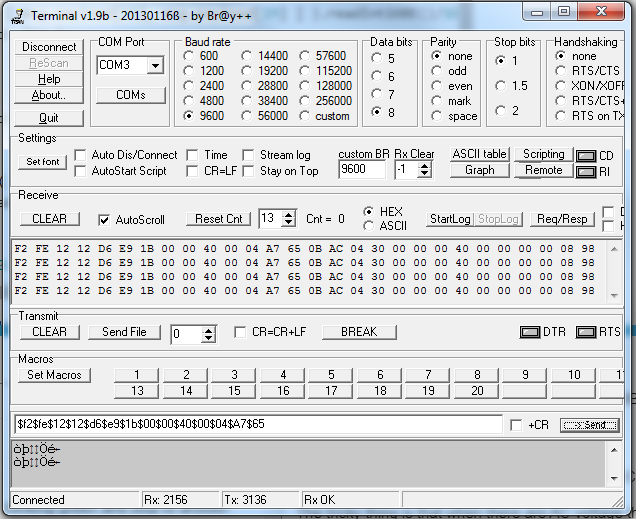
Bingo!!! I have answer from my R3 inverter!
The setup test is: DC power supply 30V 10A to simulate PV panel.
Two HC-12, one with “Terminal.exe” to send Hexa telegram. Other one HC-12 sniffing Hexa telegram (this second HC-12 only to check communication).
With only DC voltage (led in solid red)
Send:
F2 FE 12 12 D6 E9 1B 00 00 40 00 04 A7 65
Received:
F2 FE 12 12 D6 E9 1B 00 00 40 00 04 A7 65 0B AC 03 1A 00 00 00 3F 00 00 00 00 06 40
This is with 25Vdc and 0Vac
And this other
F2 FE 12 12 D6 E9 1B 00 00 40 00 04 A7 65 09 BB 04 30 00 00 00 40 00 00 00 00 08 34
with 25Vdc and 0Vac
0B AC = 2988 and I have 30Vdc
09 BB = 2491 when I have 25Vdc Clearly is the DC voltage.
The tricky thing is that when there are AC voltage the led pass to blinking green and stop to answer. Later pass to solid green and no answer too. It’s necessary to disconnect and re-start the sequence to have communication. Any suggestion?
I confirm in my inverterR3. The colored field has been checked. But only work if status led is solid red. If status led is green the communication is cut…probably other function (dif to F2) is necessary…any suggestion?

With LED solid green, try this (just use your modem ID backwards):
ModemID = 20001234
F2 43 21 00 02 65
See if start to answer.
The correct order is Vdc (2 bytes), Vout (2 bytes), Iin (2 bytes), Total energy since the inverter was first power on (4 bytes), Pout (2 bytes), Temp (2 bytes).
Not answer to:
F2 7A 40 00 04 F5
F2 A7 04 00 40 F5
F2 40 00 04 A7 F5
thanks for the meaning fields!!
Sorry, ends with 65
F2 7A 40 00 04 65