Vaillant eBUS hardware adapter (ebusd software) Thread

Ah yes that’s correct, this installation does not have an indoor hydrobox, the three-port valve is connected to the VWZ AI.

However, I don’t seem to have three-port valve status in the HMU metrics. The RunDataStatuscode in the HMU looks like the one I’ll use.

@Zarch can you confirm if your metrics are the same, since your three-port valve is also connected to VWZ AI

Thanks. That’s classic ebus :rofl:

I’m using Jones files on my 5kW Arotherm Plus.

mick@ebusd:~ $ ebusctl find | grep RunDataStatuscode
hmu RunDataStatuscode = Standby
mick@ebusd:~ $ cat /etc/default/ebusd

Cool, we have the same metrics.

I found that ebusd hmu Statuscode scode was better to use for a DHW flag than ebusd hmu RundataCode scode, the Statuscode metric responds a bit faster than RundataCode

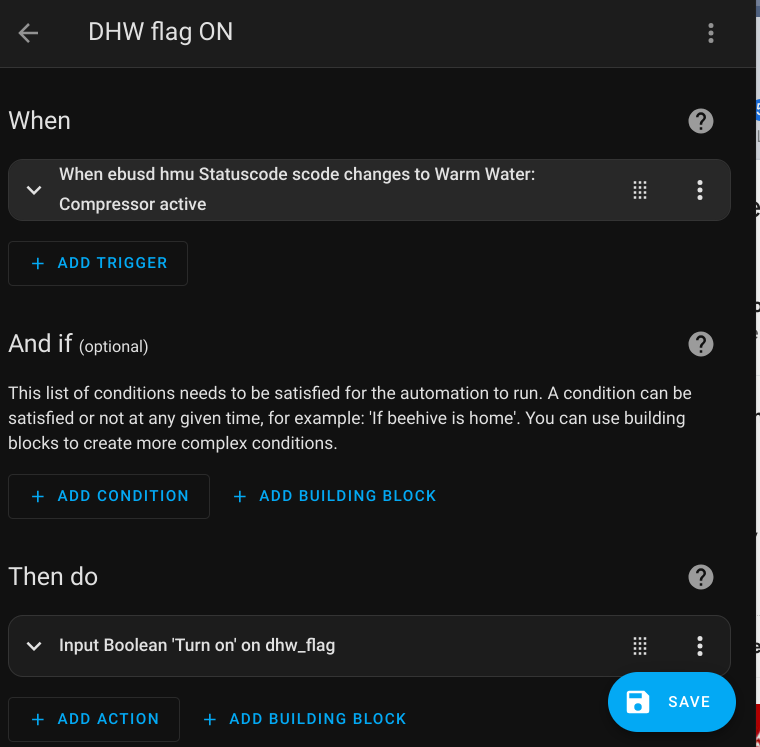
It was actually relatively straightforward to convert RundataCode into a boolean DHW flag. I used a HA automation to trigger for when RundataCode changes to Warm Water: Compressor active

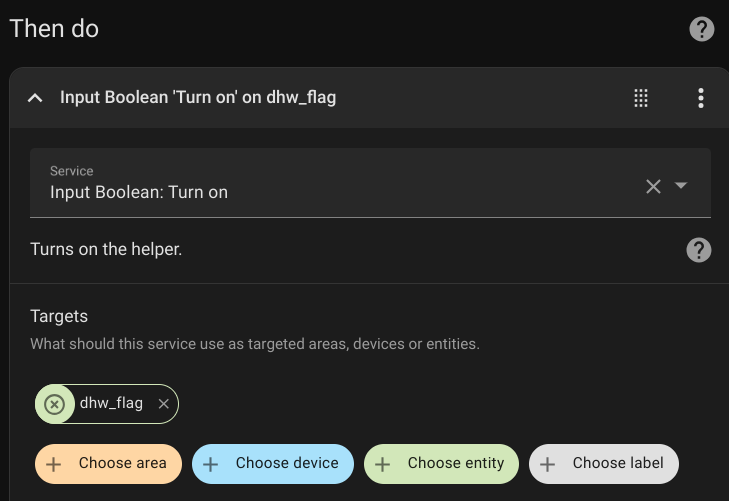
This automation then use a HA helper function to set a Input Boolean dhw_flag to ON

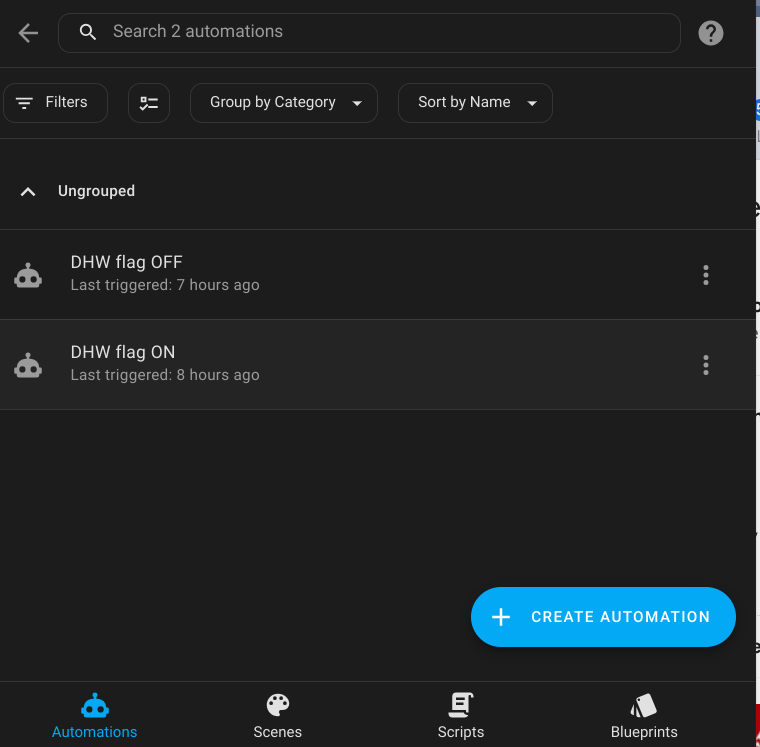
I also created a 2nd automation to turn the dhw_flag OFF when RundataCode changes from Warm Water: Compressor active to something else.

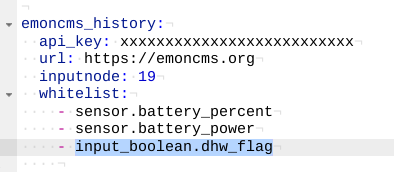
I then used Emoncms History HA integration to post the input_boolean.dwh_flag to emoncms.org

Screenshot 2024-07-29 21.41.05

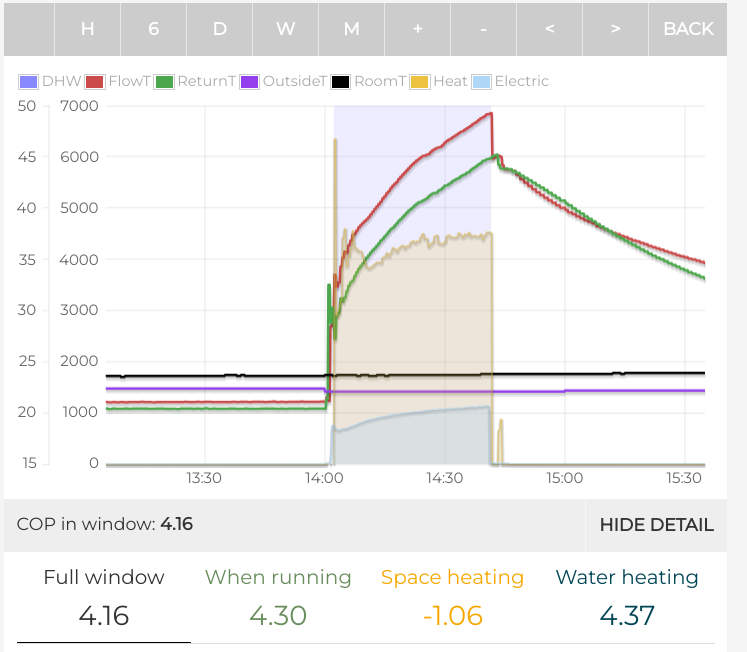
Once in emoncms.org the dhw_flag Input is logged to Feeds and then selected in the MyHeatPump App, the DHW cycles are now correctly flagged :slight_smile:

1 Like

That’s cool :slight_smile: But … I’d rather not use Home Assistant. (It once lost all my config and data, so it’s lost my trust.)

I prefer running a simple script instead to send data to heatpumpmonitor.org … and the presence of HeatpumpMonitor.org suggests using EmonCMS is not necessary. OTOH, HeatpumpMonitor.org appears to list solely read-only functionality. Having just signed up revealed that I indeed have to have an EmonCMS instance.

Any chance that will evolve? :blush:

Heatpumpmonitor.org is just an aggregator and needs to get its data from an EmonCMS instance but you can also sign up at emoncms.org and pipe your data there - no need for Home Assistant. I’m sending my data to emoncms.org via an HTTP-call from Node-RED but any script would do too.

let power_electric = flow.get("power_electrical"); 
let energy_electric = flow.get("energy_electrical");
let flow_temperature = flow.get("temperature_flow_pt1000");
let return_temperature = flow.get("corrected_temperature_return_pt1000");
let flow_rate = flow.get("flowRate");
let target_temperature = flow.get("flow_temp_desired_previousValue");
let indoor_temperature = flow.get("'temperature_indoor'");
let outdoor_temperature = flow.get("temperature_outside");
let dhw_active = flow.get("dhw_active");
let ch_active = flow.get("heating_active");
let system_active = flow.get("state");

let apiKey = "xxx123"; // replace with your API key
// Create a JSON object for the fulljson parameter
let fulljson = {
    "electric_power": power_electric,
    "electric_energy": energy_electric,
    "temperature_flow": flow_temperature,
    "temperature_return": return_temperature,
    "flow_rate": flow_rate,
    "temperature_flow_target": target_temperature,
    "temperature_indoor": indoor_temperature,
    "temperature_outdoor": outdoor_temperature,
    "dhw_active": dhw_active,
    "ch_active": ch_active,
    "system_active": system_active
};

// Convert the JSON object to a string and then URL-encode it
let fulljsonEncoded = encodeURIComponent(JSON.stringify(fulljson));

// Construct the query string
let queryString = `node=heatpump&fulljson=${fulljsonEncoded}&apikey=${apiKey}`;

// Set the query string as msg.url or msg.payload
//msg.url = "?" + queryString; // OR msg.payload = queryString;
let url = `https://emoncms.org/input/post?node=heatpump&fulljson=${fulljsonEncoded}&apikey=${apiKey}`;
//msg.payload = queryString;
msg.url = url;

flow.set('query_url', url);
return msg;

2 Likes

Need to try this. My current approach (using diverter valve) shows heating as one during DHW defrosts!

Hi all

I’ve just completed my DIY install of a 5kW AroTHERM, as there is nobody in Ireland even supplying them yet.

I have my setup on docker and I have downloaded 08.hmu.csv

I noticed that I should be downloading 15.basv.csv, but am I reading this correctly that this just points at 15.700.csv and if so, do I just download this file instead ?

Thanks in advance

I personally haven’t downloaded individual config files.

I downloaded the whole of the JonesPD fork and pointed my config file at those.

My read-only config file

#jones files read only
EBUSD_OPTS="--scanconfig=full --configpath=/home/mick/jones/ebusd-configuration/ebusd-2.1.x/en  -d ens:/dev/ttyAMA0 --latency=60 --loglevel=debug --mqtthost=carbone.lan --mqttport=1883 --mqttint=/etc/ebusd/mqtt-hassio.cfg --mqttjson --mqttvar=filter-direction=r"

The ebus system them just pulls in the files it needs to depending on the hardware you have attached to your system.

ebusctl info will show you what hardware the bus scanner has found (the masters) and what files it is using to read those

mick@ebusd:~ $ ebusctl info

version: ebusd 23.3.23.3

update check: OK, device firmware 1[4819] available, vaillant/08.hmu.csv: different version available, vaillant/broadcast.csv: different version available, vaillant/hcmode.inc: different version available, vaillant/yield3f40.inc: different version available

device: /dev/ttyAMA0, serial high speed, enhanced, firmware 1.1[3501].1[3501] signal: acquired symbol rate: 42
max symbol rate: 300
min arbitration micros: 7
max arbitration micros: 790
min symbol latency: 0
max symbol latency: 12
scan: finished
reconnects: 0
masters: 5
messages: 870
conditional: 0
poll: 0
update: 18
address 03: master #11
address 08: slave #11, scanned "MF=Vaillant;ID=HMU00;SW=0902;HW=5103", loaded "vaillant/08.hmu.csv"
address 10: master #2
address 15: slave #2, scanned "MF=Vaillant;ID=BASV0;SW=0217;HW=8803", loaded "vaillant/15.basv.csv"
address 31: master #8, ebusd
address 36: slave #8, ebusd, scanning
address 71: master #9
address 76: slave #9, scanned "MF=Vaillant;ID=VWZIO;SW=0202;HW=0103", loaded "vaillant/76.vwzio.csv"
address ec: slave, scanned "MF=Vaillant;ID=SOL00;SW=0217;HW=8803", loaded 
 "vaillant/ec.sol.sc.csv"
address f1: master #10
address f6: slave #10, scanned "MF=Vaillant;ID=NETX2;SW=4035;HW=5703"

mick@ebusd:~ $

Any idea here

And I got the same using the permalink too :frowning:

AND I tried https://user:[email protected]

You just pull/clone the top level and get everything from the repo. You don’t have to pull the specific folder deep into the tree.

That sorted it - thank you

1 Like

Whey hey - I finally got it working on Docker

I had issues - the first of which was with config files. I just could not get it to see the Vaillant files. So for now, I just went with the cloud based files. But the “mqtt-hassio.cfg” file was found ok. Sym links would not copy from git to the local copy, so this could be the issue.

The first and possibly the more important note for hosting any files locally is that that section within the docker-compose.yaml file needs a “volumes” section

And a piece very easy to miss is the “ens:” just before the device IP address or port

services:
  ebusd:
    container_name: ebusd
    image: john30/ebusd:latest
    restart: unless-stopped
    ports:
      - 8888:8888
    volumes:
      - /opt/ebusd/config:/config
    command: --mqtthost=192.168.1.xx --mqttport=1883 --mqtttopic=ebusd  --mqttjson --mqttint=/config/mqtt-hassio.cfg --mqttuser=username --mqttpass=password --device=ens:192.168.1.yy:9999 --scanconfig --configpath=http://ebusd.eu/config/ --pollinterval=1 --accesslevel=*

Hope this helps someone else looking to implement this on Docker. Docker is great for loading up all sorts of containers to try out stuff, and without fear of breaking something else.

Now to get my data publishing up to emoncms !!!

2 Likes

OT but HA has changed so much. If that experience was over a year ago, it is a different beast. Plus, automated backups are possible and make a huge difference!

Hey all.

I’ve just bought the ebusd adapter Sheild V6. I’ve plugged it directly onto my rasberry pi 3-64 running home assistant OS.

Is there a guide for how to install the eBUSd software for dummies? I’m not upto speed with linux/programming/etc

The official adapter shield website offers a howto: Start using the adapter - eBUS Adapter Shield v5

Apparently there’s an addon for Homa Assistant as well.

See post #34 in this thread

What is the section / heading / the few lines above the indented name please ?

mqtt:
sensor:

1 Like

Configuration warnings

Invalid config for ‘sensor’ at configuration.yaml, line 41: required key ‘platform’ not provided

Looks like we might be stuck 0.3kW / 0.4kW etc coming from CurrentYieldPower and CurrentConsumedPower

I asked a question here

And got a tremendous response here:

I was hoping for a more granular reading otherwise we can only turn 0.3kW into 300W for use in the heatpump app and the next jump would be 0.4kW / 400W.

Then in Vaillant world you add Yield + Consumed to get heat output.

2 Likes