SNET-Pro2 is a useful monitoring tool for the MIM-E03*N controller, but it does not (for example) display outdoor unit power consumption, making calculation of CoP more tedious. This is frustrating because this figure is displayed on the Wired Remote Controller (WRC), albeit at poor precision (0.1kW), located a couple of rooms distant from my laptop. So why can’t SNET display it?
A quick rummage around the SNET software indicated that I could add this (and to some extent other) values to the display fairly easily. (I’ve tried to make the process description palatable to inexperienced or prospective SNET users, hence its daunting length.)
First, a quick summary of my SNET setup: I connect my MIM-E03EN (terminals F1/F2) to my broadband router with an RS485-to-Ethernet adapter (a USR-TCP232-306 in my case, costing under £50), with the adapter configuration software, a virtual COM port, and SNET, downloaded onto my laptop. (Detailed installation steps appeared in the https://community.openenergymonitor.org/t/monitoring-your-samsung-ashp-controller/27638 thread.)
I have an 8kW HTQ series heat pump, for which the SNET display (Outdoor Unit Data tab) looks like this:
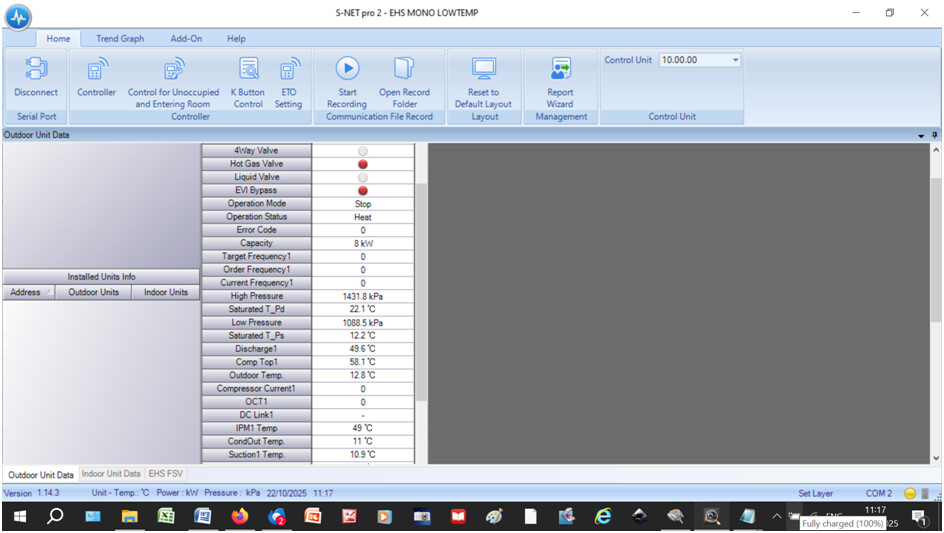
I wanted to insert a field for the Outdoor Unit Power Consumption (in W) between the IPM1 Temp field and the CondOut Temp field.
Before getting into the method details, it may help those wishing to do something similar with some background to the data transfer method that SNET uses to communicate with the MIM controller. (I’m no Control Engineer and have developed the following understanding based on the expertise of many others, to whom grateful thanks.)
-
Samsung have created a data communication protocol called NASA. (I’m guessing, but this probably stands for something like Native Asynchronous Serial Architecture.) Under this protocol, the MIM controller communicates with the various inputs (e.g. instruments) and outputs (e.g. controlled devices such as the compressor inverter and EEVs), and indeed SNET, by means of data packets fed onto the data highway. Each packet consists of data control information (such as source and destination addresses, and packet length) and one or more messages. Each message consists of a two-byte reference (aka “message number” or “index”) to the data device (e.g. a specific instrument) and one or more payload bytes (e.g. the measured value at that instrument). The “rules” for packet construction and a fairly comprehensive list of message numbers are available in NASA Protocol.docx (77.1 KB).
-
The SNET software writers have created a subset of this list, based on those data most likely to be needed by heat pump installers and service engineers (for whom SNET was originally created), and only the data associated with this reduced number of messages can be displayed on SNET. This subset appears in the SNET software – on Windows computers at least, it can be found at C:\Progam Files (x86)\ S-NET pro2\Projects\RuleScript\NASA.ptc. If you open this file with a text editor, you will see a large number of programme blocks, each commencing with Message ProtocolID =“xxxx” Index=“nnnn”, where xxxx is a unique alphanumeric title and nnnn is the associated two-byte message number (in hexadecimal, thus two characters per byte). This line may be followed by one or more instructions to SNET on the required interpretation of the data payload at that message number for display purposes. As an example, the entry for ambient temperature measurement appears as:
Message ProtocolID =“VAR_out_sensor_airout” Index=“8204”
Variable Signed = “true”/
Unit>Celsius</Unit
Arithmatic Operation=“Division”>10</Arithmatic
Range Min = “-41” Max = “150”/
/Message
This translates to “if message number 0x8204 appears at F1/F2, link it to the label VAR_out_sensor_airout, use 2s complement to evaluate the payload (as it may be a negative number), assign degC as the unit of measure, convert the hexadecimal payload to decimal and divide it by 10 (so as to give a precision of 0.1degC), and ensure that the result is valid (between -41 and 150degC)”.
Unfortunately, the Index list is not in numerical order so use the Find command in your text editor to locate your required block.
-
The SNET display content list differs for each type of equipment. For example, I can see the list for my HTQ under …Rulescript\EHS\EHS Mono Lowtemp\EHS Mono Lowtemp.dis for the Outdoor Unit Data tab, …\EHS Mono Lowtemp Indoor.dis for the Indoor Unit Data tab, and …\EHS Mono Lowtemp FSV.dis for the EHS FSV tab. If you open (say) the outdoor unit .dis file with a text editor, you will find (part way down) programme blocks for each display variable, starting (in my case) with:
Column ProtocolID="STR_AD_PRODUCT_MODEL_NAME"...
Then: Column ProtocolID=“ENUM_out_load_comp1”…
Then: Column ProtocolID=“ENUM_out_load_4way”…
And so on down the whole SNET display list. The important thing to note is that these label names must be exactly the same as those in NASA.ptc, as SNET will want to cross reference them.
So to add my Outdoor Unit Power Consumption field, I need to:
-
Obtain the correct message number for this variable from the NASA codes list (it is 0x8413) and confirm that it appears in the NASA.ptc subset of permitted entries (it is, with the label LVAR_OUT_CONTROL_WATTMETER_1W_1MIN_SUM).
-
Edit the EHS Mono Lowtemp.dis file by adding an additional programme block between the IPM1 Temp block and the CondOut Temp block (which is where I want the new field to appear):
Column ProtocolID=“LVAR_OUT_CONTROL_WATTMETER_1W_1MIN_SUM”
    Name

      String>OU Pwr Consump'n (W)</String>

    /Name

  /Column
The String can be any meaningful name for your new field. The reason that I added “(W)” to it is because SNET only recognises a limited number of measurement units – “kW” is recognised but “W” is not, and any displayed value would have no units.
-
Confirm that the relevant block in NASA.ptc does not require editing. In this case it does, because the default block reads:
Message ProtocolID =“LVAR_OUT_CONTROL_WATTMETER_1W_1MIN_SUM” Index=“8413”
Variable Signed = “false”/
Unit>kW</Unit
Arithmatic Operation=“Division”>1000.0</Arithmatic
/Message
Although 0x8413 contains the value in W, the above code would result in SNET displaying kW (with a single decimal place), when I really want the extra precision of W. So I need to edit this block by replacing the kW with W and (for simplicity) replacing the 1000.0 with 1.0.
Having made these modifications in my text editor, I need to save the two files back to their original locations. However Samsung have placed access restrictions on them, which must be removed before saving. This is straightforward (at least on Windows PCs):
- In File Manager, navigate to NASA.ptc
- Right click on the name and select Properties
- Click on the Security tab and Edit the permissions to allow full control
- Repeat this process up the full PATH (i.e. RuleScript and Projects)
- Repeat this process for any edited .dis files (EHS Mono Lowtemp.dis in the above example)
When done, reload SNET. You will now see (on the Outdoor Unit Data tab) the following, showing the new field “OU Pwr Consump’n (W)”:
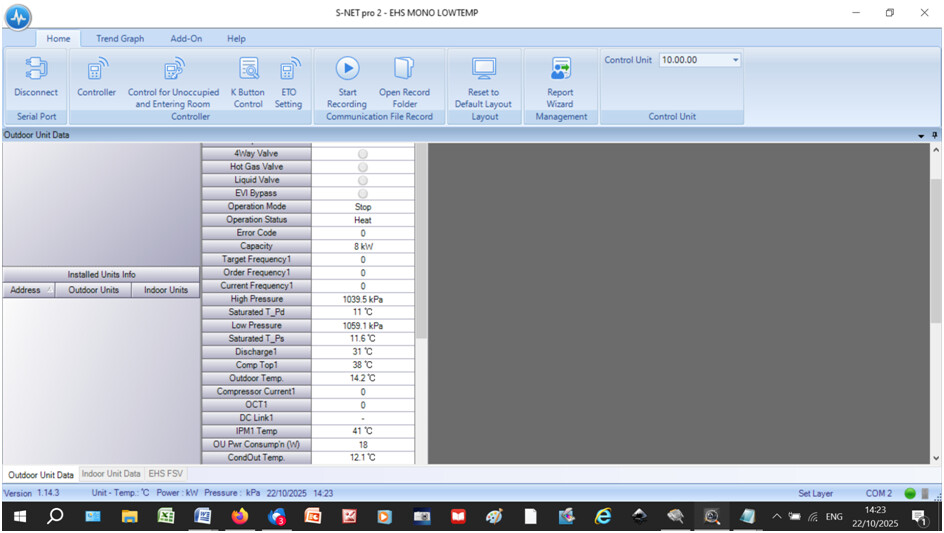
So now I can monitor my Outdoor Unit power consumption in real time* from the comfort of my laptop. The new field also appears in the Excel log file, in the correct place, so I can calculate my instantaneous CoP on the spreadsheet from this number (Outdoor tab), and LWT/RWT/Water Flow (Indoor tab), along with known water density and heat capacity correlations. (Obviously, true CoP should include indoor power consumption – in my case two circulating pumps and the MIM – but these are small and because the pumps are fixed speed I know the values to within a few W, so I can make a simple adjustment on the spreadsheet.)
* “Real time” is a slight exaggeration. Out of interest I checked how often 0x8413 appears at F1/F2, using a little Python-based filter for any packet containing “8413” and got:
[INFO] Filtering for register 0x8413
1881 ms 0x8413 = 18, 0x8414 = 6268092
32850 ms 0x8413 = 18, 0x8414 = 6268092
63199 ms 0x8413 = 18, 0x8414 = 6268092
93957 ms 0x8413 = 18, 0x8414 = 6268092
So that looks like every 30s or thereabouts.
Any comments on the foregoing gratefully received…
 , but I have to record a minor qualification to the process set out in the above posts. I described 0x8413 as “Outdoor Unit power consumption” and used it in my example of SNET field addition. Subsequent discussion on another thread