Emoncms,.. Settings.php and database backup

Hi Guys,… My system is a raspberry pi, with lastest s/w installed,

I’ve been running daily cron jobs to create database backups,.. for the past year or so,.. but for reasons beyond this discussion I noticed that one of the jobs was not running as expected.

So I ran the job in foreground and upon completion I noticed there was one warning,

INFO: These components couldn't be found to backup: /var/www/emoncms/settings.php

file… is this to be expected?? I saw in some old threads there was default file,.. but that no longer seems to exist, is this correct?, do I need the file,.. is there a copy somewhere on my system.

Also my uncompressed backup file is some 1.2Gigs and takes approx. 20mins to complete,.. is this normal for a system with approx. 3 and bit years worth of data??? is this manageable going forward,… I still have plenty of free space, as follows:- I think there is a 16G sd card,..( not sure its been so long since I looked at it,. and a 32gig usb pen drive for backups

Filesystem      Size  Used Avail Use% Mounted on
/dev/root       5.8G  2.6G  3.0G  47% /
devtmpfs        667M     0  667M   0% /dev
tmpfs           925M     0  925M   0% /dev/shm
tmpfs           370M  9.2M  361M   3% /run
tmpfs           5.0M  4.0K  5.0M   1% /run/lock
tmpfs            30M     0   30M   0% /tmp
tmpfs           1.0M  4.0K 1020K   1% /var/lib/php/sessions
tmpfs           1.0M     0  1.0M   0% /var/tmp
/dev/mmcblk0p3  8.1G  1.6G  6.2G  21% /var/opt/emoncms
/dev/mmcblk0p1  255M   51M  205M  20% /boot
/dev/sda         29G  5.9G   21G  22% /mnt/Backups
log2ram          50M  7.9M   43M  16% /var/log
tmpfs           185M     0  185M   0% /run/user/1000

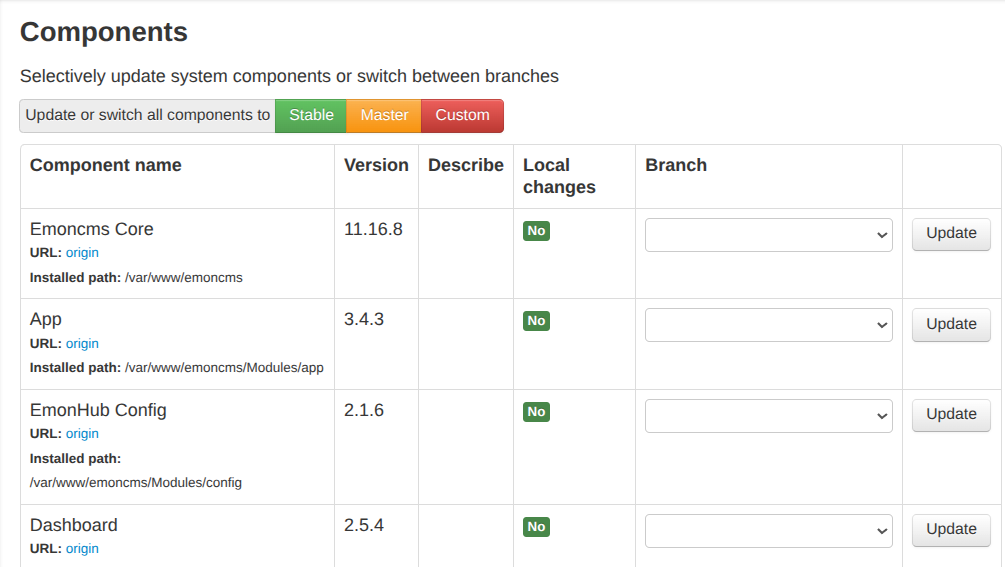
One last question,.. during updates,.. how do I tell which branch I am running with,.. none of the 3 buttons stable, master, custom are hi-lighted, to indicate which branch is currently active,.. or am I missing something, besides the obvious.. :slight_smile:

Many Tx

That file disappeared a few years ago, replaced by settings.ini. See this:

As for your 1.2 GB of data, clearly this will depend on how many feeds, their feed interval and their type – variable interval time series take approximately twice as much storage space for the same number of data points as fixed interval.

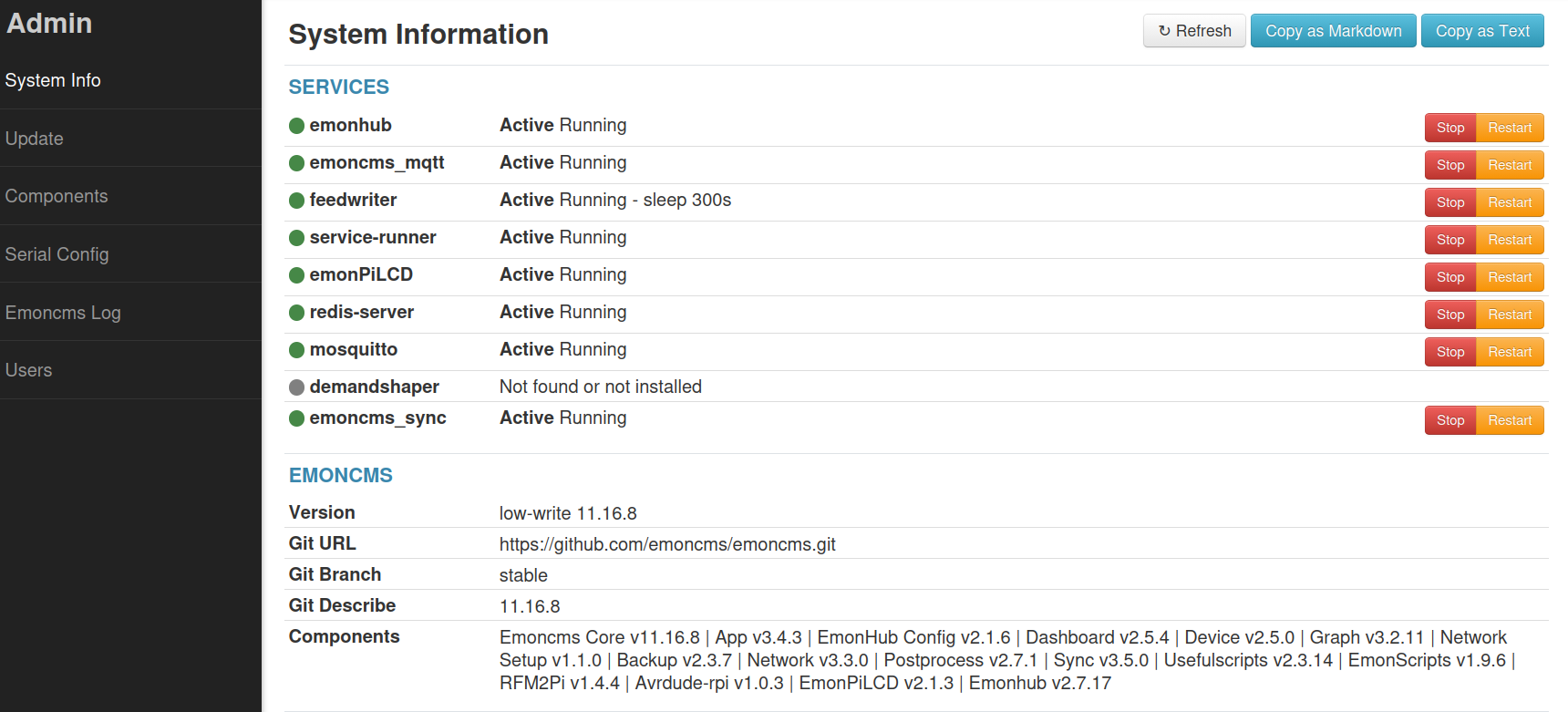
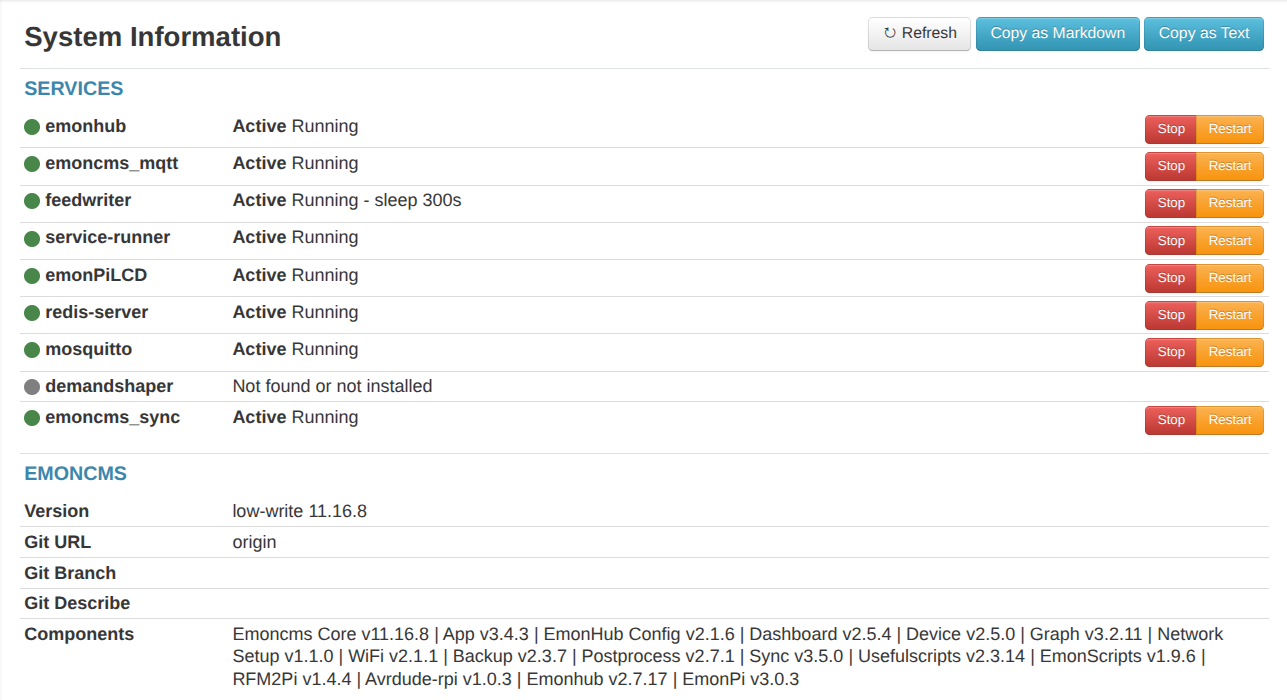
I think you might be – it is 3 lines up from the bottom of this screenshot, it’s just that this is not of the page you were looking at. :grinning_face:

Ah Thankyou Robert for your ever punctual responses…

Can the backup script therefore be updated please,… as this can lead to drawing the wrong conclusion.. :grinning_face: appreciate there are other dev. priorities.. but it would be nice to fix it.

stable, master, custom,… In my defense, Ma’ Lord.. I see this:-

and this,..

I assume this is due to my install using a different ‘start of the week’,.. Any chance this might be included as a selectable standard feature??

On this point how do I remove this edit,.. and switch back to fully ‘stable’ as having an edited file seems to cause more problems than it is worth. ( without a full install :slightly_smiling_face: )

But many tx to all

Done, available in latest stable: hide missing settings.php error if a newer system · emoncms/backup@d90148b · GitHub

What is your workflow here, a cronjob on the Pi that generates the backup and then a scp or rsync to another machine? or are you just recording last few days on the Pi? To be honest the intention behind the backup module was not for it to be used daily as that’s going to generate a fair bit of additional SD card wear as well! It’s more designed for a backup or export before you update the image on the SD card - though it’s actually easier to have two SD cards and use a USB SD card reader and the USB import option to import the data straight from the old SD card without generating the backup export first..

No info being shown for branch and describe there usually means that the emoncms application does not have permissions to run the relevant git commands. See this command in EmonScripts to enable this EmonScripts/install/main.sh at master · openenergymonitor/EmonScripts · GitHub

Thankyou for your response Tryston,..

My workflow is running a cron job at the end of the day (23:xx), create a backup file,.. then cp the compressed file to the USB pen as noted in mounts…

I run a Daily, Weekly, and Monthly backup and purge the daily and weekly backups…

This maybe a bit of overkill,.. from your comments,.. so maybe I should remove,. cut down on the daily backups..??

M.

You can never have too many backups :slight_smile:

I don’t think writing a backup file once a day impacts on card wear significantly. The data writing that could happen several times a second with a lot of feeds is what really does impact card wear.

Amen to that!

In this case, likely little to none, as he mentioned he’s writing the backup to a 32 GB USB pen drive.

But, if that 1.2 GB backup file were to be written to 16GB µSB card on a daily basis, it could have a considerable impact. It depends on the type of memory the card uses. Viz:

Card Class / Flash Type Total Terabytes Written (TBW) Estimated Lifespan (1.2 GB/day)
Generic / Low-End Consumer (TLC/QLC) ~150–300 write cycles (2.4–4.8 TBW) 5.5–11 months
Standard Consumer Name-Brand (SanDisk Ultra, Samsung EVO) ~500 write cycles (~8 TBW) 1.8–2 years
High Endurance / Industrial (SanDisk High Endurance, Endurance PRO) ~1,500–3,000+ write cycles (24–48+ TBW) 5.5–11 years

He also said my uncompressed backup file is some 1.2Gigs… If that’s the case, compressing the file would help with the “wear” issue, at the expense of an increased overall backup time.

Tx Trystan,.. ran the file as you suggested,.. and I now have the ‘branch’ displayed in the relevant boxes.

FYI,.. the script returned the following error:-

/opt/openenergymonitor/EmonScripts/install/main.sh: line 125: /EmonScripts/install/non_emonsd.sh: No such file or directory

Hope that means something,..

KR

Mark

Humm,.. Should I be thinking about getting a new SD card,.. my backups go back to Apr 2023, and will have been writing a daily backup since then,… cannot honestly remember which type of card I have,.. probably one of the old fast ones.. ( but which one exactly I don’t know, with looking ).

Just thinking,.. can I directly write the backup file to:-

eg the USB pen, an NFS or Samba mount,. ( I have a NAS running 24/7 )

and then compress on the NAS filesystem…

The formula to estimate the total card life is:

{EstimatedLifespan (Years)} = {{{Capacity (GB)} \times {ProgErase Cycles}}\over{{Daily Write Volume (GB)} \times 365}}

You’ll need to know how many Program/Erase cycles your card is rated for.

Yes, that should work.
It would also keep the file writing (WRT the backup) on the SD card to a minimum.

Tx for the feedback Bill

Looking at the script

/opt/emoncms/modules/backup/emoncms-export.sh

there does not appear to be any option to set the destination,…

is there an alternative to the above script that offers the ability to set working / storage filesystem.

Can a $USER just copy the database files directly,.. or are they locked??

I’m not familair with the export script. (never needed to use it)
Maybe one of the other users/mods can pitch in and answer that question.

@glyn.hudson @TrystanLea

Line 57:

tar_filename="${backup_location}/emoncms-backup-$(hostname)-$(date +"%Y-%m-%d").tar"

I’d be inclined to write a copycat script based on that one for reading the data but doing what you want when it comes to writing it out. Of course, writing will follow similar steps but customised to suit your needs – like where is the target mounted.
The really critical bits you must not leave out are stopping and restarting the Feedwriter.

I backup my own local emonSD Pi system using the sync module to a development instance of emoncms running on my laptop. That said in the past whenever I have had an SD card issue I’ve only ever needed to use the backup modules “import from USB” feature, if there is a bit of disk corruption, usually fsck.ext2 tools sort that out, but since moving over to the industrial SD cards + surge protection - I haven’t had an issue for years now…

Yes I dont think using the backup modules archive generator on a daily basis is a good idea. It’s definitely not what it was built for.

I thought I’d get claude to have a look at what a more elegant solution would look like here (e.g an incremental direct to USB drive rsync based backup scheme), may well have something to share shortly!

Interesting.

I’d tried using rsync to move an instance but it still took a long time.

My thoughts went, having looked at the code a bit more carefully, like this:

  1. Is it realistic to split the data for each feed into smaller chunks - say a calendar month? It would allow for only the last chunk to be backed up - or more properly archived along with all previous chunks.
  2. What implications does this have when using the chunked data inside emonCMS?
  3. Would it be possible to shorten a Feed, by splitting the file at a block boundary? Some clever ‘tidying up’ would be needed because this would never (Sod’s Law) coincide with a convenient date & time, then copy the first part to an offline archive before freeing the blocks it occupied to the system for re-use. I don’t know enough about file operations at block level to know if this is possible.

Regular backups are very handy, especially for those who are local only and dont have an emoncms.org copy to fall back on!

I tend to backup once per month, out of 10 years of data I figure loosing a month is a compromise. I now have the issue that 16GB sad card can only hold one backup, and my original emonpi is rather underpowered pi2 so takes quite some time to generate the backup (>12 hours from memory)

This is beginning to sound like a ‘full backup’, and ‘incremental backup’,… albeit a simplistic version

if it were possible to backup, just the last day, week, from a starting point of full once per month to an external device,.. that would be amazing,.. as loosing any data is never good,. and keeping downtime is a minimum is always my goal.

Have looked into some ‘higher grade’ SD cards and found some

【10x High Endurance】 GIGASTONE Industrial 32GB

these are from Amazon,.. so not the cheapest, £35.. but found some full Industrial grade Scandisk ones,.. but they are on ‘request a quote’ for a price…

There’s lots on ebay,.. that I would not touch with a barge pole,…

High endurance but not “industrial”
https://www.argos.co.uk/product/2656586?clickPR=plp:1:8

“Industrial”