Why doesn't a low flow temp translate into a decent COP

Thanks Andre_K,

I found this UK gov link for information and any “nerdy” members. The data set is not only for heat pumps. It looks like the typical Vortex type flow meter Class 2, which has an accuracy around +/-2% ( or less). However, the fact you have close bends near the vortex meter adversely affects the flow accuracy and pushes the tolerance out towards +/- 4%. Still pretty good.

You’re correct. The Valliant vortex flow meter and electrical meter accuracy is pretty good and the style and type of temperature sensors have the greatest uncertainty. The article here touches on areas of uncertainty surrounding heat meter measurement accuracy from 2016. Still a good read for those that like bar charts and measurement data!

2 Likes

Ron,

If you follow @Andre_K advice of waiting until the compressor/fans outside stop (for me this was when my set back kicked in), then use the ASHP Controller console to read the flow and return temps (when the compressor not running for a while) these two temps should be the same, if not then there’s a issue with sensor calibration and that will throw the Vaillant COP off by quite a large %.

In my scenario these reading with the compressor off were …

1Hr into setback, Flow Rate: 1137 L/hr, Flow Temp: 26.0C, Return Temp: 26.6C.

2Hrs into setback, Flow Rate: 1130 L/Hr, Flow Temp: 25.2C, Return Temp: 25.8C

As you can see the flow temp is consistently 0.6C lower than the return causing my COP to be under reported by 22% (See @Andre_K calcs for more detail). In your scenario its likely to be the other way around.

To get to read the flow and return temps…

In the ASHP Controller, navigate to the Installer Level, select it, enter the access code 17, navigate to the Sensor/Actuator test and keep pressing the + sign to get the Flow Rate, Flow Temp and the Return Temp readings. If you do this when the compressor isn’t running you can calc by how much your COP is mis-reporting.

All that said, if there’s one thing I got from this entire super helpful thread is that if you have low flow temp, you have an efficient system, no matter was the Vaillant COP says!

This weekend I’m putting in an Open Energy Monitor my plan is to log both and compare, just like @Zarch has done. This is great post … Vaillant aroTHERM | DT5 | Mass Flow Rate Triangle
3 Likes

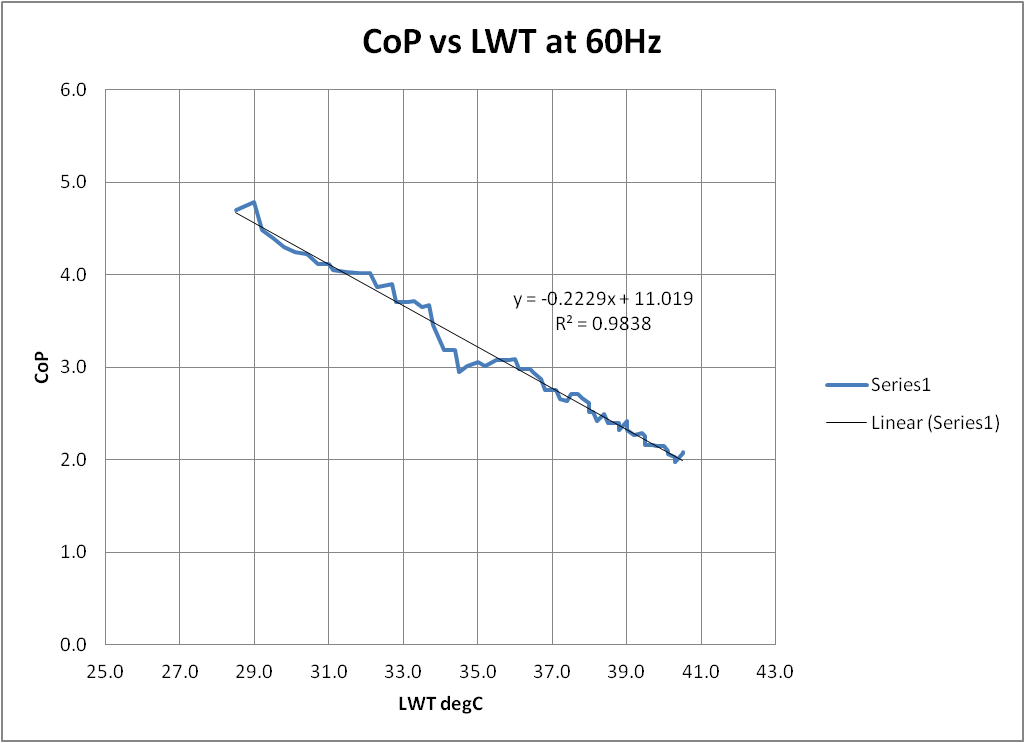
A propos a different discussion, I had cause to look at this very matter on my Samsung when the compressor was running at constant speed one day recently:

QED…

1 Like

Hey that’s brilliant. Can you share the outdoor temperature as well, because then I could directly use this model for my optimum flow rate calculator.

Hi Andre,

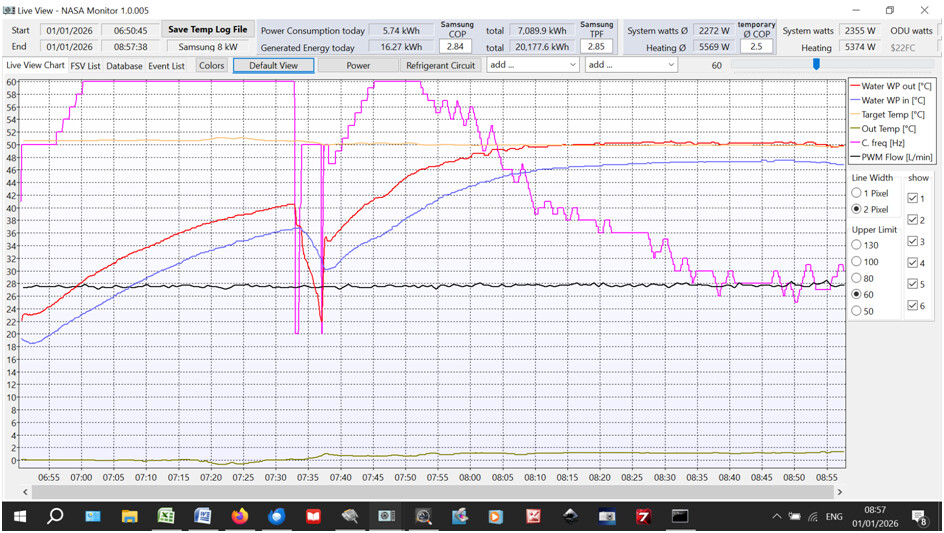
On this time trend you can see that during the period 07:00 - 07:30 (which I used to generate the above graph), ambient temperature (brown line) remained within a whisker of 0degC throughout.

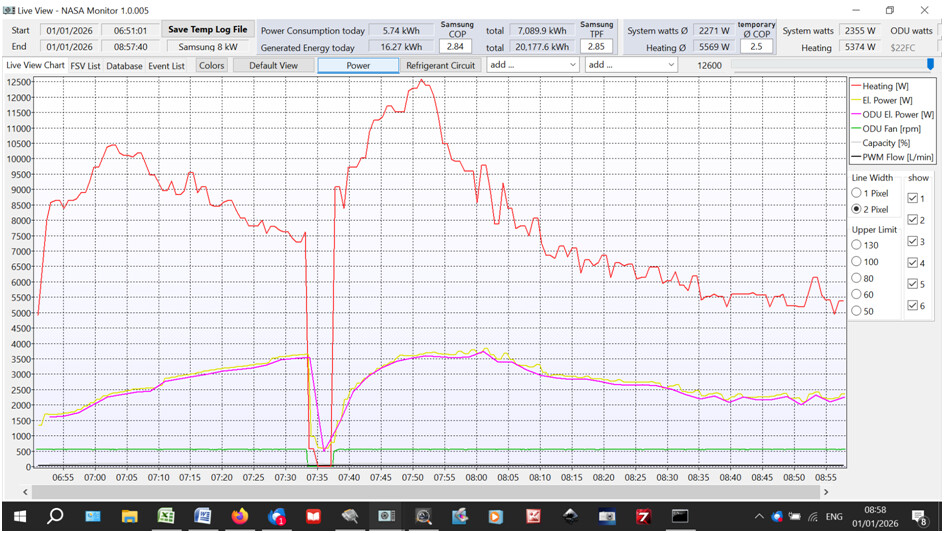
For interest, I’ll toss in the energy plot for the same time period:

I would be wary of reading too much into the absolute CoP figures in the graph:

  • The power input data (the yellow line in the second plot) arrive on the data highway some time later than the temperature data, skewing the CoP calc a bit
  • I believe that my LWT and RWT sensors are not that accurate - there’s a difference of about 0.6degC when the heat pump has stopped for a few hours
  • The heat pump was flat out during this post-setback period - not where it normally operates - and the energy values (in and out) may not be too representative

You won’t be surprised to see that the compressor speed (magenta line) reduces as LWT (red line) approaches weather compensated target (orange line). If you want to see what happened to CoP during this period (and have half an hour to waste) have a look at the log I took covering the whole morning

06H-52M-03S-EHS MONO LOWTEMP-Trend.xlsx (681.0 KB)

The black headings are what the Samsung logging software provided; the red headings are my own calculations (phys prop regressions, energy and CoP calcs etc.).

I haven’t been able to draw many conclusions on CoP variation with temperature from the rest of the data (too noisy) but, once LWT was on target (apound 08:00) it seems to remain fairly constant (to be expected) and rubbish (also to be expected at ~50degC LWT). Maybe you can squeeze out some further insights…

Sarah

PS that dip at 07:35 is a defrost as I expect you will have guessed…

Ian;

I think the answer is pretty simple: Vaillant doesn’t quality-control the flow and return temperature sensors. It’s random whether you have a good pair or a bad pair, and a bad pair can read up to 1 K different, which is the difference between a CoP of 2 or 5 – neither value being correct.

There’s a whole thread about it; I documented my experiences with fixing this on my Arotherm in that thread beginning here.

Edit: which Andre K said in the first reply :slightly_smiling_face::grinning_face_with_smiling_eyes:

1 Like

0°C outdoor is perfect. Even with all the uncertainties in your measurements, let’s compare against what I crudely fitted from a Vaillant arotherm plus 10 kW datasheet at min compressor speed. I got COP = -0.144\cdot \Delta T + 9.4 whereas your experiment yields COP = -0.223\cdot \Delta T + 11.09. Completely different systems and approches to get to the fit, but the numbers are in a similar ballpark. Around COP 10 as baseline and a drop on order of 0.1 - 0.2 per K of temperature difference. I’d love to see models like this for all heatpumps we have in the system.

1 Like

The Vaillant API includes heating power; is it not available in myPyllant? The app uses it. The heat pump only reports the output to the nearest 100 W; it looks more precise because the electricity consumption – measured to the nearest Watt – is added to it.

Two things that the API doesn’t have is flow rate and return temperature.

At a low flow temperature low COP combination, there may be an EEV issue. In my case EEV did not work. Any EEV position reading is the setpoint for the EEV, it is not the actual position. The actual position is not known. If the EEV does not react in reality, then the setpoint will be steered towards minimum and stay there, at 55. It suggests the EEV closed entirely but it is completely open. Efficiency gone of course. It is not visible at first sight.