Hi all, I’m looking to monitor my vaillant. I purchased the ebus but now realise I need more to do so. I don’t have home assistant, or a pi or anything.
What’s going to be the easiest (cost effective) way to get the data from the ebus stick to something useable? I’m not really interested in a home server or home assistant for anything else.
Second that, though if cost is a tight constraint there’s no need to upload to emoncms.org, you can save the extra yearly costs to mirror the feeds to the online emoncms and keep a fully local version running.
I purchased the ebusd adapter and already integrated it into Home Assistant.
But I have a question regarding the connection to the Vaillant Bus.
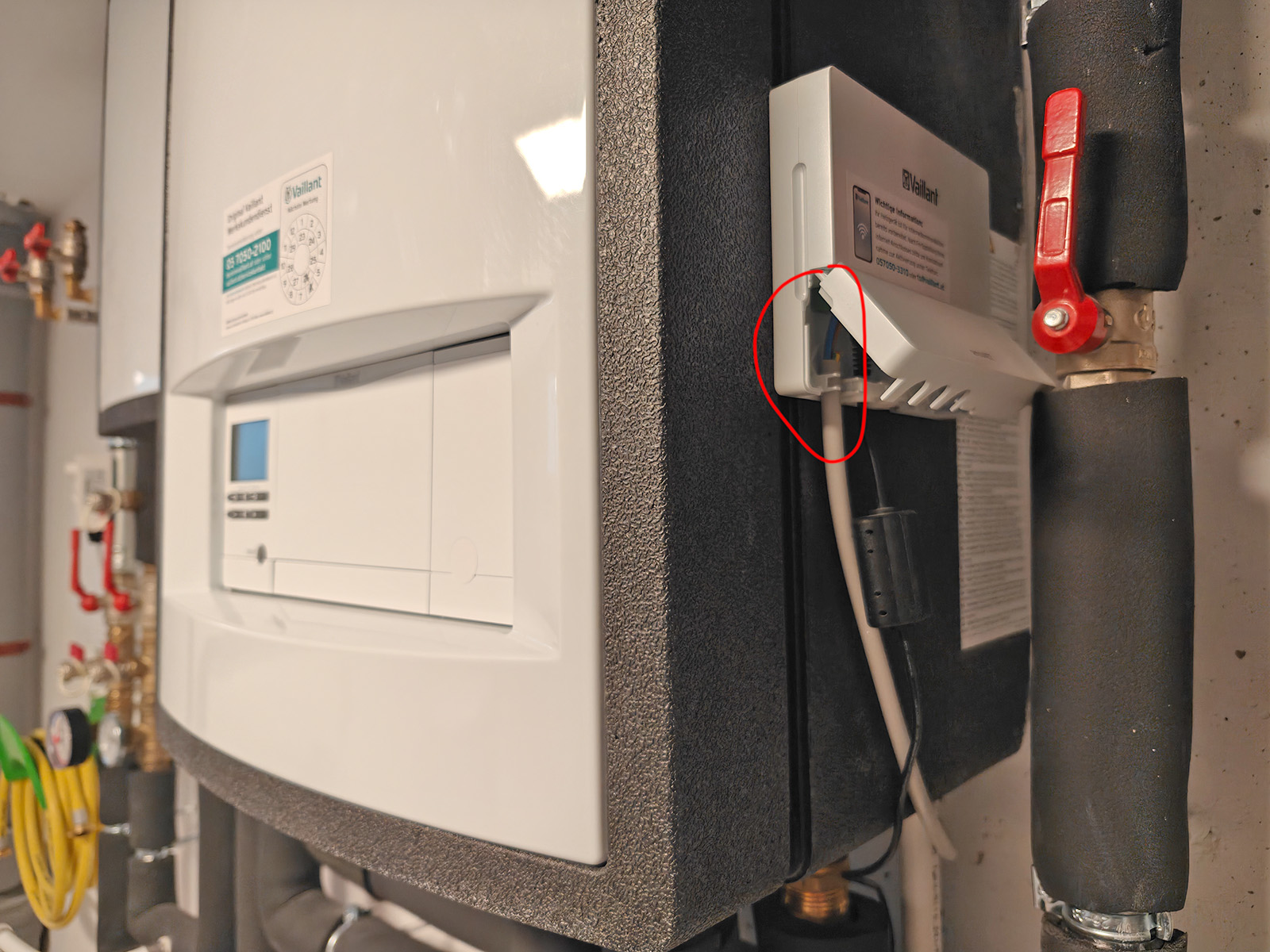
I have the Vaillant hydraulic station and the Network interface VR921 already connected to it.
Can I now just unplug this marked cable and split it to both the existing Vaillant Network interface and the new ebusd adapter? (= connect them both devices in parallel) and then it should work?
I live in the country and we get short power dropouts monthly and a 9 hour power cut on one occasion without any loss of sync. If the system has a network connection then it has plenty of opportunity to resync its clock either from NTP or the Vaillant server so if that is the case and it isn’t happening then I’d class that as a bug that Vaillant should fix. It is also something that the app should check the moment you ask it something. As well as non-optimal heating times there will be cost implications for customers on a variable tariff. If it doesn’t have an Internet connection then it is a bit remiss that it can’t do what every PC in the world manages to do just fine and run the clock locally till the power comes back!
Hi all. To stick my head out and ask a dumb question.
If I put said ebus chip onto the pi (loaded with emonsd) will it be able to read directly or will I need to get stuck into it trying to get it to read the data. If this has been discussed can somone point me to a location?
I had hoped it would be simpler to get set up, but I’m falling at early hurdles! And also don’t want to mess my hp up.
I did see this post from earlier, but it seems beyond me currently. If love to get this up and running but don’t have capacity for investing time in lots of learning currently.
It’s not just plug & play unfortunately, the most complex part is getting the right config for the heatpump. They’ve also moved ebusd to an entirely different configfile format and apparently you can even run it directly on the ebus module for a license fee. I’m not at all up to date with the recent developments, unfortunately.
Thanks. It seems I bit of more than I can chew, for the time being anyway. Which is a shame as I would have been nice to have better data to understand how the machine is running.
Did anyone set the ebus chip up on a pi runngin emoncms, if so can you comment on this step noted on the ebus website please?
Configuration with Raspberry Pi OS

By default, the pins required for the eBUS adapter are used by the Raspberry Pi OS for a serial login shell. To run the eBUS adapter via this interface instead, this shell must be disabled.

Warning! If this shell is not completely shut down, it will send uncontrolled data to the eBUS, which can lead to a malfunction of the entire bus system.

To deactivate the Raspberry Pi, the following steps must be performed (in essence, the text may vary slightly depending on the Raspberry Pi OS):

sudo raspi-configcarry out

Interface Optionschoose

Serial Portchoose

Would you like a login shell to be accessible over serial?answer with “No”/“No”

Would you like the serial port hardware to be enabled?answer with “Yes”

Exit “raspi-config” and reboot.
This will not be an issue if you just connect the ebus shield via USB instead of directly plugging it into the GPIO pin header on the Pi. So I would just go with the USB setup and not worry about it.