Vaillant eBUS hardware adapter (ebusd software) Thread

added the chmod, good spot

There is a hack to make cron run every 30 seconds.

You can add a second additional line in cron to call the script again, but put a sleep 30 at the start

* * * * * sleep 30; /home/mick/pull_ebus_values.sh

But i’ve found once a minute sufficient for my needs.

1 Like

I currently use this in cron:

* * * * * /usr/bin/flock -n /tmp/ebusReadViaCron.lock /opt/dro/ebusReadViaCron.sh >> /dev/null 2>&1

And the script has some metrics it reads only once, and most others every ten seconds:

root@emonpi:~# cat /opt/dro/ebusReadViaCron.sh
#!/usr/bin/env bash

for i in $(seq 1 6); do
  echo "[$(date)]"
  begin_time=$(date +%s.%N)
  end_time=$(echo "$begin_time + 9.95"|bc)

  if [ $i -eq 1 ]; then 
    for slowMetric in Z1ActualRoomTempDesired HwcStorageTemp Hc1ActualFlowTempDesired
    do
      #/usr/bin/ebusctl read -m 10 -V ${slowMetric}
      /usr/bin/ebusctl read -f -V ${slowMetric}
      sleep .5
    done
  fi

  for fastMetric in RunDataCompressorSpeed EnergyIntegral Z1RoomTemp RunDataElectricPowerConsumption BuildingCircuitFlow RunDataReturnTemp RunDataFlowTemp
  do
    #/usr/bin/ebusctl read -m 10 -V ${fastMetric}
    /usr/bin/ebusctl read -f -V ${fastMetric}
    sleep .5
  done

  now=$(date +%s.%N)
  sleep_seconds=$(echo "$end_time - $now"|bc)
  sleep $sleep_seconds
done

I think I needed to install bc to do the calculations: apt-get install bc

Works well for me. When I get around I’ll try to make a how-to to get the heat pump app working without using Home Assistant. Just ebusd via mqtt into emoncms.

1 Like

At some point I’ll ask what all that means :rofl: My heads burst, this is my first project into any sort of linux OS command line stuff.

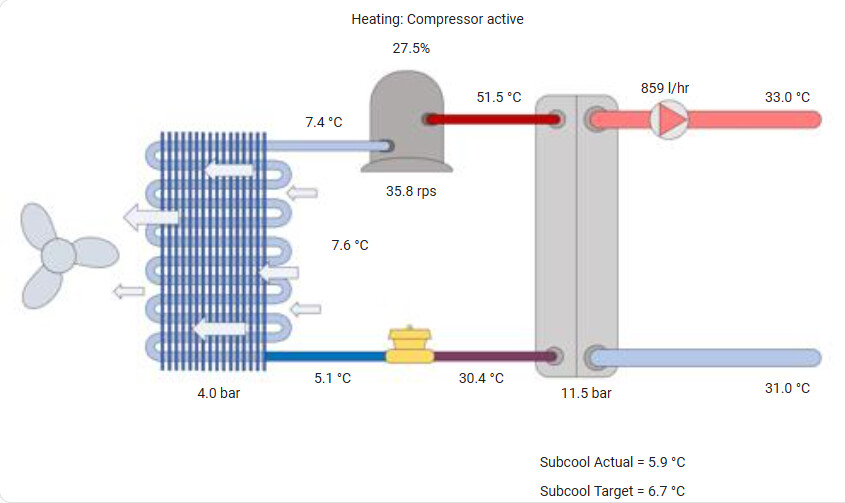
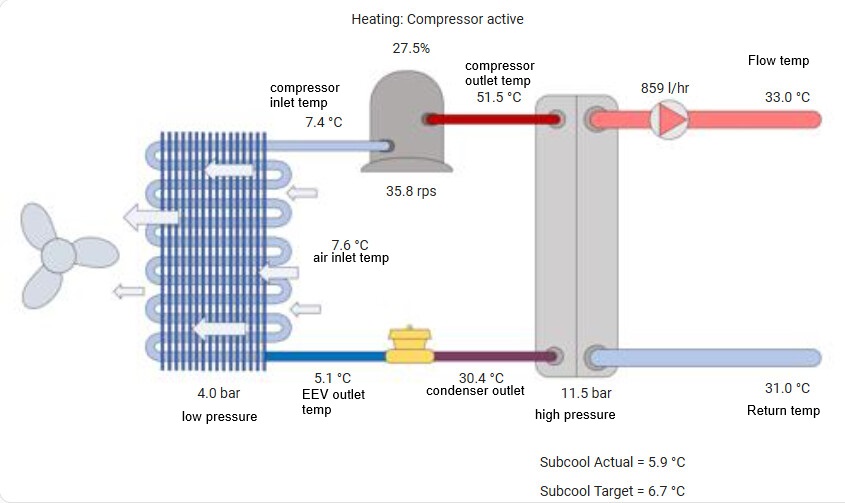
I have now managed to get (Nearly live) data streaming onto this backdrop. (updating 1-4min) will need a better app to view on, the HA card isn’t very customisable and doesn’t view right.

Big thanks to Mick and Andre, (I’d get you a pint at installer Mick but unfortunately wont be there this year!)

3 Likes

That looks awesome John.

I might ask what all those elements are that you are reading there and copy that. :laughing:

This is what I’m pulling at the moment. There are one or two on the list that arn’t 100% right yet (Fan speed I have as % but looks like I’m pulling the RPM value)

mqtt:
  sensor:
    - name: "V System Pressure"
      state_topic: "ebusd/hmu/BuildingCircuitWaterPressure"
      value_template: "{{ value_json['0'].value }}"
      unit_of_measurement: "bar"
      icon: "mdi:gauge"

    - name: "V Compressor Modulation"
      state_topic: "ebusd/hmu/State00"
      value_template: "{{ value_json.S00_CompressorModulation.value }}"
      unit_of_measurement: "%"
      icon: "mdi:gauge"

    - name: "V Outdoor Temperature"
      state_topic: "ebusd/broadcast/OutsideTemp"
      value_template: "{{ value_json.temp2.value }}"
      unit_of_measurement: "°C"
      icon: "mdi:gauge"

    - name: "V Flow Temperature"
      state_topic: "ebusd/hmu/FlowTemp"
      value_template: "{{ value_json['0'].value }}"
      unit_of_measurement: "°C"
      icon: "mdi:gauge"

    - name: "V Return Temperature"
      state_topic: "ebusd/hmu/ReturnTemp"
      value_template: "{{ value_json.temps2.value }}"
      unit_of_measurement: "°C"
      icon: "mdi:gauge"

    - name: "V Target Flow Temperature"
      state_topic: "ebusd/hmu/"
      value_template: "{{ value_json.flowtempdesired.value }}"
      unit_of_measurement: "°C"
      icon: "mdi:gauge"

    - name: "V Compressor Outlet Temperature"
      state_topic: "ebusd/hmu/CompressorOutletTemp"
      value_template: "{{ value_json.temps2.value }}"
      unit_of_measurement: "°C"
      icon: "mdi:gauge"
      
    - name: "V Compressor Inlet Temperature"
      state_topic: "ebusd/hmu/CompressorInletTemp"
      value_template: "{{ value_json.temps2.value }}"
      unit_of_measurement: "°C"
      icon: "mdi:gauge"

    - name: "V Air Inlet Temperature"
      state_topic: "ebusd/hmu/AirInletTemp"
      value_template: "{{ value_json.temps2.value }}"
      unit_of_measurement: "°C"
      icon: "mdi:gauge"
      
    - name: "V Compressor Speed"
      state_topic: "ebusd/hmu/CompressorSpeed"
      value_template: "{{ value_json['0'].value }}"
      unit_of_measurement: "rps"
      icon: "mdi:gauge"
      
    - name: "V Status Code"
      state_topic: "ebusd/hmu/RunDataStatuscode"
      value_template: "{{ value_json.scode.value }}"
      icon: "mdi:gauge"
      device_class: "enum"

    - name: "V Pump Power"
      state_topic: "ebusd/hmu/BuildingCircuitPumpPower"
      value_template: "{{ value_json['0'].value }}"
      unit_of_measurement: "%"
      icon: "mdi:gauge"
      
    - name: "V Flow Rate"
      state_topic: "ebusd/hmu/BuildingCircuitFlow"
      value_template: "{{ value_json['0'].value }}"
      unit_of_measurement: "l/hr"
      icon: "mdi:gauge"
      
    - name: "V Condensation Temperature"
      state_topic: "ebusd/hmu/CondensationTemp"
      value_template: "{{ value_json.temps2.value }}"
      unit_of_measurement: "°C"
      icon: "mdi:gauge"
      
    - name: "V Evaporation Temperature"
      state_topic: "ebusd/hmu/EvaporationTemp"
      value_template: "{{ value_json.temps2.value }}"
      unit_of_measurement: "°C"
      icon: "mdi:gauge"
      
    - name: "V High Pressure Switch"
      state_topic: "ebusd/hmu/HighPressureSwitch"
      value_template: "{{ value_json.scode.value }}"
      icon: "mdi:gauge"
      device_class: "enum"
      
    - name: "V EEV Position2"
      state_topic: "ebusd/hmu/RunDataEEVPositionAbs"
      value_template: "{{ value_json['0'].value }}"
      unit_of_measurement: "Step"
      icon: "mdi:gauge"
      
    - name: "V EEV Position"
      state_topic: "ebusd/hmu/PositionEEV"
      value_template: "{{ value_json['0'].value }}"
      unit_of_measurement: "%"
      icon: "mdi:gauge"
      
    - name: "V Desired Flow Temperature"
      state_topic: "ebusd/720/Hc1ActualFlowTempDesired"
      value_template: "{{ value_json.tempv.value }}"
      unit_of_measurement: "°C"
      icon: "mdi:gauge"
      
    - name: "V Room Temperature Desired"
      state_topic: "ebusd/720/z1ActualRoomTempDesired"
      value_template: "{{ value_json.tempv.value }}"
      unit_of_measurement: "°C"
      icon: "mdi:gauge"
      
    - name: "V Room Temperature Actual"
      state_topic: "ebusd/720/z1RoomTemp"
      value_template: "{{ value_json.tempv.value }}"
      unit_of_measurement: "°C"
      icon: "mdi:gauge"
      
    - name: "V Current Hot Water Temperature"
      state_topic: "ebusd/720/HwcStorageTemp"
      value_template: "{{ value_json.tempv.value }}"
      unit_of_measurement: "°C"
      icon: "mdi:gauge"
      
    - name: "V High Pressure"
      state_topic: "ebusd/hmu/HighPressure"
      value_template: "{{ value_json['0'].value }}"
      unit_of_measurement: "bar"
      icon: "mdi:gauge"
      
    - name: "V Low Pressure"
      state_topic: "ebusd/hmu/LowPressure"
      value_template: "{{ value_json['0'].value }}"
      unit_of_measurement: "bar"
      icon: "mdi:gauge"
      
    - name: "V Superheat Actual"
      state_topic: "ebusd/hmu/OverheatingActualValue"
      value_template: "{{ value_json.temps2.value }}"
      unit_of_measurement: "°C"
      icon: "mdi:gauge"
      
    - name: "V Superheat Target"
      state_topic: "ebusd/hmu/OverheatingTargetValue"
      value_template: "{{ value_json.temps2.value }}"
      unit_of_measurement: "°C"
      icon: "mdi:gauge"
      
    - name: "V Power Consumption"
      state_topic: "ebusd/hmu/RunDataCurrentConsumedPower"
      value_template: "{{ value_json.powerv.value }}"
      unit_of_measurement: "W"
      icon: "mdi:gauge"
      
    - name: "V Compressor Block Time"
      state_topic: "ebusd/hmu/CompressorBlocktime"
      value_template: "{{ value_json.powerv.value }}"
      unit_of_measurement: "min"
      icon: "mdi:gauge"
      
    - name: "V Test Flow Temp"
      state_topic: "ebusd/hmu/State01"
      value_template: "{{ value_json['0'].value }}"
      unit_of_measurement: "°C"
      icon: "mdi:thermometer"

    - name: "V Test Return Temp"
      state_topic: "ebusd/hmu/State01"
      value_template: "{{ value_json['1'].value }}"
      unit_of_measurement: "°C"
      icon: "mdi:thermometer"

    - name: "V Condenser Outlet Temperature"
      state_topic: "ebusd/hmu/CondensorOutletTemp"
      value_template: "{{ value_json.temps2.value }}"
      unit_of_measurement: "°C"
      icon: "mdi:gauge"
      
    - name: "V EEV Outlet Temperature"
      state_topic: "ebusd/hmu/EEVOutletTemp"
      value_template: "{{ value_json.temps2.value }}"
      unit_of_measurement: "°C"
      icon: "mdi:gauge"
      
    - name: "V Subcooling Actual"
      state_topic: "ebusd/hmu/SubcoolingActualValue"
      value_template: "{{ value_json.temps2.value }}"
      unit_of_measurement: "°C"
      icon: "mdi:gauge"
      
    - name: "V Subcooling Target"
      state_topic: "ebusd/hmu/SubcoolingTargetValue"
      value_template: "{{ value_json.temps2.value }}"
      unit_of_measurement: "°C"
      icon: "mdi:gauge"
      
    - name: "V Energy Integral"
      state_topic: "ebusd/hmu/EnergyIntegral"
      value_template: "{{ value_json.integral.value }}"
      unit_of_measurement: "°min"
      icon: "mdi:gauge"
      
    - name: "V Fan Speed"
      state_topic: "ebusd/hmu/RunDataFan1Speed"
      value_template: "{{ value_json['0'].value }}"
      unit_of_measurement: "%"
      icon: "mdi:gauge"

And so you know what goes where.

2 Likes

Tutorial from the geek

2 Likes

A pity he couldn’t get the name of the conductor the c.t. goes on correct. The c.t. normally goes on the LINE conductor. Both Line and Neutral conductors are regarded as LIVE because neither is necessarily at earth potential.

2 Likes

What tutorial / link did you use for the backdrop and positioning the data on it please ?

Didnt have tutorial.

I drew the fridge circuit on another platform, saced as pic. And just used picture elements card on homeassistant dashboard.

Its really not a good element though, looking for better ways to set it up. Ideally something that will save a screenshot of that picture at various times, or something that i can move a time slider and see it all change on the pic woukd be ideal

1 Like

A post was merged into an existing topic: Vaillant Arotherm Owners Thread

There are some cool examples of similar picture cards.
I’d love to get something like this set up!!!

https://www.reddit.com/r/homeassistant/comments/1fhz4e9/how_to_visualize_the_heating_system/

1 Like

Need to get some time and get a good look through that.

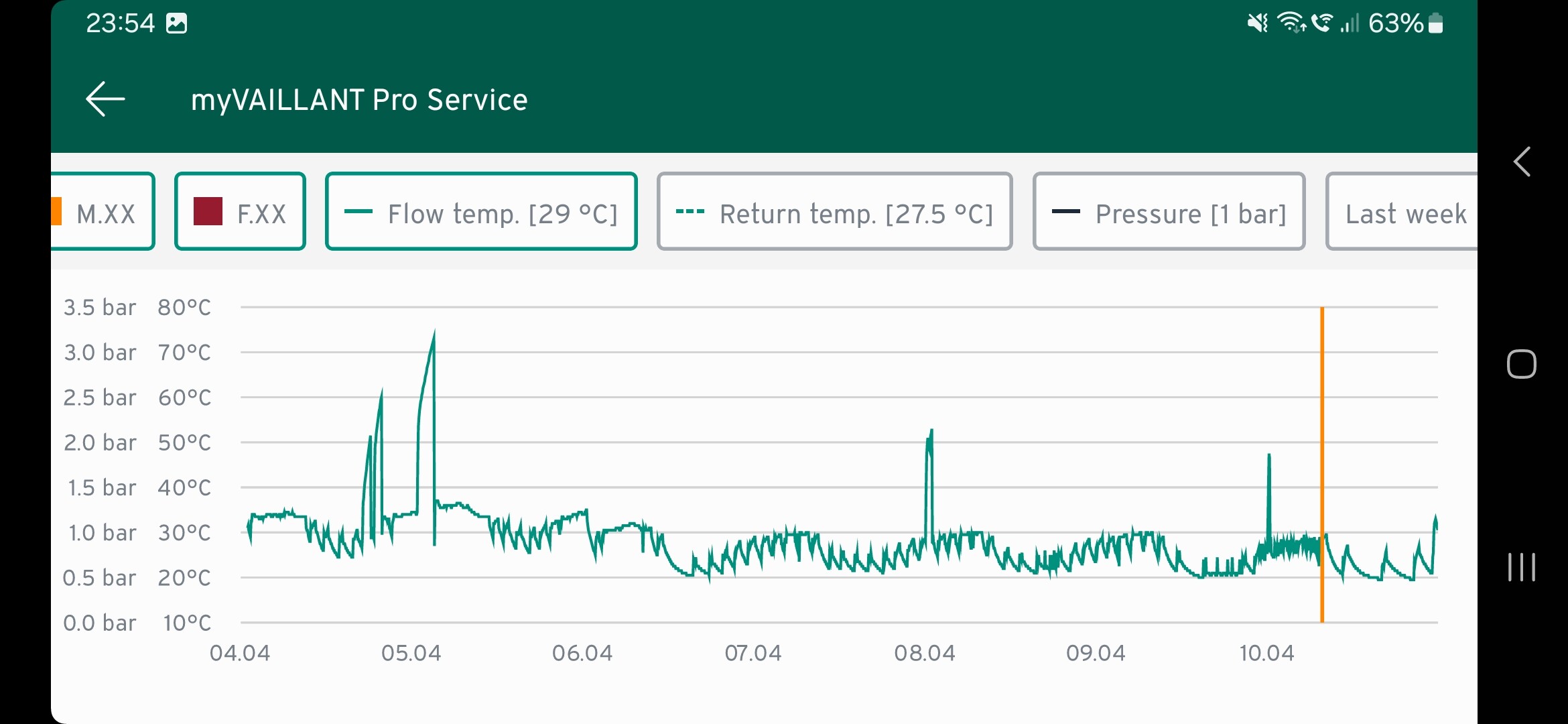
Ive been away all week but have realised the heat pumps been cycling a load more than normal, whichbwent crazy last night when i upped the polling to every 60 seconds.

So the ebusd adaptop appears to be significantly interfering with the ebus comms. Can see off the inbuilt monitoring the difference disconnecting the ebusd had just where orange line is.

Going to sit diwn and deactivate ebusds protocols for polling, and set up script that will manually poll for certain info only and space it out so that is polling for say one sensor every 5 seconds to free up bandwith on ebus.

Ive managed to keep my system at a very low cycling rate so far. 3326 hours of compressor running time with only 911 starts (0.27 starts per hour) was 0.21 starts per hour before this week!)

I thought i read the sheild c6 adapter wasnt meant to interfere with ebus, but as im forcing polls rather than just reading data tgats naturally moving accross ebus then its too much for it to handle.

It shouldn’t interfere, but at some point there was a home assistant related config that polled some problematic values and this led to the issues you describe. Which values are you avtively polling? Are you using HA?

Yeah. My thoughts too Andre

I had this a while ago, overpolling and cycling.
I’m gonna have to search back through the thread to find it.

It was just a setting change in the end.

So looking back, the fix is to do with the filter-seen variable in the mqtt-hassio config file

Make sure that is set to 1

mick@ebusd:~ $ cat /etc/ebusd/mqtt-hassio.cfg | grep filter-seen
filter-seen = 1 
mick@ebusd:~ $

I wander if I just alter that file to stop any polling via ebusd and only use the manual script if that would be better.

Hopefully get an hour to play about with it over the weekend. I’ll try what you have above, and note the bits that get updated each minute, then possibly just narrow the manual 60s poll to things that arn’t already being done.

Either that or I can try a command to space out the requests by 5-10 seconds each, so only asking for a little data at a time.

Has anyone looked at this new element of ebusd for the configuration files?

Looks like some sort of online repository that config files are pulled from, rather than file based.

I’m loathed to move to it because the JonesPD config files does ‘almost’ everything I want from it.

I say almost cos i’d love to see the temperature offset setting (internal and outdoor).

1 Like

Im afraid to even touch mine in fear of a reset or having to re-figure out how to set it up again!

Do you currently have your offsets altered? The only time ive ever adjusted them is when faced with elderly gentlemen who were ‘enginneers’ that are adamant that the sensoCOMFORT and my 4 seperate types of measuring probes wete all wrong and their cracked and leaking mercury thermometer was the only thing that was correct :smiley:

1 Like