I’ve found some very useful info on this site that has helped me setup the heatpump that we got earlier in the year. I’m now seeing some odd behaviour that I just can’t figure out and was hoping to get some opinions and pointers. It’s probably worth noting that the heatpump is oversized, it should have been 12Kw but the wrong one was ordered and apparently the 12 is a software capped 16 anyway?
The heatpump runs well and keeps the house warm but it feels sub-optimal at the moment. I have been playing with the settings to try and achieve longer run times but it’s proving hard. Initially I ran with FSV2092 set to water pump 2 (so pump continues to run whilst the thermostat is calling) which worked OK but I would see regular stops even though the outlet temperature was below the requested water law temperature. Sometimes these stops would be after 20-30mins sometimes a couple of hours,
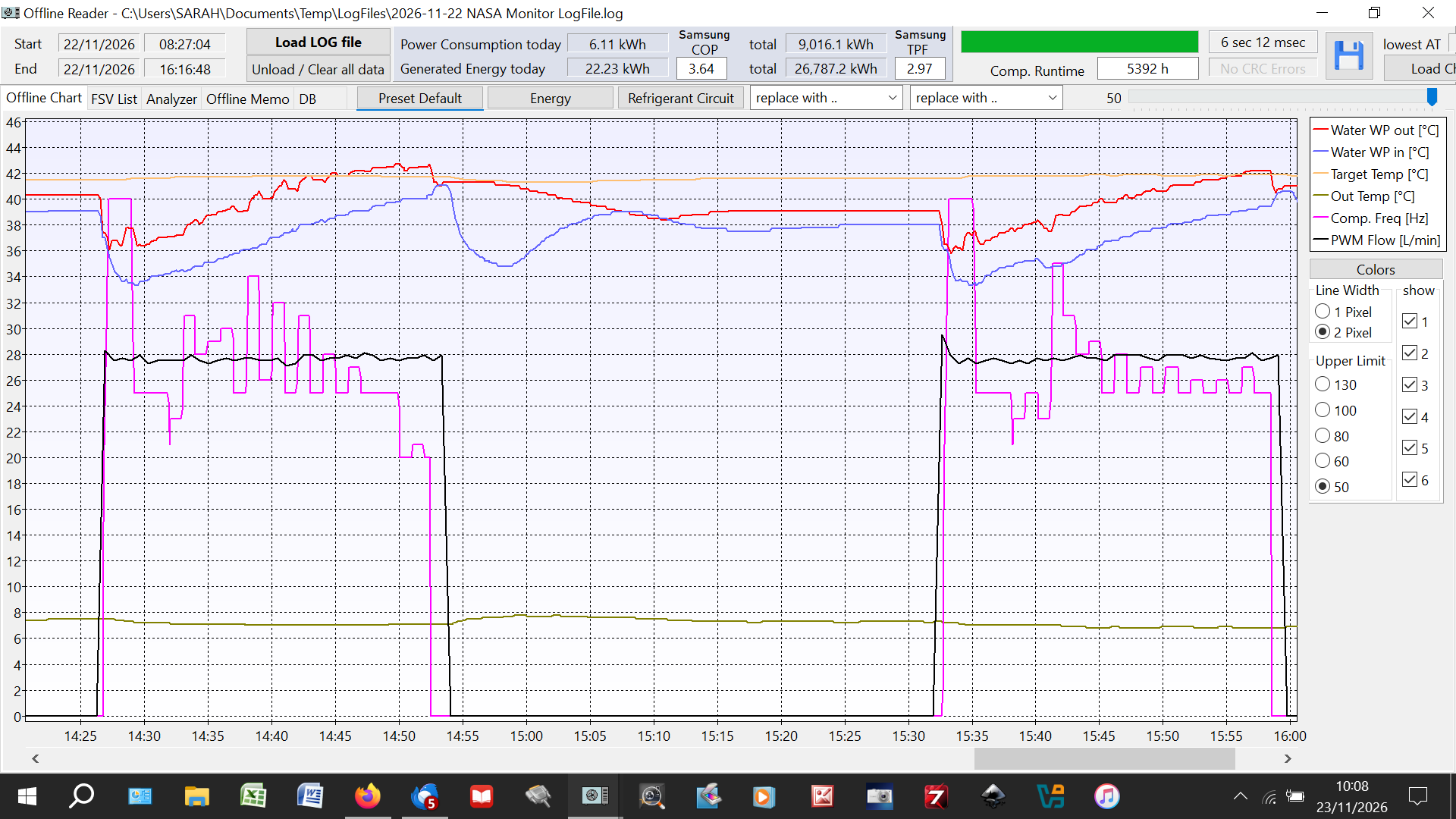
Over the last couple of days I changed this to option 1 (compressor on/off with the thermostat) in the hope it would run longer even if the WL temp was exceeded. This has given longer run times, especially noticeable last night when we were just below freezing. The outlet temp still stayed below the WL and it ran for 10 hours with occasional defrost cycles. But as it has warmed up today I am seeing the periodic stopping again even though the thermostat is still calling for heat and the outlet temp remains below the WL temp.
Has anyone seen this behaviour before? Any ideas on what I can try and tweak. Everything is monitored in homeassistant and I have a NASAmonitor plot below. One thing i have noticed (and I assume this isn’t norml) is that when these pauses happen the operating status goes from Normal->Stop->Safety it remains at safety for around 5 minutes until it starts again.
Hopefully that all makes sense, happy to share any charts or settings that may help
Hello, @amnlincoln and a warm welcome to the forum.
Can you post your NASAmonitors outputs to include the timescale, please (x-axis)?
Your display looks like a #2092 = 2 run. Can you also post a #2092 = 1 output?
What are your #2011/2012/2021/2022/2031/2032 and 2041 settings?
Are you running with PWM activated? (What are your #4051/2/3 settings?)
Finally, have you done any searches on the forum? (That’s the magnifying glass to the left of your avatar.) If you search for say samsung cycling (in all topics) you’ll see that this subject has come up many times before…
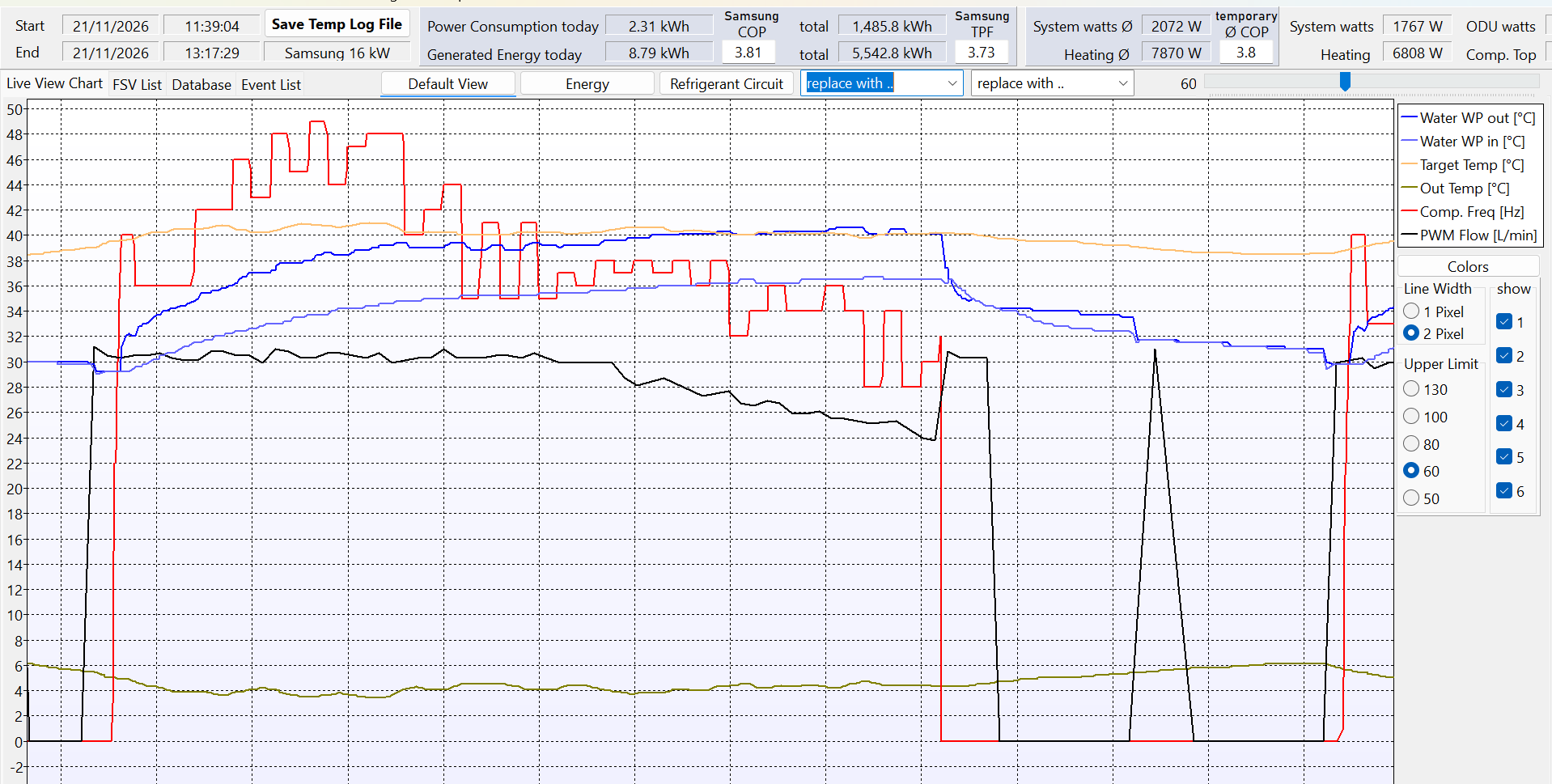
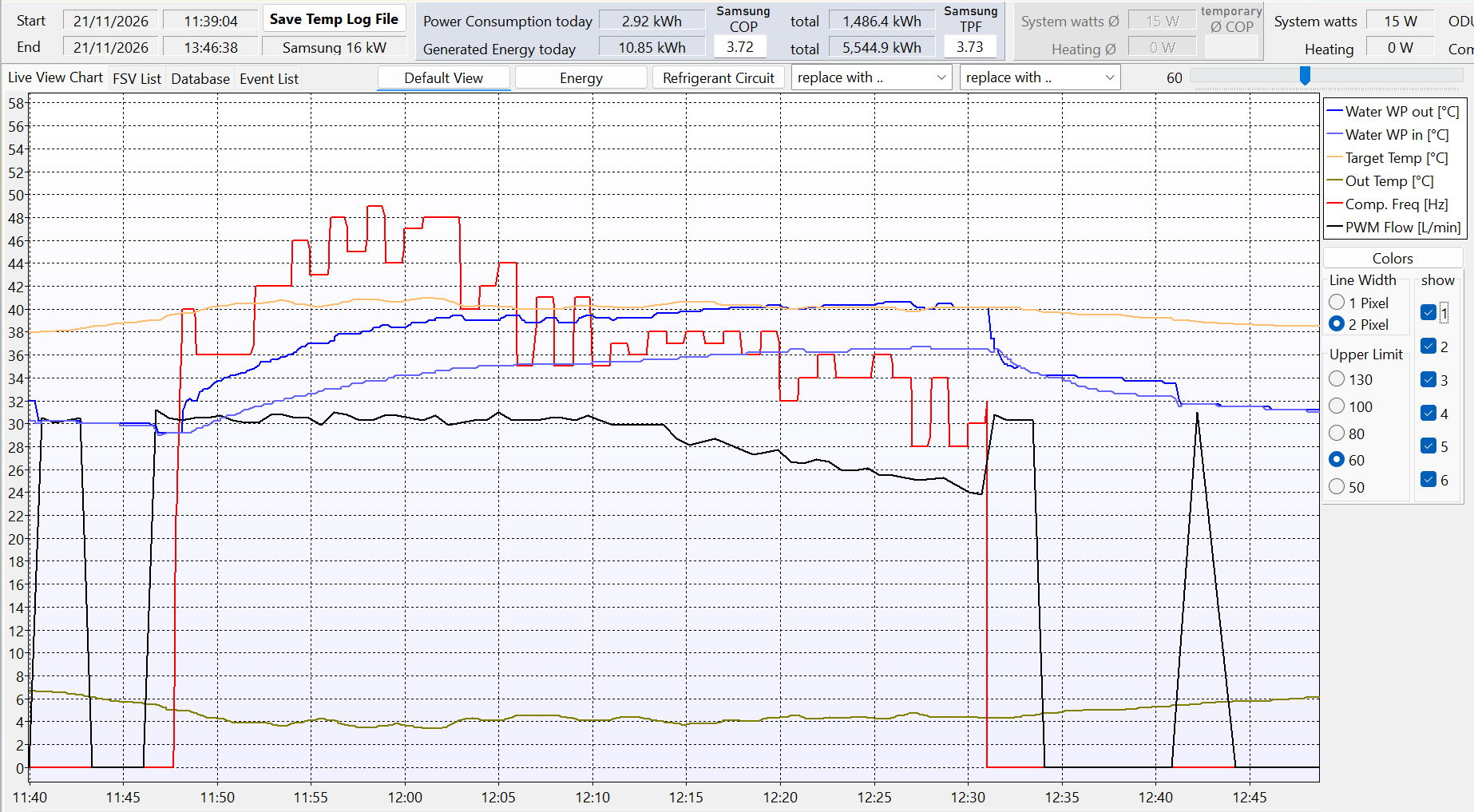
Thanks for the welcome. I have done a lot of reading about this and haven’t found anything that really matches this scenario, especially not the safety status. I may have missed it but have tweaked a fair bit with no real improvements. I have included the image again with the x-axis. Since the temperature dropped below 3 degrees this afternoon I’ve had a good few hours of running without it stopping other than for defrosts and a DHW run so the heatpump seems able to run for longer in cooler conditions.
I had the wrong FSV in my original post, it’s actually running from 2091 (UFH). However the run shown is for 2091 set to 1.
The Normal to Stop to Safety sequence is the interesting part, since that looks more like a protection trip than the thermostat simply ending a call for heat. I would watch the flow rate and the return temperature right at the moment it stops, as a low flow or a return that has crept up close to the flow temperature can trip the unit even while the outlet is still below the weather-law target. If the stops line up with a falling flow rate, checking the pump PWM behaviour and any partially closed zone valves would be my next step.
In your OP you said that “I am seeing the periodic stopping again even though the thermostat is still calling for heat and the outlet temp remains below the WL temp.” If in your plot above you are referring to stoppages like the one at 12:31, then I don’t see that - what I do see is your LWT (dark blue) nicely converging with your WL target (yellow), and slowly reducing your compressor speed (red) as it does so, until the compressor stops. (The small variations in instantaneous compressor speed are quite normal - they’re built in to the speed control algorithm and you should really just watch the trend.) The PWM (after the preprogrammed 20 minute delay per its built-in algorithm) is reducing your water flow (black) and the deltaT is nicely heading towards your 5degC target. The stoppage at 12:31 is almost certainly your roomstat becoming satisfied, and it looks like your room temperature had not dropped over its hysteresis range by the end of the display, so the compressor hadn’t yet restarted. (I’m assuming here that your roomstat is hysteresis-based rather than TPI-based.) In other words, there’s nothing unexpected in this performance. Had your roomstat still not been satisfied at 12:31, your compressor speed would have continued decreasing to its minimum (14-20Hz on an HTQ depending on OAT - may be different on a Gen7) and LWT would have continued to increase - dragging RWT with it - until your roomstat was satisfied. That’s just how #209x = 1 works .
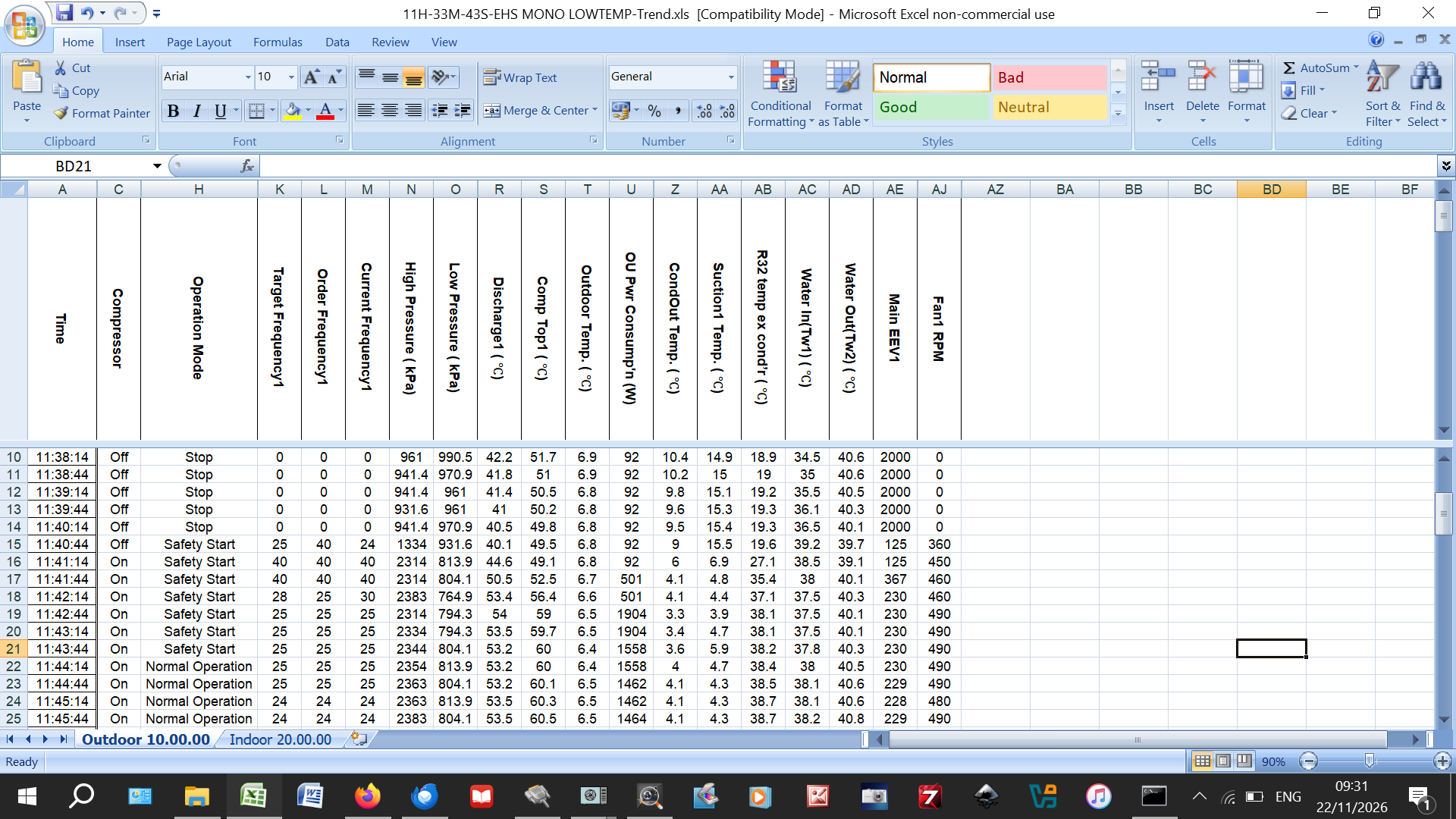
As for your Normal/Stopped/Safety query, again this is perfectly normal Samsung behaviour. There are a number of running algorithms coded into the controller, and whenever the unit starts it first runs a “Safety Start” algorithm for a few minutes, before switching to the “Normal Operation” algorithm. Here’s an extract from a typical SNET-Pro2 output (I was polling at 30s intervals in this case):
You can see Safety Start lasts about 4mins while the controller adjusts compressor speed gradually to the one appropriate to prevailing circuit conditions. Other running algorithms include Defrost and Compdown (i.e. a trip).
Just for the record, @amnlincoln, your WL target is being calculated correctly.
Since the WL “curve” is defined by T = m.OAT + c (for OAT between #2011 and #2012)
where m = [(#2022 - #2021) / (#2012 - #2011)]
and c = [#2022 - (#2012.m)]
with your settings, m = -0.944 and c = 44.16, so for your OAT at 11:55 of 4.0, your T should be 40.4, which looking at your plot, it is.
@mikaelkorhonen - I will check the numbers again but I haven’t noticed anything unusual. All the zones are open and the only difference I can see is the OAT. I will double check though!
@SarahH Thank you for the detailed response, I hadn’t realised the safety start was normal so thats one thing to rule out at least. The interesting thing with this is they thermostat was calling for heat all through that run, it was at least 2 degrees below it’s set point. It’s a hive, which I believe is TPI based, and I can see it calling both in home assistant and the hive app which is why I don’t understand the stop in this situation.
Just to check today I bumped up the room stat a few degrees to make sure and the results are similar, unfortunately the laptop I ran NASAmonitor on decided to install updates just after I went out for the day but some home assistant data is shown below. You can see tun times of around 30 mins when the OAT is around 6 degrees. at 15:00 it dropts to just below 4 degrees (the scale isn’t great!) and then I get a longer run. Throughout the day the room temp is around 19 degrees (the red line) with a target of 25. The three bars in the “HP Running” section are 1. the running state, 2. The thermostat call for heat (on or off) and 3. The defrost status
I’ll dig through some more data this evening, I’m getting on a train for a couple of hours shortly so will have an opportunity to create some more graphs to see if I can spot anything odd.
I will also disable PWM but I’m pretty sure I have tried that before without any improvement.
Just going out, @amnlincoln, so a short response from me this time .
Isn’t the room temperature on your display (red line) coming from the Wired Remote Controller (WRC)? Yet you have told your heat pump that you are using a 3rd party thermostat for room temperature control, not the WRC (you’re using #2091, not #2093).
So your red line is a red herring… (your actual room temperature is whatever your 3rd party roomstat says it is).
Hi @SarahH, the red line on the HA charts is the temperature reported by the hive thermostat in the living room. The WRC is in the garage so much colder than that
@amnlincoln if your roomstat (your Hive) is really TPI, I think that this may explain your observations. (Read the whole of Heat Pump Wireless Room Thermostats – A Cautionary Note for a full explanation - my OP needs a little qualification, which it gets towards the end of the thread.)
Without knowing anything about your Hive setup, I suspect that its TPI is setting your compressor on/off frequency (e.g. roughly 2 per hour at OAT = 6degC). Your reported room temperature (your red line) doesn’t seem to be varying at all, but that may be because of the display resolution. For comparison, I’ve switched my roomstat to hysteresis instead of TPI, and yesterday my living room was cycling over its hysteresis setting of 0.2degC about once per hour (about half an hour to warm up, half an hour to cool down):
I guess I would hardly see +/- 0.2degC changes if I plotted room temperature. And TPI maintains a constant room temperature better than hysteresis, so no wonder your red line looks constant.
To summarise, I think your setup is running exactly as I would expect, and your “[heat pump] keeps stopping” is simply your Hive TPI doing what it is supposed to.
 .
 .