Monitoring Your Samsung ASHP Controller

Hi David @hank31980,

  1. I’d say you’ve made tremendous progress in just 2 weeks! :slightly_smiling_face:.
  2. For continuous operation (and without any personal knowledge of the 16kW unit), I’d guess that you are close to the LWT limit. The 15Hz minimum inverter frequency you are seeing compares with the 14Hz I can get on my 8kW unit (but then only with #2091 = 1, and at OATs higher than ~7degC).
  3. Whether this operating strategy is the best from a CoP and power consumption perspective is harder to say, and something I am wrestling with myself. I’m increasingly inclined to suspect that continuous “low and slow” isn’t necessarily the economic optimum. I gathering evidence that, because the instantaneous CoP seems to be higher when the HP is running at high output (the “parasitic” losses being proportionately lower), it may be better to deliberately cycle it. That is, running it hard for half an hour then stopping it for half an hour (rather than just trundling along at half speed) actually uses less power in the long run, as long as you don’t mind your room cooling a bit during the “off” period. (This evidence is being validated somewhat by @TrystanLea with his Dynamic Heat Pump Simulator thread right now.)
  4. My tentative conclusion is that #2091 = 1, whilst giving a stable, minimum-cycling operation, may actually result in higher running costs than the #2091 = 2-4 options, as long as the consequent cycling is not excessive.
  5. This sort of leads into your question about a possible “derate parameter” to emulate the smaller units in the range. If you are already running your compressor at or close to its minimum permissible speed (there are several things that may have made Samsung set this minimum, including loss of lubrication, onset of compressor surge, thrust bearing design, inverter efficiency etc etc) the only other thing it can do is stop (i.e. cycle). I may be missing something, but isn’t setting its cycle rate so that it runs for just 50% of the time (each hour, say) equivalent to running an 8kW unit continuously?
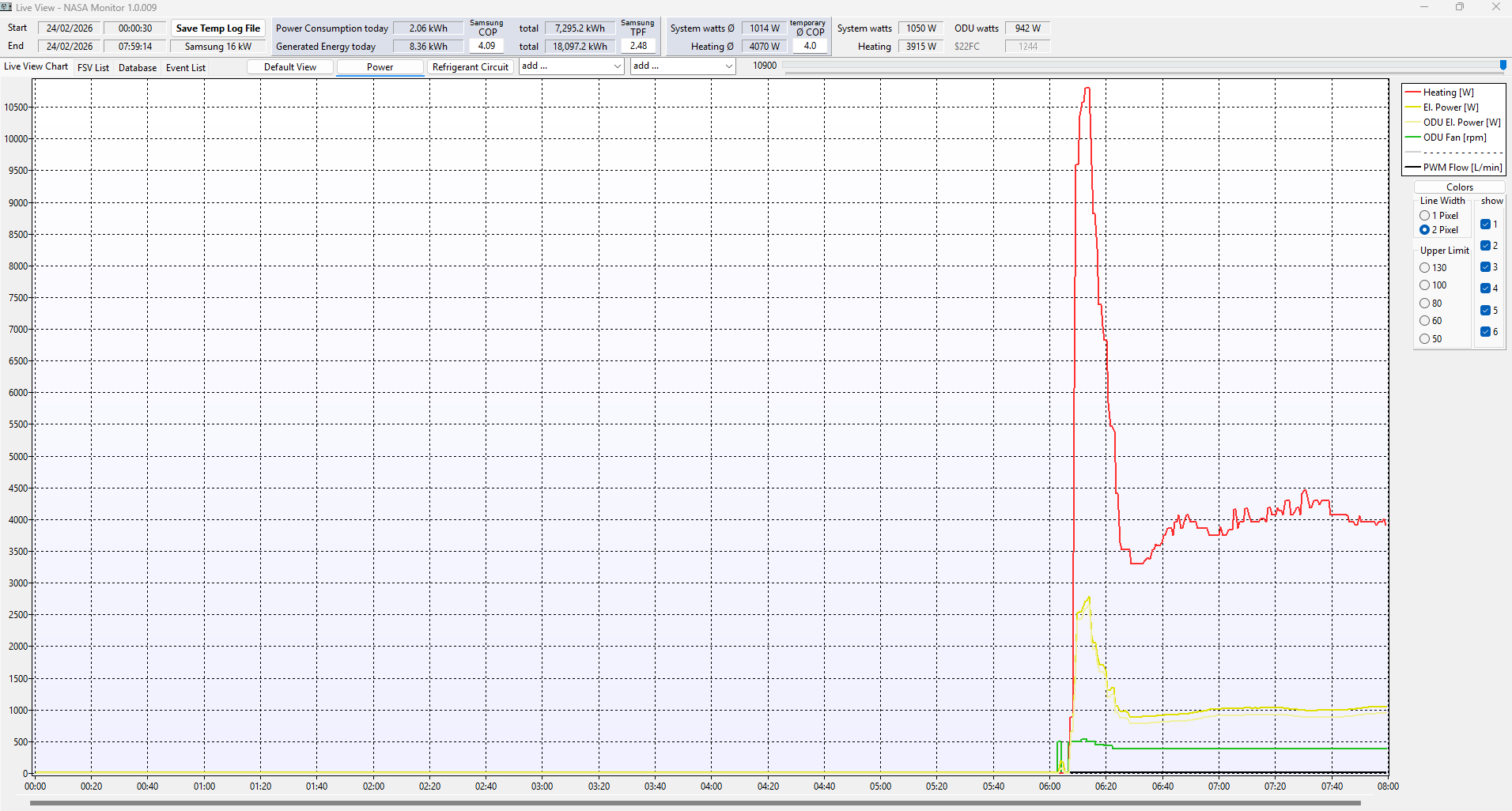
This progress only achieved with your advice don’t forget and with a bit of my time and effort thrown in to gain access to the ASHP via S-Net and now more recently NASA monitor.

Don’t get me wrong here, I am so happy with where I am with the Heating system now compared to previous winter months, and what I like about the constant running of the ASHP is that there are no Large spikes in Power demand as the Water Outet temp is pretty constant, therefore from a noise point of view, the ASHP is running steady and quietly, which is an important factor for me, and is almost as important as how efficient the system runs.

I take on board your point about my favourite parameter #2091 and whether I should do some testing of my own, ie allow it to switch off the compressor once Water Outlet Target achieved, and see if the compressor cycling gives me any benefits or downsides.

Also I guess your point about 1 hour ON 1 hour OFF is 50% duty so in theory mimics the output of a 100% duty 8kW system.

1 Like

Nearly - I turned ours off one evening a week or so ago.

Outside temp was 5.2c increasing to 5.4c, heating was off for 45 minutes and lost 0.5c in the sitting room. Luckily, Mrs D didn’t complain.

On restarting it took an hour to return to the fairly flat line consumption and in that hour used 2.05kWh whereas in the hour prior to turning it off it used 1.72kWh.

So it’s more economical to do this but I’m happy to leave it running 24/7 as it’s easier, more comfy and it doesn’t cost much more in the grand scheme of things.

I agree with your point……….whilst efficiency is a big factor, I like the way my system is running right now, it has now arrived in the “ASHP ball park” and that fact alone takes the pressure off me, before I was constantly fiddling with Room stats and balancing Radiators etc etc . Right now I can sit back and carry out some minor tweaks and monitor the effects via the software tools and room temps.

I am favouring this constant ON approach, as it seems to be giving me a steady water outlet temp and therefore providing a steady heat to the house.

It was only my observation today that the actual Water Outlet Temp appeared to go no lower than about 39c…………the OAT today was around 10c……and the WL Setpoint was around 36c.

So I was interested to find out why for a WL setpoint of 36c the actual LW stayed up at 39c?

If your heat production was around 3.5-4 kW, which is the lowest the Samsung 16 kW (and 12 kW) can modulate down to, then the problem is your emitters. At LWT of 39C one would expect heat production and heat emission to be around 5-6 kW at least. Can you say what the actual heat production was?

I presume that you have 2091/2 set to 1 (turn off by thermostat only), in which case, in mild conditions, the LWT will rise above set point until the minimum heat production and emission is achieved. In theory, making it cycle off by setting 2091/2 = 2-4 means that a lower average heat production can be achieved. In practice, Gen 6 Samsung has a nasty habit of cycling on and off every 7-8 minutes in these conditions, which is not good for it.

Hi Mike,

I switched everything OFF last night by setting T-Stat to 18c, as all rooms were around 22c and I was interested to see a start sequence from 06:00 this morning.

I also changed 2022 & 2032 down from 35c to 30c to see if that helped for the current weather condition of OAT 10c.

Also to confirm, I only have 1 Heating Zone (house with radiators only, no UFH) and I only use 2091, which as you surmised is set to 1 ,so that the Compressor runs constantly until Thermostat disables it. The rapid cycling I had before when this was not set to 1 was not good, so I will stick with this setting for sure.

As of yesterday, I am using about 1kW of electric power and getting about 4kW of heating power.

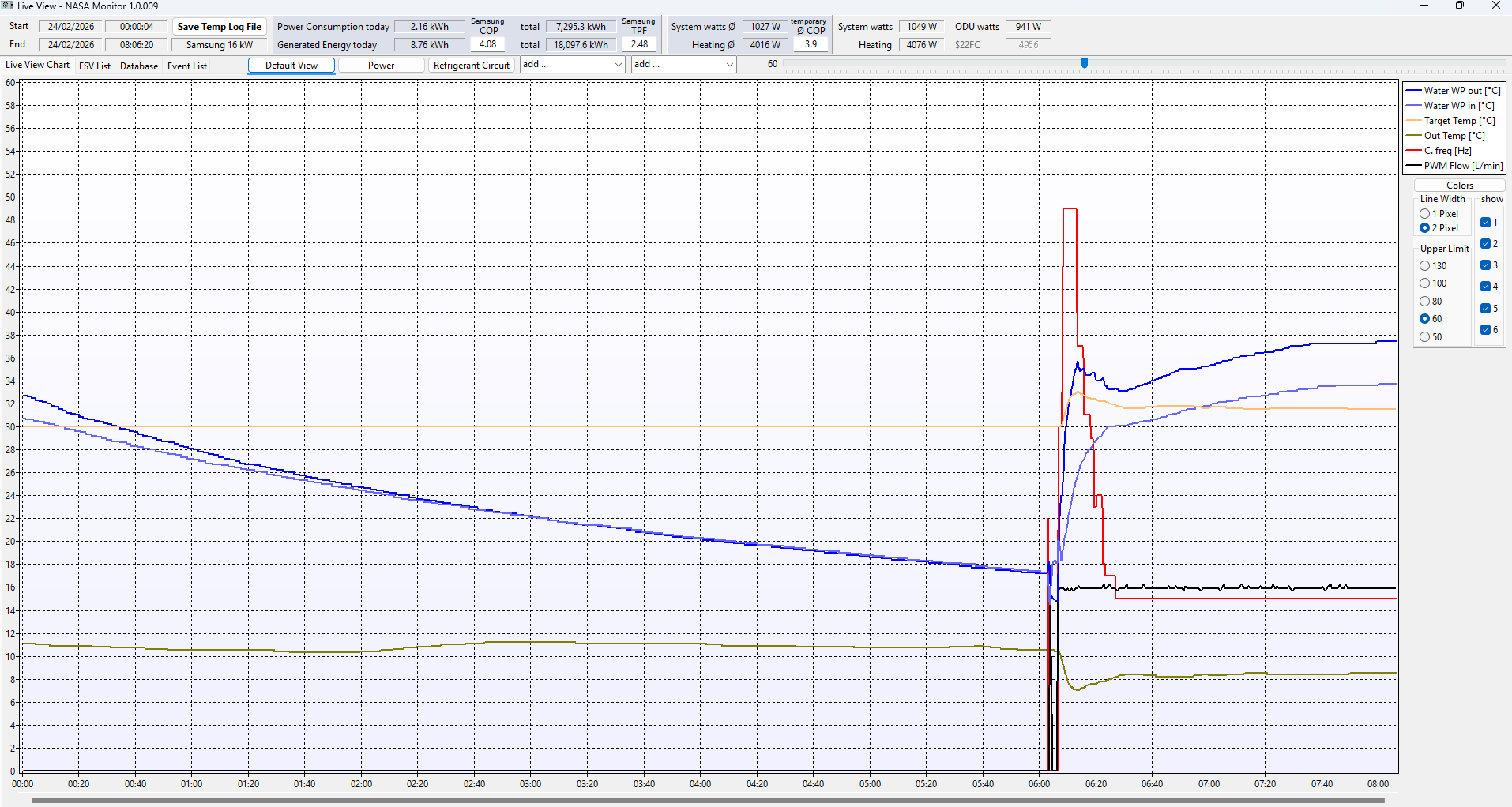
You can see how things happened this morning.

It looks like the Water Outlet Temp was gradually rising, although seems to have steadied at around 37c, but maybe still gradually climbing, I think it was a similar situation yesterday.

Hi David, I think that confirms that your emitters are the problem. They are unable to emit the minimum heat output (around 4 kW) unless the LWT is 37°C or more. One possibility is that your TRV‘s are shutting off and restricting the amount of emitters surface area. I believe that it is better to balance the radiators, so that all the rooms are at the desired temperature, rather than using TRVs. It may be worth turning all the TRV’s to maximum position to see what affect this has on your minimum LWT during this mild weather. Ideally, the radiators should be balanced, so that all the rooms are at the desired temperature using Weather compensation alone.

It may be worth turning all the TRV‘s to maximum position to see what affect this has on your minimum LWT.

The other possibility is that you have a buffer tank. If that is the case, your radiators may be seeing a totally different LWT to the one that you are monitoring.

Hi Mike,

I don’t have a buffer tank.

All TRV’s are currently set to 24c, simply to be sure that all heating zones are 100% Open.

So looks like minimum output of 16kW ASHP seems to be greater than the Radiators can cope with. I can see that Water Outlet temperature has now slowly risen to 39c since system started at 06:00 this morning. WL Setpoint is still set to 30c.

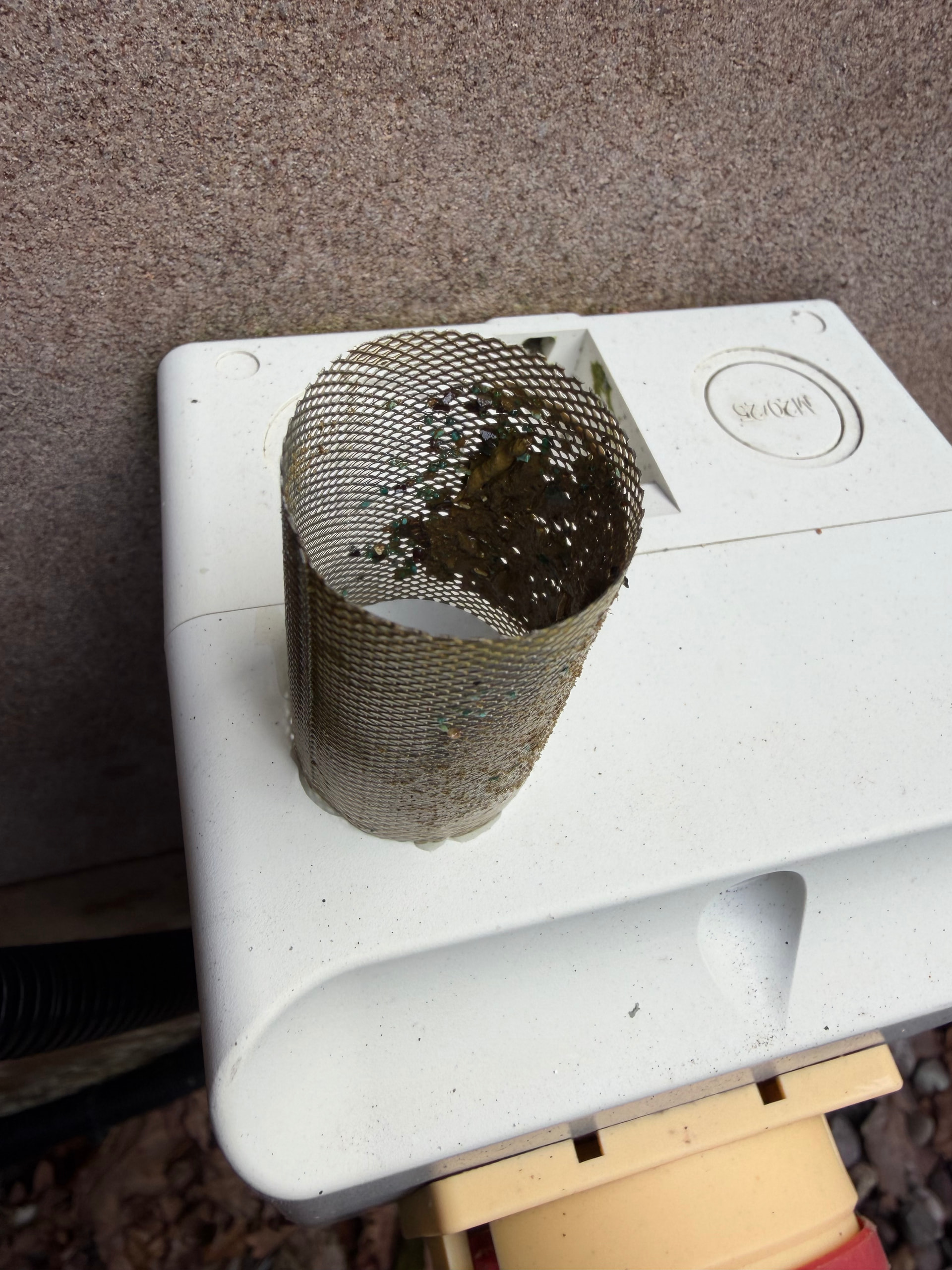
I’ve just quickly checked the Strainer to make sure it’s clean and found it was a little bit blocked, so I’ve given it a clean, also checked the MAG filter and gave that a clean too, just to be sure ASHP main circuit Flow rates are not being affected.

I have the same Samsung heat pump, except mine is the 12kW model, which is actually a top end limited 16kW model like yours. Ours behave identically at minimum output.

You are spot on with much of your assumptions. I too see minimum power draw of around 1kW (I think it’s closer to 800W for the outdoor unit, excluding circulation pumps etc), which equates to ~4kW of heat output.

Now some very basic physics - when running in #2091 = 1 mode (i.e, always on, no compressor cycling), the heat pump will continuously output a minimum of around 4kW. You may ask for a flow temp of 30C, but that 4kW of heat has to go somewhere. If your radiators are unable to emit 4kW of heat at the requested 30C flow temp, the water returning to the heat pump will not have lost sufficient heat, and when an additional 4kW of heat is added, the net result is the water circulating in the system will continue to rise, until it reaches an equilibrium point where the emitters can emit heat at the same rate heat being added (produced). For your system, this appears to correspond to a flow temperature of 39C. On my system this is around 33C at OAT of 10C (which simply implies my emitters are bigger than yours)

There are only two ways you can run lower flow temperatures:

  1. Install bigger emitters (radiators) that can dissipate the heat produced at lower flow temperatures
  2. Cycle the heat pump on/off allowing the circulating water time to cool.

You should be able to look up the output of your radiators (commonly given at dT 50C), and correct these value for any given flow temperature). Doing this is a spreadsheet should show that your radiators are capable of emitting ~4kW when the flow temp is 39C, which essentially just confirms what you are already observing.

Having such a spreadsheet is also useful for showing you the effect of any potential radiator upgrades, as you will be able to see the affect on flow temperatures those upgrades will make.

1 Like

Ok, well its certainly not the worst problem, I can always just switch the unit off when I don’t need it, and in the meantime I will have to do some homework and try an understand what types of radiators I have?

Well, now the actual ASHP seems to be working more or less as it should, I’ve decided to try and simplify the whole setup.

So for now I have removed the External Thermostat controls that I had configured and have now setup the system to just use the wall mounted Wired Remote (MIM-E03CN).

The Water Law is set as before OAT -5 to 10 = WL 45 to 35 and that seems to be chugging away in the background successfully.

Indoor Target Temp is set to 21 degC and so far I think its working ok. It looks like it switches off when the Room temp gets beyond 21 degC and I think switches back on at 20 degC.

I’ve got a Samsung WiFi kit on the system, so I’ve got access to basic ON/OFF and Temp selection via Smart Things App.

Because of this I’ve now added Smart Things to Home Assistant, so I have the same controls in there.

Because of this, I’ve added the HA Entity for Smart things to my Control4 smart home system, within the Control4 system I have setup Schedules for Indoor Temp.

I didn’t realise until yesterday that Heating schedules are available via the Wired Controller under “Weekly Schedules”, doesn’t matter now, but it seems like I learn a new thing every time I take a closer look at the Samsung ASHP.

  • 21 degC = Home 06:00 to 22:00
  • 19 degC = Sleep 22:00 to 06:00
  • 17 degC = Away (and select Hold Permanent)

So all in all, I’m now very happy with the setup and will just start to see how the Indoor Temp hysteresis works out and also monitor how the house comfort works out and how the subsequent energy use works out.

The main thing for me is that the Heating system is now working in a slow but steady way, delivering a nice, relatively low energy, low cost.heat to the house.

Can’t believe the difference between performance as seen in January 2026 and everything before compared to what this is doing right now.

Thanks again to all who responded, special thanks to @SarahH for her very clear and knowledgeable input.

2 Likes

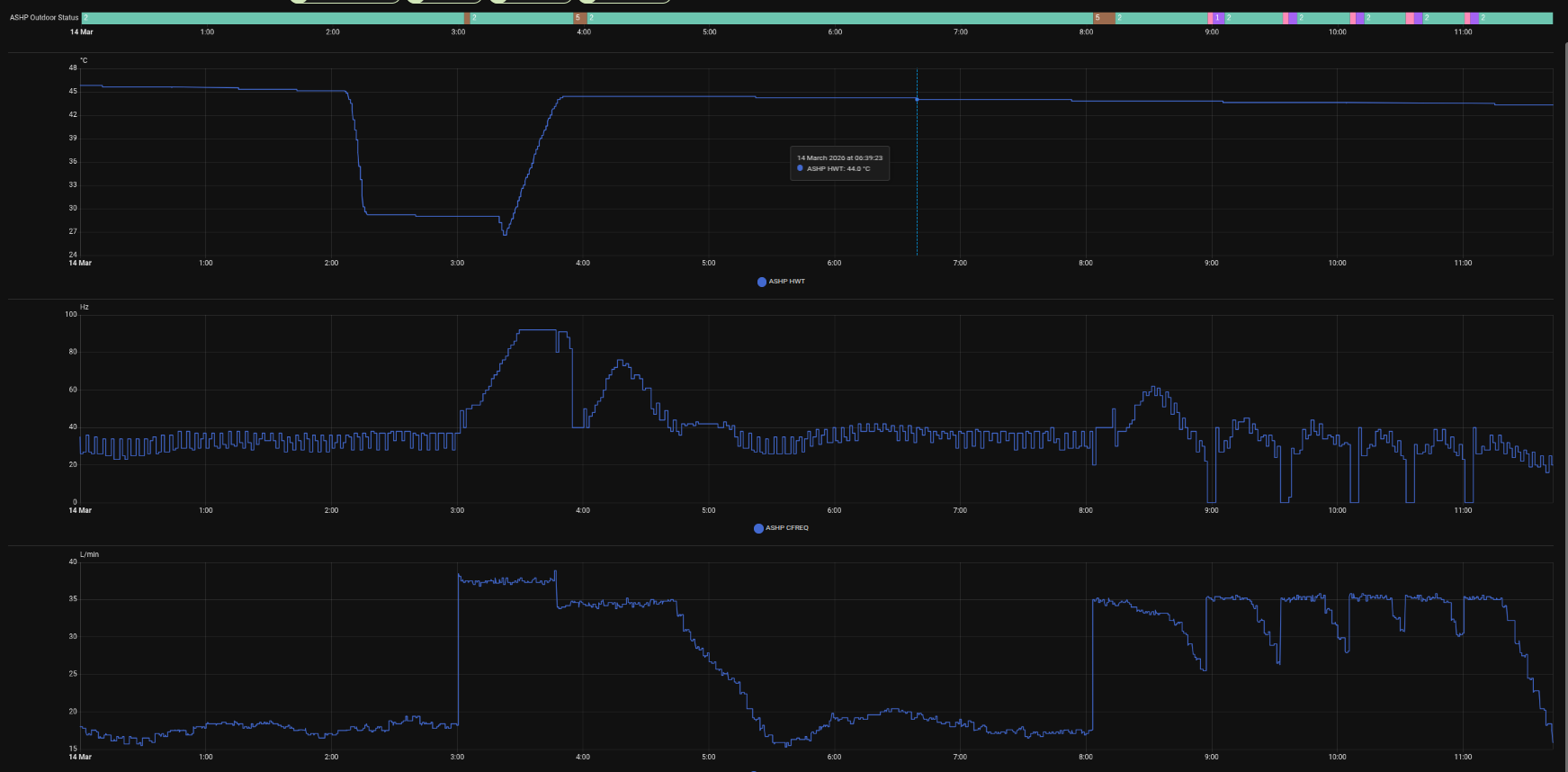
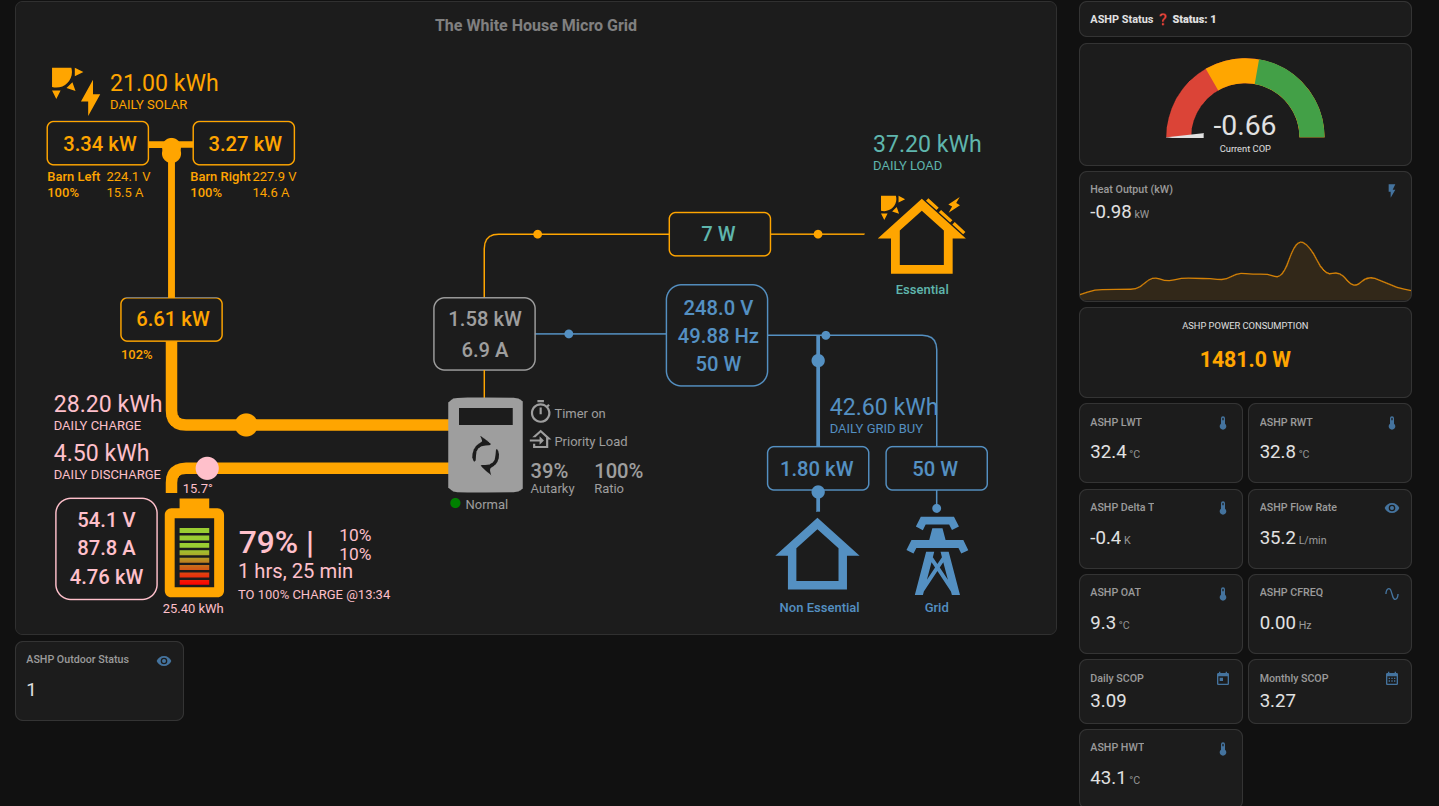
Don’t want to hijack this thread but I am new owner of a Samsung Gen7 AE160CXYBEK Integrated unit. It seems to be behaving a bit weird. it is set on Auto with only 1 DHW schedule at 3-4AM to boost the DHW up for the coming day. The temp last night got pretty low and the pump did weird things. As you can see it dumped all our HW around 2 and then didn’t have time to make it back up. Then it is cycling between off safety normal this morning also goes negavie COP quie a bit this morning. Running th epump at 100% for a loing time and strpping th heat it put in out. Can’t really understand the behaviour. OAT Temp has come back up this morning to around 9 degrees.

Its electrical use was very high and remains elevated. Heres a pic of its behaviour from midnight to now.

Just hoping someone recognises this behaviour and how to deal with it as it has been super wasteful using a lot of energy for no gain.

It is using water law fully with a setting of 4 for #2093 suing the satandard Samsung 15 35 -10 50 profile.

I monitor it using teh Modbus card and a Waveshare RS485 to ETH (B) POE device.

Here is it is dumping the heat out of the house. It has gone into standby but he pump is running full out and stripping heat.

Cheers

I’ve chosen a setting of 1 for 2093, which uses the internal Wired Controller as a Thermostat, I used to have external Thermostat so I used to use 2091/2092, but I’ve simplified down to internal controller for now, which is fine.

Also I set a temp of 21 C for the room where the Wired Controller is, which represents the top end of temperature for that room, and I leave every other Zone TRV fully open apart from Bedrooms which I set back via Electronic TRV during the night.

This setting of 1 for this 2093 parameter completely calmed my system down!

With this setting when WL Outlet Temp is achieved, the system then doesn’t switch off the Compressor at all, it just constantly modulates the Frequency of it down to minimum of 15Hz if necessary and this seems to control Water Outlet temps well.

I leave the Samsung ASHP on 24/7 now and just rely on the Wired Remote Room Temp Setpoint of 21 C to switch heating off if it is ever exceeded and this seems to perform well just modulating itself via the Water Law driven by outside temp.

I’ve chosen to use 32 C for outside temp 15 C and 42 C for outside temp -05 C……..although these settings will be need to be adjusted for your own house, but I think you have something similar/not too far away from that.

So are you using the indoor wired remote controller as the thermostat? On my system if I set that then there is no Auto mode available only Heat. As I understand it setting #2093 1 means the comp is switched off only by the indoor thermostat. What about the water pump? All TRV’s are fully open on my system as we are still finding our way. We did have it set that way to start but the installer recommended setting auto mode and water outlet. Then adjusting it +/- 5 degrees using the remote controller as that is the only setting available.

It is currently operating in Auto mode with Water Outlet Temp as the thermostat but as you can see is showing weird behaviour. Dumping the DHW in the middle of the night before then trying to heat the DHW on its normal schedule. I have no idea what that is about. I have no heating schedule set just Auto. Do you set a schedule and temp and set heat Mode? Was operating well when the temp was around 10 but as the temp dropped yesterday and through the night everything seems to have gone to s**t!

Cheers

I’ve just got my system set to Heat, I may look into Cool or Auto another day, but for now I just want to know the ASHP will just deliver Heating.

Yes I’ve switched to use the Wired Controller as the system Thermostat and I can set the Room temp on it and I can see the Water Outlet temp, but can’t directly adjust it, as the WL is set in the parameters.

You can choose Indoor temp or Water outlet temp via one of the Menus on the Wired Controller. I have obviously chosen Indoor room temp as the control method.

With regards to the 2093 setting of 1 the Water pumps continue to run as does the ODU Compressor and ODU Fan(s).

Only thing to stop everything would be Room temp going above setpoint, but if your Water Law is good then the water Outlet temp will just vary between your set limits and simply depends on Outside Ambient Temps.

What I see now with my Samsung ASHP is water outlet temps of around 37 C and the house just slowly warms up and maintains a comfortable heat and draws a steady 1kW to 2kW depending on Outside temps.

Last night which was quite cold around 2C, I think ASHP used about 1.75kW/hr but today as it warmed up to around 10C the ASHP used around 1kW/hr but for both Outdoor temp ranges the temp in the house kept stayed nice and evenly warm via Water outlet temps of 39C down to 35C.

Many thanks for this. Seems like a black art. I expected to set Auto and let it be. But losing expensive HW in the middle of the night is not fun. Still can’t understand why. The DHW side should be safe from any of this variability as it is just a simple once a day 3-4am schedule to heat the DHW and then go back to economic mode. The Tank is awesome at keeping the heat.

21 is too low for this system as it leaves the house cold. We initially had it set as you have with 21 then put it up .5 degrees per day until we got to 23 which seemed to be comfortable for everyone. Then teh Installer said to run it Auto as it would be a lot more economical! It’s not really 23 everywhere just the location of the indoor controller reports it that way.

I will give it another go with using Indoor temp and #2093 1 to see what that does in our house.

Cheers

Yeah that setting of 1 for 2093 was a game changer for me.

Before that change my system was cycling horribly and in January was performing poorly and using a ton of electricity.

Now it’s steady and predictable and the house is nice and cosy but using far less electricity.

I just can’t believe my house, with radiators and no UFH could ever be cosy using 37 C water. I guess it’s just the fact that it is running constantly.

I would maybe try to switch to just Heat and also try and change the control to Indoor Thermostat instead of Water outlet and be sure to set your Room temp to something to allow the system to just run constantly, ie 24 C or whatever, so you can judge how it runs for 24/48 hrs.