By way of checking that I still know what I’m doing (with Arduino, ATMega 328s, etc) I got the Github emonTx3 LPL sketch working fine using LPL, albeit with an 868 MHz radio working at 433 MHz, into an emonPi3. My initial problem with the watchdog was down to having two fixed-focus acrylic lenses in my eyes  (I’d picked up the emonTx3 with an RFM12B.)
Now the bad news (perhaps) is, having put your Node 15 definition into my emonhub.conf but with your comments preceded by # (not // - it’s not C or C++), I’m also getting data from your sketch - having changed to LPL as you did.
2026-06-28 22:56:27,370 INFO     SPI        Packet received 53 bytes
2026-06-28 22:56:27,370 DEBUG    SPI        812 NEW FRAME :
2026-06-28 22:56:27,371 DEBUG    SPI        812 Timestamp : 1782683787.370379
2026-06-28 22:56:27,371 DEBUG    SPI        812 From Node : 15
2026-06-28 22:56:27,371 DEBUG    SPI        812    Values : [50, 259.5, 50.01, 0, 0, 0, 0, 0, 0, 0, 0, 0, 0, 0, 0, 300, 300, 300, 300, 0, 0, 0, 0.0]
2026-06-28 22:56:27,372 DEBUG    SPI        812      RSSI : -45
2026-06-28 22:56:27,372 DEBUG    SPI        812 Sent to channel(start)' : ToEmonCMS
2026-06-28 22:56:27,372 DEBUG    SPI        812 Sent to channel(end)' : ToEmonCMS
2026-06-28 22:56:27,598 DEBUG    MQTT       Publishing: emon/emonTx3cm15/MSG 50
2026-06-28 22:56:27,599 DEBUG    MQTT       Publishing: emon/emonTx3cm15/Vrms 259.5
2026-06-28 22:56:27,599 DEBUG    MQTT       Publishing: emon/emonTx3cm15/F 50.01
2026-06-28 22:56:27,600 DEBUG    MQTT       Publishing: emon/emonTx3cm15/P1 0
2026-06-28 22:56:27,601 DEBUG    MQTT       Publishing: emon/emonTx3cm15/P2 0
2026-06-28 22:56:27,601 DEBUG    MQTT       Publishing: emon/emonTx3cm15/P3 0
2026-06-28 22:56:27,602 DEBUG    MQTT       Publishing: emon/emonTx3cm15/P4 0
2026-06-28 22:56:27,603 DEBUG    MQTT       Publishing: emon/emonTx3cm15/E1 0
2026-06-28 22:56:27,603 DEBUG    MQTT       Publishing: emon/emonTx3cm15/E2 0
2026-06-28 22:56:27,604 DEBUG    MQTT       Publishing: emon/emonTx3cm15/E3 0
2026-06-28 22:56:27,605 DEBUG    MQTT       Publishing: emon/emonTx3cm15/E4 0
2026-06-28 22:56:27,605 DEBUG    MQTT       Publishing: emon/emonTx3cm15/pf1 0
2026-06-28 22:56:27,606 DEBUG    MQTT       Publishing: emon/emonTx3cm15/pf2 0
2026-06-28 22:56:27,607 DEBUG    MQTT       Publishing: emon/emonTx3cm15/pf3 0
2026-06-28 22:56:27,607 DEBUG    MQTT       Publishing: emon/emonTx3cm15/pf4 0
2026-06-28 22:56:27,608 DEBUG    MQTT       Publishing: emon/emonTx3cm15/T1 300
2026-06-28 22:56:27,608 DEBUG    MQTT       Publishing: emon/emonTx3cm15/T2 300
2026-06-28 22:56:27,609 DEBUG    MQTT       Publishing: emon/emonTx3cm15/T3 300
2026-06-28 22:56:27,610 DEBUG    MQTT       Publishing: emon/emonTx3cm15/T4 300
2026-06-28 22:56:27,610 DEBUG    MQTT       Publishing: emon/emonTx3cm15/pulse 0
2026-06-28 22:56:27,611 DEBUG    MQTT       Publishing: emon/emonTx3cm15/error 0
2026-06-28 22:56:27,611 DEBUG    MQTT       Publishing: emon/emonTx3cm15/missed 0
2026-06-28 22:56:27,611 DEBUG    MQTT       Publishing: emon/emonTx3cm15/missedprc 0.0
2026-06-28 22:56:27,612 DEBUG    MQTT       Publishing: emon/emonTx3cm15/rssi -45
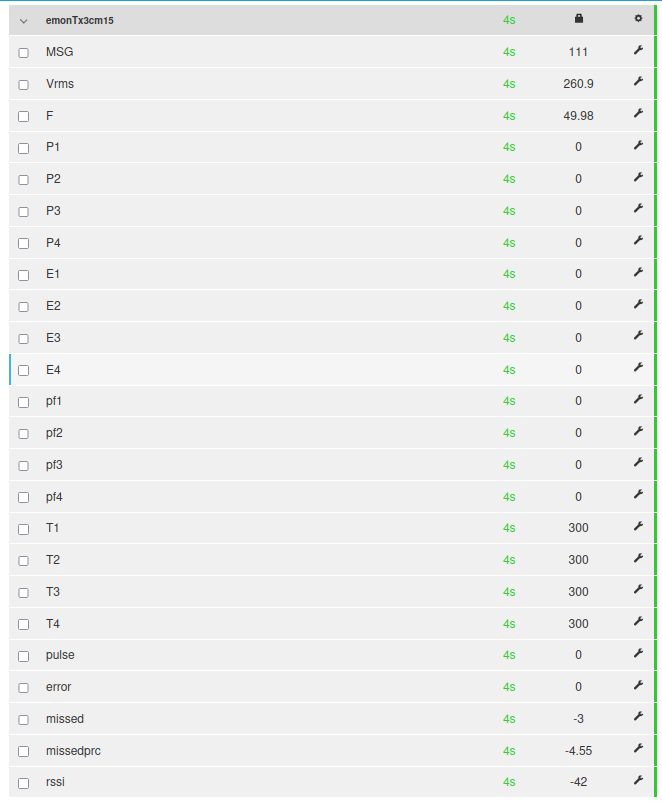
And it’s made it into emonCMS and onto the Inputs page too…
I’ve only got the a.c. adapter connected for now.
I replaced one of the # comment deliminators with your // and it all blew up…
2026-06-28 23:10:54,350 INFO     SPI        Packet received 53 bytes
2026-06-28 23:10:54,350 DEBUG    SPI        8 NEW FRAME :
2026-06-28 23:10:54,351 WARNING  SPI        8 RX data length: 53 is not valid for datacodes ['L', 'h', 'h', 'h', 'h', 'h', 'h', 'l', 'l', 'l', 'l', 'h', 'h', 'h', 'h', 'h', 'h', 'h', 'h', 'L', 'b                                                   // V2.4.0.J Line Frequency data code added (h)', 'power facors data codes added (h)', 'T4 datacode added (h)']
So I think that was your problem - and if you’d looked in the emonhub log you’d have seen another 3 lines for the other 3 illegal comments.
Here’s your valid Node definition out of my emonhub.conf
[[15]]
  nodename = emonTx3cm15
  [[[rx]]]
    names = MSG, Vrms, F, P1, P2, P3, P4, E1, E2, E3, E4, pf1, pf2, pf3, pf4, T1, T2, T3, T4, pulse, error  # V2.4.0.J Line Frequency name added (F),  power factors added (pf1, pf2, pf3, pf4), T4 added
    datacodes = L,h,h,h,h,h,h,l,l,l,l,h,h,h,h,h,h,h,h,L,b                                                   # V2.4.0.J Line Frequency data code added (h), power facors data codes added (h), T4 datacode added (h)
    scales = 1,0.01,0.01,1,1,1,1,1,1,1,1,0.01,0.01,0.01,0.01,0.01,0.01,0.01,0.01,1,1                       # V2.4.0.J Line Frequency scale added (0.01), power factors scales added (0.01), T4 scale added (0.01)
    units = n,V,Hz,W,W,W,W,Wh,Wh,Wh,Wh,n,n,n,n,C,C,C,C,p,b                                                  # V2.4.0.J Line Frequency unit added (Hz), power factors units added (n), T4 unit added (C)
The small matter of your illegal frequency remains, so let me know what you want to do about that.