Is it possible I have deleted an input, namely heatpump_dhw,… if so how do I get it to reappear again? Will it automatically appear if there is a change of status on the hardware input?
I don’t know specifically for the Heatpump variant, but for standard emonCMS, yes. You will have deleted any processing that appears on the Input page, so you must reinstate this manually.
Thanks Robert, I did look for guidance on manually creating, I will look again and see if i can work out how to do that.
Did you delete the Feed or the Input? I suspect the former. If you have an EmonHP it comes with support so you can get that from the shop.
Well, on my inputs page ( Emoncms - input view ) I do not have an entry ‘input’ called heatpump_dwh,… ? correction heatpump_dhw.
k
It does not exist, you cannot manually create an Input in emonCMS. As soon as the relevant data appears, the Input is created automatically. If you look at the Input Help, you should be able to see how to type a request in your web browser to send an appropriate item of data to emonCMS, and when it arrives, the Input will appear.
Thanks Robert. I’ll go and read some more.
A quick question Robert, the inputs that appear on my inputs page, “Emoncms - input view are they actually ‘resident’ on my emonHP so if I delete from that webpage it is actually deleted off the emonHP in my garage?
I don’t understand you. The question might be quick, the answer is a bit longer…
You are looking at the “Inputs” page in emonCMS. That is a web page, and you’re looking at it in a web browser in your house. The web page is created on a web server by a piece of software called Apache. The server is the Raspberry Pi inside your Heatpump Monitor box, and emonCMS is working with Apache to generate the web page. It is created dynamically, it’s not a file like the Docs pages here, for example. When you type in your browser, you’re interacting with emonCMS and emonCMS is altering the page. OK so far?
The Inputs page is a set of processes, for which you set the rules (e.g. divide by 1000 to convert watts to kW, Log to feed, etc) and a Feed is a database file on the SD card in your RPi where the data is stored. Still OK?
In between the USB socket, or strictly the input port on the RPi, and emonCMS is emonHub, which interprets the serial data and sends it as a software message to emonCMS. It’s when that software message lands in emonCMS that the input appears on the Inputs page.
When you have new (never seen before) data arrive, the Input is created and it appears on the Inputs page. When you click the Spanner icon at the end of that line, you can create the rules to process the input data, and those rules remain attached to that Input. One (at least, there can be more) of the rules must write the data to a Feed, either by ‘Log to feed’ or an implied write (e.g. Power to kWh) else the data is overwritten by the new data with the same name arriving, is never saved and is lost forever.
If serial data arrives without a name, an ‘Interfacer’ - an add-on to emonHub - can give it a name. If it arrives as a message with a name attached (e.g. JSON format) that name is what appears for it on the Inputs page.
What I wrote earlier about the Inputs API Help illustrates this. If I type this in the address box of my web browser, an input called “power1”, with the value 100 will appear, from my emontx, in my emonCMS.
http://192.168.1.71/input/post?node=emontx&fulljson={"power1":100}&apikey=ac5826690fed340716c62b6ddfa681ac
(n.b. that’s a false APIkey)
You can type a similar line (see your Input API Help on the Inputs page for your APIkey) to simulate/generate the missing Input.
Robert, thanks for taking the time to explain. Although to be fair you had originally referred me to Input Help as opposed to Input API Help.
Sorry, I always think of it as the Help on the Inputs page.
As I said, if an emonHP then the shop will help @Gwil
Thanks, it looks like because i did not order the DHW input sensor, then the heatpump_dhw input was not enabled on my device,…. so i need to create one, that is, create a new input heatpump_dhw,… and i have no idea how to do that. Furthermore, I have been trying to input/post and can’t get it to work, neither work?
https://emonpi.local/input/post?node=mynode&fulljson={“power1”:100,“power2”:200,“power3”:300}
http://emonpi.local/input/post?node=mynode&fulljson={“power1”:100,“power2”:200,“power3”:300}
Glyn has ask me to post a thread, re this and I will.
K
Hi Keith,
Afraid I can’t really help here - but the hostname would be “emonhp.local” rather than “emonpi.local” for your device.
What is your DHW status sensor and what does it output?
Gwil, my sensor will simply give a binary/logic 1 (3v3) when the DHW motor is active, conversely it will give a logic 0 (0V) when inactive.
This will be fed into the DHW input on the top of the emonHP…
I have been able to log into my local emonhp by typing http://emonhp !
QUESTIONS
-
Now that I am there, how do I create a DWH input on my local device?
-
How do I map that input to the hardware input connector on the top of the emonHP,…?
K
That is the same behaviour as the DHW status sensor we use - so you should be able to wire it into a pluggable terminal block and put it into the ‘DHW‘ input on top of the emonHP. The input should appear automatically.
OK Gwil,… I will try. BUT Glyn had said:-
No, since there wasn’t a DHW status sensor ordered as part of your bundle, the heatpump_dhw Feed won’t be present. But you can create your own if you want. You can see the list of Input and Feeds by logging into your https://emoncms.org account with username
Now I understand that he was referring to feeds,…. but i was asking about inputs,… Let’s see if it appears automatically if I toggle the DHW input.
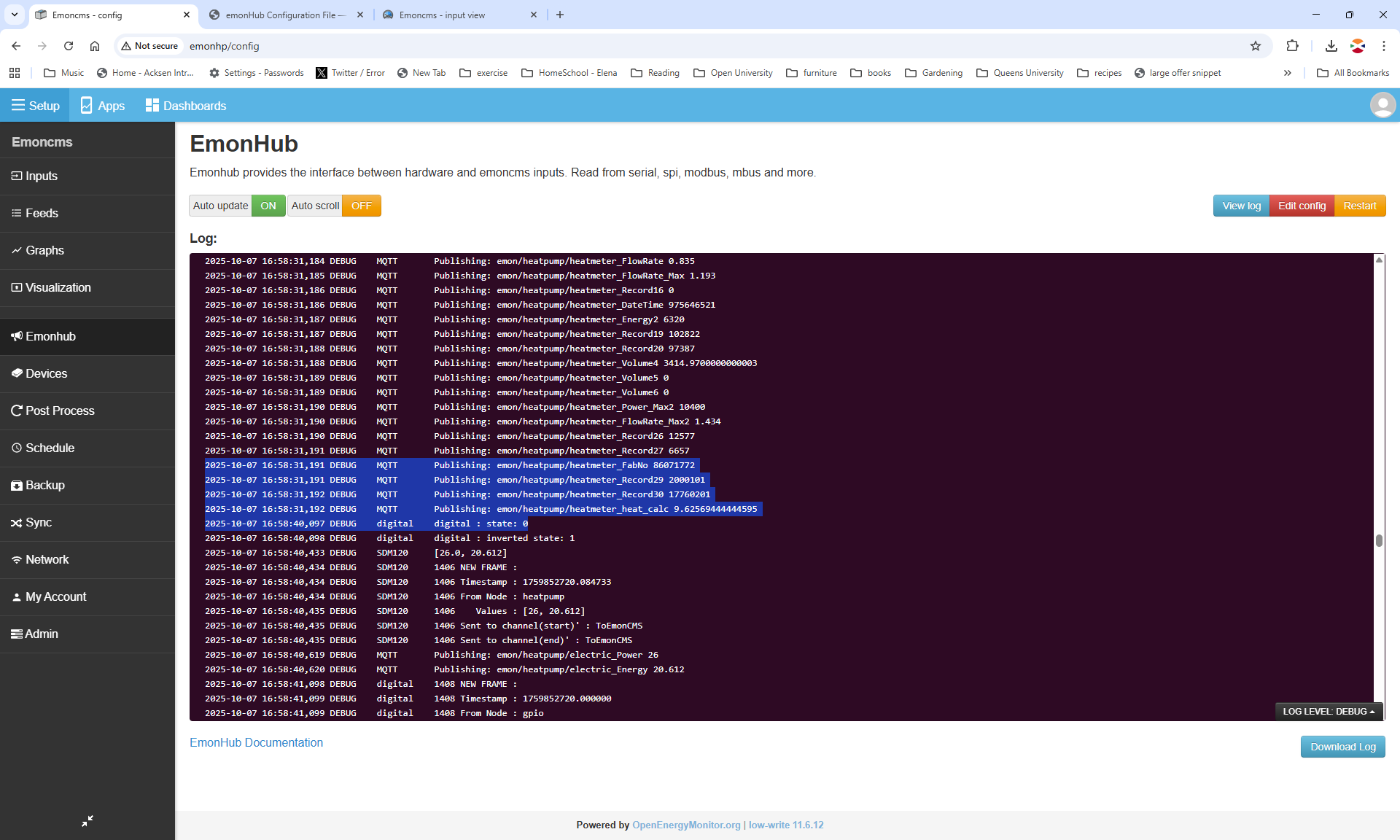
Gwil,… OK if i toggle the DHW input 3v3 to 0V i see the “digital : state: 0” change to “digital : state: 1” on the EmonHub,…. but i do not see an associated input being created on my local device?
Am i correct that the digital input is used for DHW?
Could you take a screenshot of the inputs page? Also take a screenshot of where you are seeing this:
digital : state: 0” change to “digital : state: 1