I’m not sure if this helps, but Samsung published a service bulletin last year with new firmware for MIM-E03 (Gen 6, HTQ and non integrated R290) controllers that turns off cyclical operation of the circulation pump when heating is deactivated if the outside temperature is higher than the heating-off FSV setting.
This may stop the summertime stealing of DHW, but it won’t stop it during defrost (I haven’t actually experience this behaviour).
There was a service bulletin that details a firmware update for MIM-E03 controllers. Depending on the version of the PCB there are two different firmware versions, both turn off alL heating related functions when the outdoor temperature is above the heat pump off temperature FSV value (including routine cycling of circulation pumps, rumoured to cause hot water theft in summer).
I have loaded 231214 onto my version 0, MIM-E03EN and have noticed low output running to be more stable (less likely to get into a short cycling frenzy). It also provides an adjustable hysteresis for room temperature control and water outlet control which might be useful for some installations. For later versions of PCB there is a different firmware file.
I couldn’t find the firmware files on the Samsung installer portal so I emailed support who sent it to me.
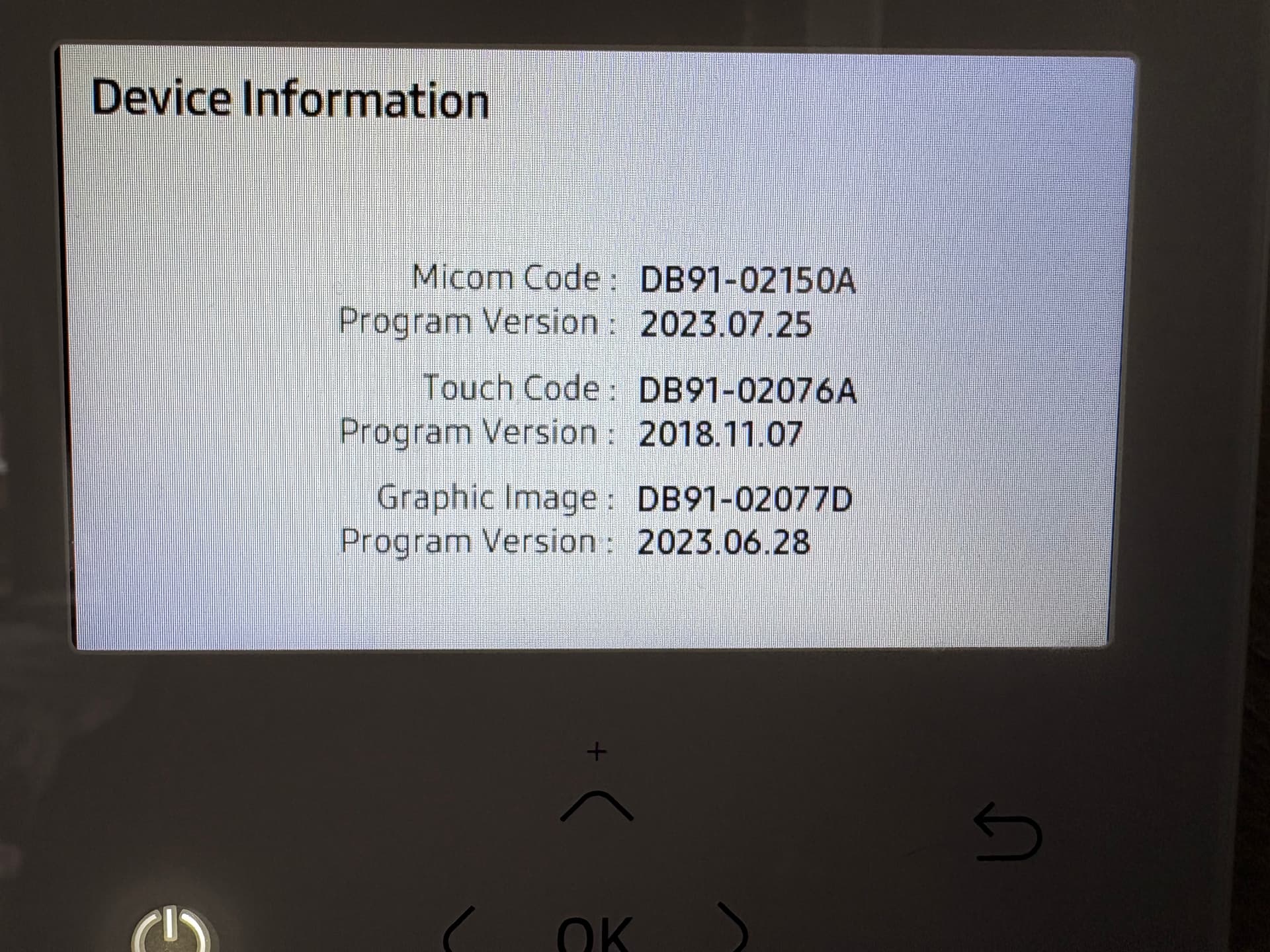
Hi Paul, my Samsung Mono Control Kit MIM-E03EN purchased in August 2024 has the following firmware (is this what you are referring to?) and does not run the circulation pump in summer and it also seems to modulate the LWT several degrees below the set weather compensation curve when above the target temperature. Is it this feature that improves short cycling?
Where can I find the adjustment to indoor temperature hystereses?
Hi Stuart,
That is the current software on the remote control, not the MIM. I don’t actually know a way of seeing the current version on the MIM other than through SmartThings or connecting the SNET interface.
Can you see and adjust FSV 1061 & 1062? If you can adjust them it sounds like you have the newer firmware already. If you can see them but the controller says not available you are probably on the older firmware. However from the behaviour you describe it does sound like it has been updated already or is the later board that shipped with newer firmware from the factory.
thankyou Paul, I can indeed adjust 1061 and 1062 so it must be the latest firmware. Apart from the water pump cycling the most useful improvement for me is the modulation of LWT. I can see it is working right now preventing an overshoot of target room temperature which would otherwise cause unnecessary cycling that many complain about.
Hi Paul, really interesting information. I’m not sure what version I have but I think pretty old one. May I ask what hardware do you use to update the software ? Do I really need that expensive programming tool or it’s possible with some 3rd party tool from aliexpress or something like that ?
Also where did you downloaded firmware from. Would it be possible to send me the one you have eventually ? I would really like to update it but I don’t want to spend 300 eur for that tool.
how did you get it working on F1/F2 connections? I only can read on those but writing does not work. Nothing changes. Wondering how did you get it working?
So Yes I do have 1 card remaining, but its USB connector is micro B.
About the connection with F1/F2, Yes the tool can send. I’ve tried against my F1/F2 link aside from the F3/F4 (I had a RS485 to serial to USB converter (FTDI 232R + MAX485) to do so). I could change some values but not the ambient temps values (which was the main reason I went to the control layer).
Happy new year all, and a lot of heat pumped wishes.
Hi @Topaz - are you still selling the F3/F4 board? I think I’ve got as far as I can with the ESPHome / Home Assistant integration using F1/F2. We need to monitor user initiated actions via the controller to see what’s happening between the controller and the board. Many Thanks!
I’ve though of adding the code on ESP32 to void the need for a rpi/computer to plug the USB to. But hadn’t had time to explore that way.
Anyway, The python code is quite straightforward, aside from the anticollision and nasa framing (which you should already have) so I think it’ could be plugged quite easily into your existing code (the board has dupont connector to avoid the need for the USB link. and make it easily integrable)
An ESP32 version of the PCB would be really useful. There is simply nothing out there that supports modulated RS485 and ESP32. It could then directly interface with ESPHome and Home Assistant. Come to think of it, would it be possible to devise an ESP32 board that supports either F1/F2 OR F3/F4? Could it be powered either over F3/F4 or via 12V input for F1/F2? Thinking out loud here…
It could support both modes (as actually it only requires a single usart and a dipswitch to select the channel.
Yes the board coud be powered by the F3/F4, meaning you could just wire it in the outdoor unit and no wire at wall, a bit like the samsung wireless control, but with full control
Tell me if you want to go this way. I could be of help!
I’m also very interested in your board interfacing with F3/F4. I understood from the posts above that you’re currently restocking. Could you let me know how I can order one?