Service-runner Activating - cant start up service (Ubuntu 24)

Hi

The problem:
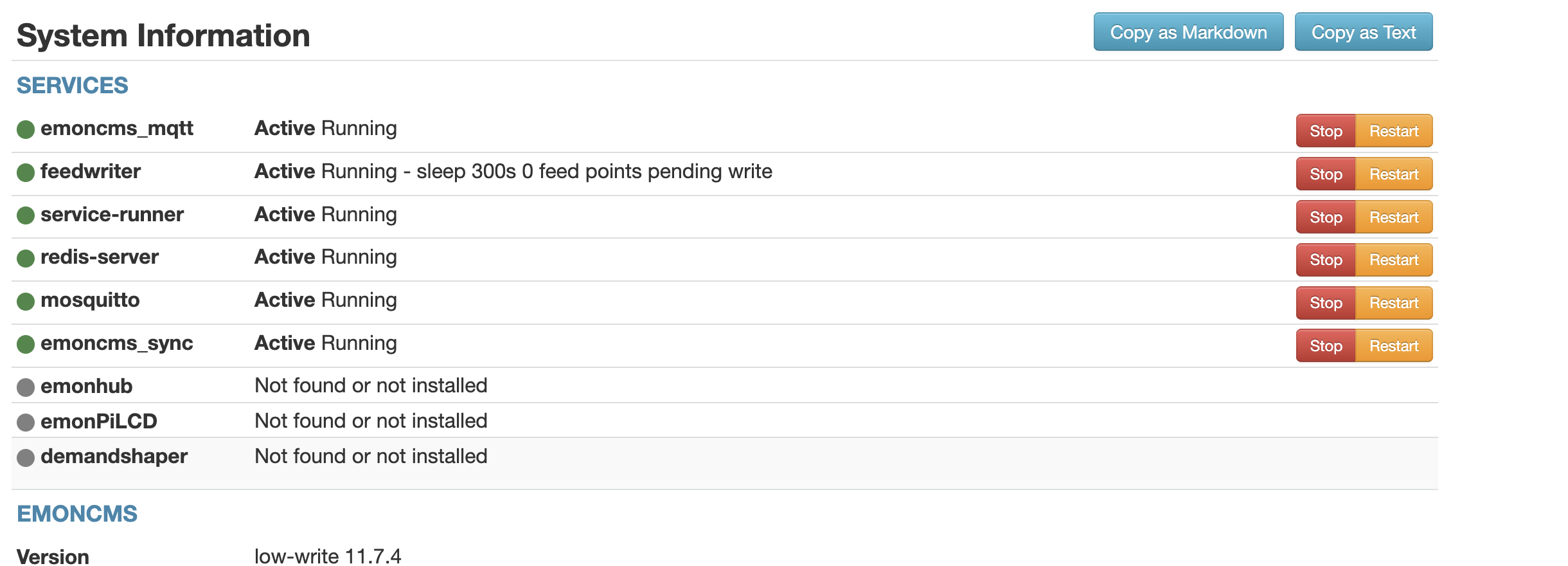
I am unable to start service runner. I get “service-runner Activating loaded activating auto-restart” in system information

What have I done/tried:

I ran: sudo systemctl edit service-runner.servicEe and added (the text inside the “” marks):
[Service] User= << I left the User= null

And then executed:

sudo systemctl enable service-runner.service
sudo systemctl start service-runner.service
systemctl status service-runner.service

When I copy/paste all 3 instructions at the same time, the service appears to start. The readout shows:
● service-runner.service - Emoncms service-runner Input Script << Green dot

If I immediately run again ONLY: “systemctl status service-runner.service”, display shows:

● service-runner.service - Emoncms service-runner Input Script << white dot, and further down

Process: 10339 ExecStart=/usr/bin/python3 /var/www/emoncms/scripts/services/service-runner/service-runner.py (code=exited, status=1/FAILURE)

So the process appears to start and then stop.

I then executed: journalctl -f -u service-runner and the display as follows:

Jul 07 16:39:57 emonpi systemd[1]: service-runner.service: Scheduled restart job, restart counter is at 245.
Jul 07 16:39:57 emonpi systemd[1]: Started service-runner.service - Emoncms service-runner Input Script.
Jul 07 16:39:58 emonpi service-runner[10481]: Traceback (most recent call last):
Jul 07 16:39:58 emonpi service-runner[10481]:   File "/var/www/emoncms/scripts/services/service-runner/service-runner.py", line 13, in <module>
Jul 07 16:39:58 emonpi service-runner[10481]:     import redis
Jul 07 16:39:58 emonpi service-runner[10481]: ModuleNotFoundError: No module named 'redis'
Jul 07 16:39:58 emonpi systemd[1]: service-runner.service: Main process exited, code=exited, status=1/FAILURE
Jul 07 16:39:58 emonpi systemd[1]: service-runner.service: Failed with result 'exit-code'.
Jul 07 16:40:28 emonpi systemd[1]: service-runner.service: Scheduled restart job, restart counter is at 246.
Jul 07 16:40:28 emonpi systemd[1]: Started service-runner.service - Emoncms service-runner Input Script.
Jul 07 16:40:28 emonpi service-runner[10499]: Traceback (most recent call last):
Jul 07 16:40:28 emonpi service-runner[10499]:   File "/var/www/emoncms/scripts/services/service-runner/service-runner.py", line 13, in <module>
Jul 07 16:40:28 emonpi service-runner[10499]:     import redis
Jul 07 16:40:28 emonpi service-runner[10499]: ModuleNotFoundError: No module named 'redis'
Jul 07 16:40:28 emonpi systemd[1]: service-runner.service: Main process exited, code=exited, status=1/FAILURE
Jul 07 16:40:28 emonpi systemd[1]: service-runner.service: Failed with result 'exit-code'.
  • So, apparently there’s an issue w/ redis. So I executed: “redis-cli ping” and the reply is PONG…

Any pointers or help appreciated!!

Tks in advance,

P
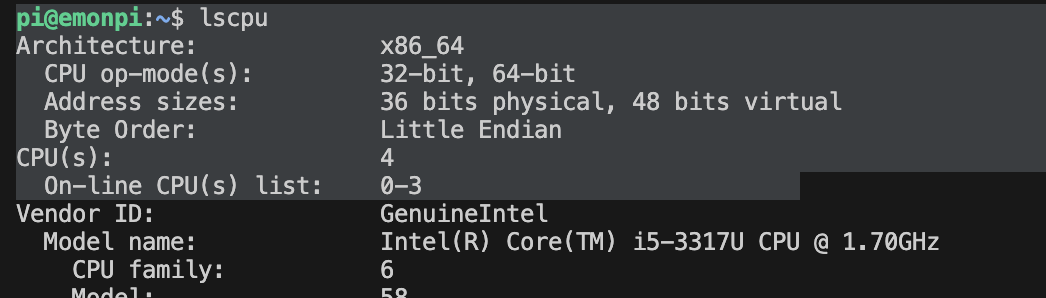
Is this 32bit or 64bit Ubuntu?

I’m pretty sure I tried ubuntu-24 and could not get it to work. Works fine on 22.

It is worth running the install and directing the output to a log file so if there are any errors, you will be able to find them.

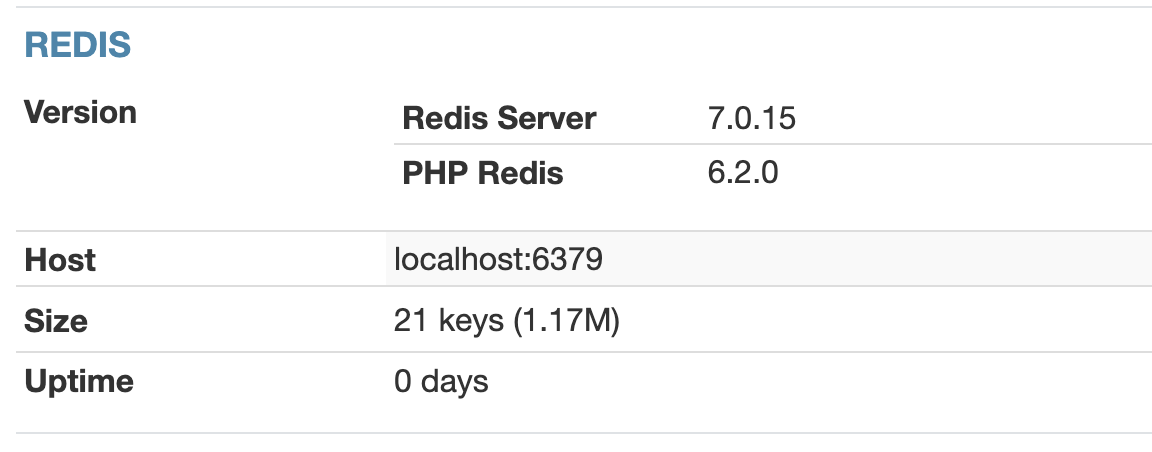
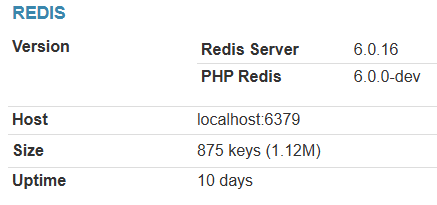
My instinct is that the php-redis failed (this is separate to the server redis). What does it say under the REDIS section of the Admin/system page?

@TrystanLea - relevant to the updating SD Card image perhaps.

Hello @phamiltonsmith

Can you try running this script again, it’s the redis installation part of the install scripts:

EmonScripts/install/redis.sh at master · openenergymonitor/EmonScripts · GitHub

run with:

cd /opt/openenergymonitor/EmonScripts/install
./redis.sh

Copy the logs here, there should be an error in there..

Tks for your response!

I appear to be running 64bit Ubuntu…


.

And, this is in REDIS display… I Think something is off: the machine has been running for about 24 hrs and “uptime = 0 days” - sounds “off”…

I will try @TrystanLea suggestion and come back…

Tks
P

Thanks for your input. Here’s the log:

pi@emonpi:~$ cd /opt/openenergymonitor/EmonScripts/install
pi@emonpi:/opt/openenergymonitor/EmonScripts/install$ ./redis.sh 
-------------------------------------------------------------
Redis configuration
-------------------------------------------------------------
Reading package lists... Done
Building dependency tree... Done
Reading state information... Done
redis-server is already the newest version (5:7.0.15-1ubuntu0.24.04.1).
0 upgraded, 0 newly installed, 0 to remove and 13 not upgraded.
-------------------------------------------------------------

fatal: destination path 'phpredis' already exists and is not an empty directory.
Configuring for:
PHP Api Version:         20230831
Zend Module Api No:      20230831
Zend Extension Api No:   420230831
configure.ac:165: warning: The macro `AC_PROG_LIBTOOL' is obsolete.
configure.ac:165: You should run autoupdate.
build/libtool.m4:100: AC_PROG_LIBTOOL is expanded from...
configure.ac:165: the top level
checking for grep that handles long lines and -e... /usr/bin/grep
checking for egrep... /usr/bin/grep -E
checking for a sed that does not truncate output... /usr/bin/sed
checking for pkg-config... /usr/bin/pkg-config
checking pkg-config is at least version 0.9.0... yes
checking for cc... cc
checking whether the C compiler works... yes
checking for C compiler default output file name... a.out
checking for suffix of executables... 
checking whether we are cross compiling... no
checking for suffix of object files... o
checking whether the compiler supports GNU C... yes
checking whether cc accepts -g... yes
checking for cc option to enable C11 features... none needed
checking how to run the C preprocessor... cc -E
checking for icc... no
checking for suncc... no
checking for system library directory... lib
checking if compiler supports -Wl,-rpath,... yes
checking build system type... x86_64-pc-linux-gnu
checking host system type... x86_64-pc-linux-gnu
checking target system type... x86_64-pc-linux-gnu
checking for PHP prefix... /usr
checking for PHP includes... -I/usr/include/php/20230831 -I/usr/include/php/20230831/main -I/usr/include/php/20230831/TSRM -I/usr/include/php/20230831/Zend -I/usr/include/php/20230831/ext -I/usr/include/php/20230831/ext/date/lib
checking for PHP extension directory... /usr/lib/php/20230831
checking for PHP installed headers prefix... /usr/include/php/20230831
checking if debug is enabled... no
checking if zts is enabled... no
checking for gawk... gawk
checking whether to enable redis support... yes, shared
checking whether to enable sessions... yes
checking whether to enable json serializer support... yes
checking whether to enable igbinary serializer support... no
checking whether to enable msgpack serializer support... no
checking whether to enable lzf compression... no
checking use system liblzf... no
checking whether to enable Zstd compression... no
checking use system libzstd... yes
checking whether to enable lz4 compression... no
checking use system liblz4... no
checking for hash includes... /usr/include/php/20230831
checking for json includes... /usr/include/php/20230831
checking for redis json support... enabled
checking for redis igbinary support... disabled
checking for pkg-config... /usr/bin/pkg-config
checking for git... yes
checking how to print strings... printf
checking for a sed that does not truncate output... (cached) /usr/bin/sed
checking for fgrep... /usr/bin/grep -F
checking for ld used by cc... /usr/bin/ld
checking if the linker (/usr/bin/ld) is GNU ld... yes
checking for BSD- or MS-compatible name lister (nm)... /usr/bin/nm -B
checking the name lister (/usr/bin/nm -B) interface... BSD nm
checking whether ln -s works... yes
checking the maximum length of command line arguments... 1572864
checking how to convert x86_64-pc-linux-gnu file names to x86_64-pc-linux-gnu format... func_convert_file_noop
checking how to convert x86_64-pc-linux-gnu file names to toolchain format... func_convert_file_noop
checking for /usr/bin/ld option to reload object files... -r
checking for file... file
checking for objdump... objdump
checking how to recognize dependent libraries... pass_all
checking for dlltool... no
checking how to associate runtime and link libraries... printf %s\n
checking for ar... ar
checking for archiver @FILE support... @
checking for strip... strip
checking for ranlib... ranlib
checking for gawk... (cached) gawk
checking command to parse /usr/bin/nm -B output from cc object... ok
checking for sysroot... no
checking for a working dd... /usr/bin/dd
checking how to truncate binary pipes... /usr/bin/dd bs=4096 count=1
checking for mt... mt
checking if mt is a manifest tool... no
checking for stdio.h... yes
checking for stdlib.h... yes
checking for string.h... yes
checking for inttypes.h... yes
checking for stdint.h... yes
checking for strings.h... yes
checking for sys/stat.h... yes
checking for sys/types.h... yes
checking for unistd.h... yes
checking for dlfcn.h... yes
checking for objdir... .libs
checking if cc supports -fno-rtti -fno-exceptions... no
checking for cc option to produce PIC... -fPIC -DPIC
checking if cc PIC flag -fPIC -DPIC works... yes
checking if cc static flag -static works... yes
checking if cc supports -c -o file.o... yes
checking if cc supports -c -o file.o... (cached) yes
checking whether the cc linker (/usr/bin/ld -m elf_x86_64) supports shared libraries... yes
checking whether -lc should be explicitly linked in... no
checking dynamic linker characteristics... GNU/Linux ld.so
checking how to hardcode library paths into programs... immediate
checking whether stripping libraries is possible... yes
checking if libtool supports shared libraries... yes
checking whether to build shared libraries... yes
checking whether to build static libraries... no
configure: patching config.h.in
configure: creating ./config.status
config.status: creating config.h
config.status: config.h is unchanged
config.status: executing libtool commands
/bin/bash /opt/openenergymonitor/EmonScripts/install/phpredis/libtool --tag=CC --mode=install cp ./redis.la /opt/openenergymonitor/EmonScripts/install/phpredis/modules
libtool: install: cp ./.libs/redis.so /opt/openenergymonitor/EmonScripts/install/phpredis/modules/redis.so
libtool: install: cp ./.libs/redis.lai /opt/openenergymonitor/EmonScripts/install/phpredis/modules/redis.la
libtool: finish: PATH="/usr/local/sbin:/usr/local/bin:/usr/sbin:/usr/bin:/sbin:/bin:/usr/games:/usr/local/games:/snap/bin:/sbin" ldconfig -n /opt/openenergymonitor/EmonScripts/install/phpredis/modules
----------------------------------------------------------------------
Libraries have been installed in:
   /opt/openenergymonitor/EmonScripts/install/phpredis/modules

If you ever happen to want to link against installed libraries
in a given directory, LIBDIR, you must either use libtool, and
specify the full pathname of the library, or use the '-LLIBDIR'
flag during linking and do at least one of the following:
   - add LIBDIR to the 'LD_LIBRARY_PATH' environment variable
     during execution
   - add LIBDIR to the 'LD_RUN_PATH' environment variable
     during linking
   - use the '-Wl,-rpath -Wl,LIBDIR' linker flag
   - have your system administrator add LIBDIR to '/etc/ld.so.conf'

See any operating system documentation about shared libraries for
more information, such as the ld(1) and ld.so(8) manual pages.
----------------------------------------------------------------------

Build complete.
Don't forget to run 'make test'.

Installing shared extensions:     /usr/lib/php/20230831/
-------------------------------------------------------------
extension=redis.soerror: externally-managed-environment

× This environment is externally managed
╰─> To install Python packages system-wide, try apt install
    python3-xyz, where xyz is the package you are trying to
    install.
    
    If you wish to install a non-Debian-packaged Python package,
    create a virtual environment using python3 -m venv path/to/venv.
    Then use path/to/venv/bin/python and path/to/venv/bin/pip. Make
    sure you have python3-full installed.
    
    If you wish to install a non-Debian packaged Python application,
    it may be easiest to use pipx install xyz, which will manage a
    virtual environment for you. Make sure you have pipx installed.
    
    See /usr/share/doc/python3.12/README.venv for more information.

note: If you believe this is a mistake, please contact your Python installation or OS distribution provider. You can override this, at the risk of breaking your Python installation or OS, by passing --break-system-packages.
hint: See PEP 668 for the detailed specification.
pi@emonpi:/opt/openenergymonitor/EmonScripts/install$

Formatted for presentation. Moderator(RW):
For future reference, when posting code or output, please put 3 ‘backticks’ (normally found at the top left of the keyboard) on a line of their own before the code, and 3 more backticks also on a line of their own after the code:

```
code
```

If it is something like php you can add a language identifier after the first 3 backticks: ```php or even ```text if you don’t want any language markup applied.

hi @TrystanLea / @borpin

Sorry to press :slight_smile: I know you have been busy! I’ve seen all those commits!
When you have a chance, cld y have a look at the logs I posted?

@borpin , SHould I try the install on Ubuntu 22?

tks
P

Worth a try. Would prove my thoughts are correct. I’ve not had time to try 24 myself again.

Indeed, your thoughts were correct, under UBUNTU 22 (ubuntu-22.04.5-live-server-amd64) everything operates as intended!

@borpin quick question: what should i NOT update in order to ensure everything continues working just fine? Sounds contridictory to “best practices” but I really dont want my server to start failing

Tks!

1 Like

Good. I never had the time to get to the bottom of why. I think it may be a PHP or REDIS issue.

That’s a big question.

Updating emoncms itself should be fine.

Updating the server should be fine. If in a VM, take a snapshot first :slight_smile: