Well - thanks to some top tips from @SarahH @toadhall and @pantherale0, and to ChatGPT, I cracked the nut, and now have a user interface within HA from which I can select day & time from dropdowns, and the disinfection gets changed in the HP - all using YAML only (to keep things as simple as possible), which is what I wanted to achieve.
There are a whole load more functions and data streams available, and I’ve only selected those which I’m interested in, but the main point is they’re all accessible from HA - some are read-only, and some are read/write, and some are not actually ‘mapped’ at all; it’s these ‘hidden’ ones that I had a struggle with, but have now overcome, so I thought it might help other Folk, if I reported back.
The board members I’ve already cited have all posted their own versions of some really helpful reference documentation, with which you can look up the various registers / addresses to incorporate into your code. Sarah H’s is here, the ones that toadhall pointed me to are here and here and pantherale0’s is here. There’s also some great info to be gleaned from Glyn Hudson’s @glyn.hudson Github repository. Some of the references are shown as hexadecimals and some as integers. It all takes a bit of reading (or did for me).
========================================================================
I feel the need to state early-on, that I’m not a professional in this field - simply an enthusiastic ammateur. I’m writing this in order to pass on some of my learning, to help other, like-minded Folk; please bear in mind that messing around at this level could, presumably, damage your system or software. Please therefore continue completely at your own peril, and only continue to use my ramblings as a guide - and be absolutely sure that whatever actions you take are of your own doing.
========================================================================
Sometimes, you can’t beat an example, and I think this may help some Folk a good deal - to get a foot in the door. Firstly, this is how I fired-up the MODBUS in HA, and got my first bit of useful data back - from registers that were already written - by Samsung. The ‘address’ can be calculated by reference to the Samsung installation manual that ships with your MIM-B19-N modbus interface module. You first need to know what the ‘address value’ is of your ‘indoor unit’ - the main box of tricks which does a lot of the system controlling. It’s big white tin box in your system, which is either attached directly to your Samsung DHW cylinder, or if, like me, you have a 3rd party cylinder (or none at all) the box may be mounted separately. There’s a photo of it earlier in this thread. It seems that in a simple system the address will be ‘0’ and this is the case for me. I didn’t use any other way to check the address, as 0 seemed to work correctly.
The address of the item you’re interested in, is calculated from:
(50 + (IU address [0, in my case] *50)) + a number - taken from the manual. IU stands for ‘Indoor Unit.’
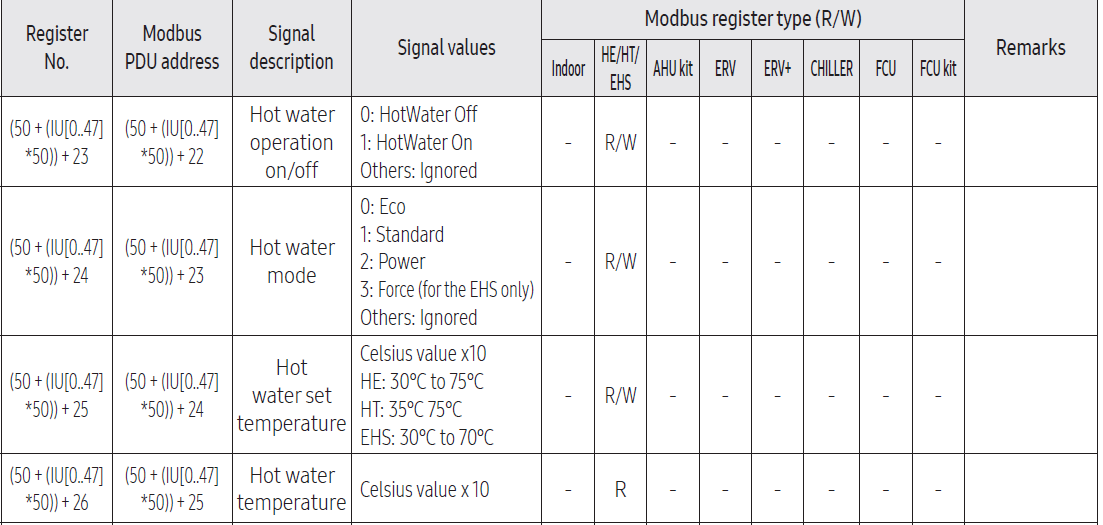
If we look at the table above (an excerpt from the ‘Modbus Register Table’ in the MIM-B19 installation manual) - for ‘Hot Water Temperature’ we see that the ‘number’ to add in the formula can be taken from the ‘Modbus PDU address’ column, and in this case, is 25.so 50 +(0X50) + 25 evaluates to 75, and this is the address to use to pluck this data from your machine.
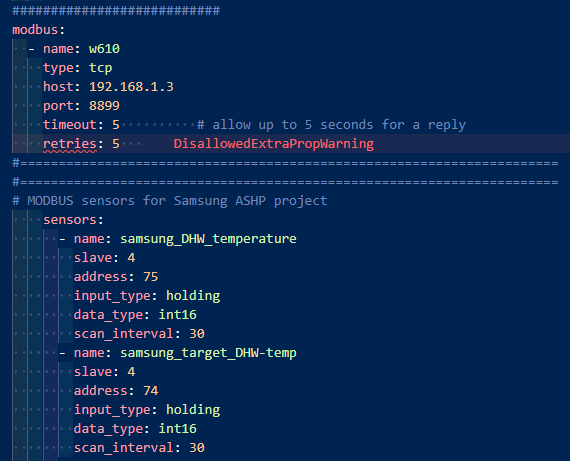
I found that this yaml worked for me - incorporated into my HA ‘configuration.yaml’ section:
modbus:
The top section is the configuration for the W610 converter - 192.168.1.3 is the static IP address I chose to set (previously mentioned). Replace this with whatever IP your router has assigned, and the port number with whatever you chose when you configured the W610. I’m showing the creation of just two, of many sensors I’m using in my project. Note the ‘address 75’ which is used for my ‘samsung_DHW_temperature’ sensor. As per my earlier post in this thread, I set my MIM-B19 address (using the dip switches & rotary selector) to ‘4’, hence ‘slave: 4’ in the code. Please ignore the ‘Disallowedextrapropwarning’ message - this is generated by Studio Code Server (the software I installed with which to edit my yaml). Having read data from the HP, I now wanted to send data to it…
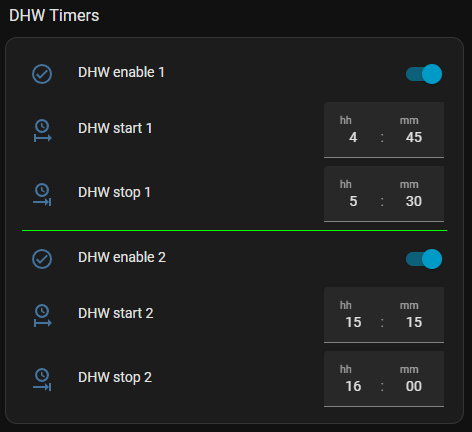
I particularly wanted to control DHW cycles, and finding no easy way to remotely pre-program the time schedules in the ‘Remote Controller’ I at least found access to the DHW on/off register, and being read/Write (R/W) meant I could change it remotely. I opted for two sets of time-only HA ‘Date/Time Helpers’ for setting my schedules (I didn’t want to be messing around with having to set dates, too - as the times align broadly with our cheap energy slots, and as such I generally want the DHW to fire each day at the same time, but in order to have an easy way of disabling the slots, I also incorporated an ‘enable/disable’ switch:
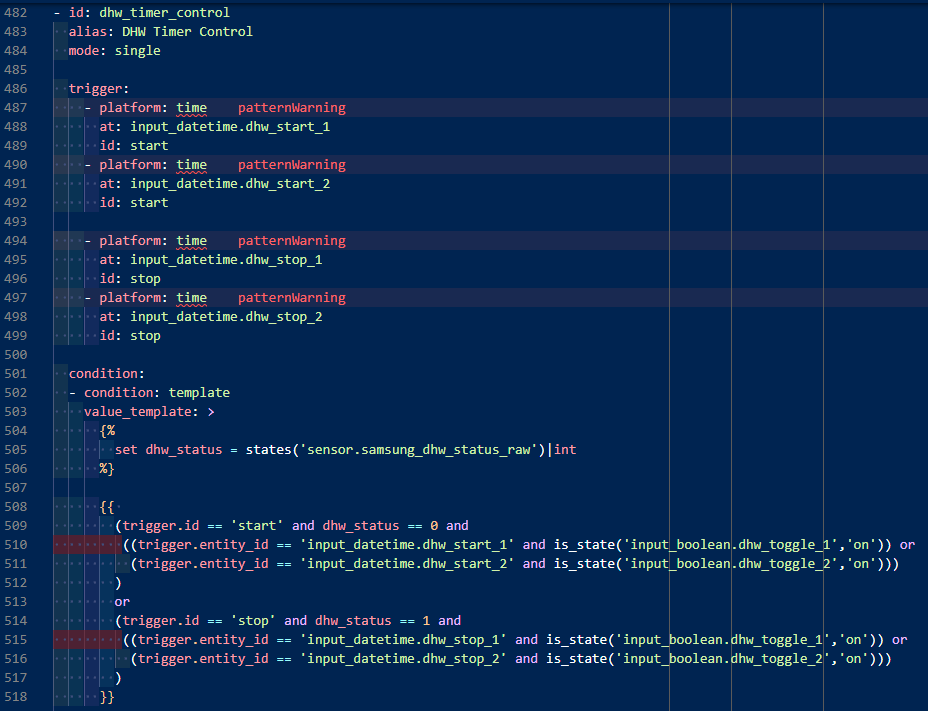
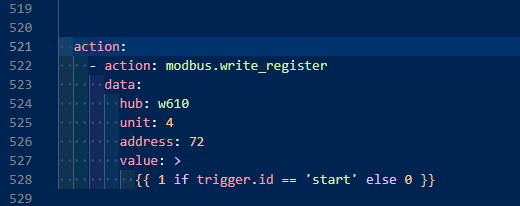
This is the control code I ended up with, in ‘templates.yaml’ (I had to do two screenshots, but it’s all the same codeblock):
Note that we’re sending to ‘address: 72’ calculated from the top line of the above table snippet in the ‘Modbus PDU address’ column 50 + ([0] X 50) + 22 = 72 … where, once again, 0 is the address of my indoor unit (IU).
I’m no software engineer, so I’m positive that others can make a better job of it than me, but this does, at least, work.
Once again, ignore the red ‘patternwarning’ messages.
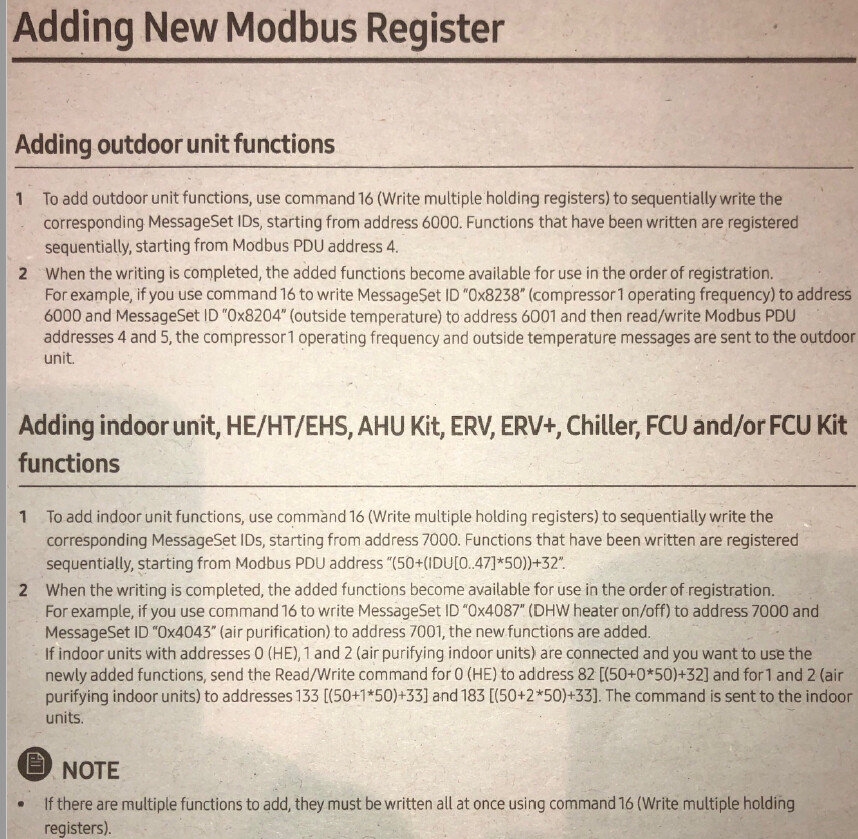
This, then, got me fairly straightforwardly to reading the data THAT SAMSUNG HAVE MADE AVAILABLE, but there’s a lot that isn’t ‘pre-programmed’ so-to-speak, and we have to add these ‘functions’ to Modbus ourselves if we wish to access them. You’ll need to wade through the previously-mentioned docs that Folk have published, in order to find which of these you want, and whether or not you need to self-add. P.17 of the Samsung MIM-B-19 manual contains some fairly crucial info on this:
Samsung aren’t known for their clarity-of-explanations, and this took me quite a while to decode, and take in.
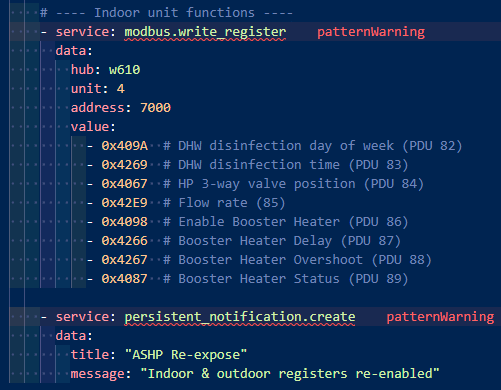
It can be seen that if wishing to add functionality associated with the ‘outdoor unit’ (ASHP) then they should be written to addresses starting 6000, but adding those associated with the ‘indoor unit’ (the ‘White box’ MIM) then they need to be written to addresses starting 7000. I discovered that those in which I was particularly interested to control (DHW disinfection start time, and start day), were associated with the indoor unit.
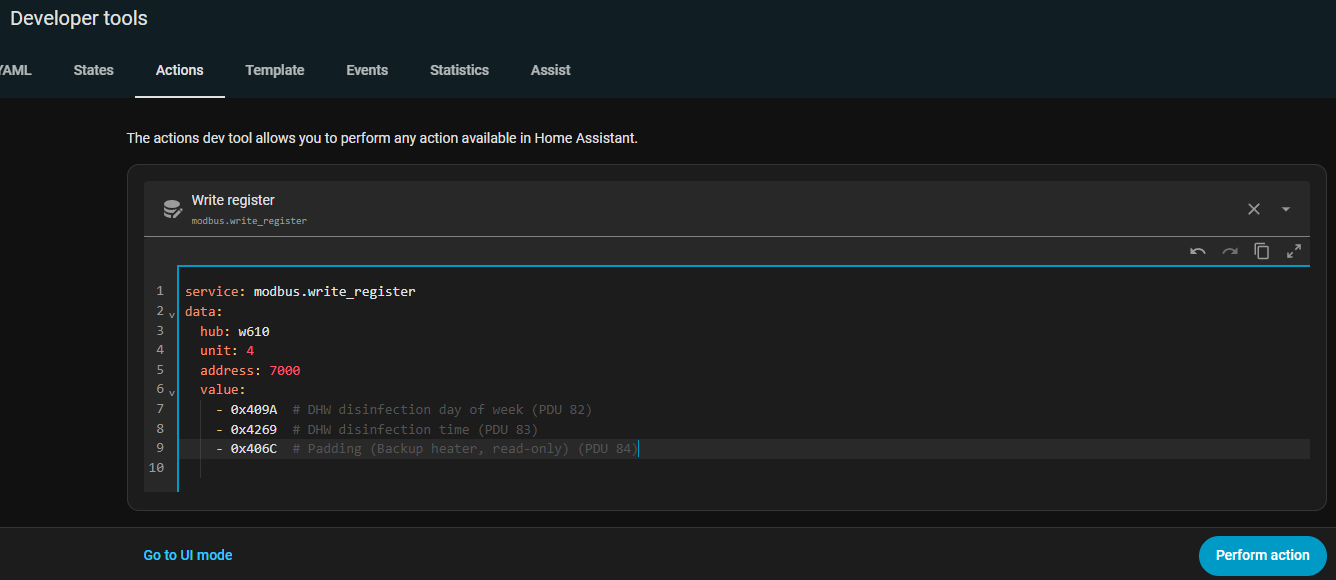
In order to add these functions, one needs to ‘…write the corresponding MessageSet IDs starting from 7000.’ Turns out that ‘MessageSet IDs’ are the aforementioned hex codes, and you’ll need to trawl through the aforementioned docs, to find the published codes. An example would be Sarah Hanson’s very useful Excel workbook ‘NASA_Interpreter.xlsx’.(see earlier posts for link) sheet name ‘NASA Database’ where down in row 245 you’ll see in col A, a ‘Mess #’ of 4269. To get the hex, we need to precede this with ‘0x’ thus the MessageSet ID becomes: 0x4269. Now, referencing the Para 2 notes in the P.17 snippet above, we now write this to 7000…, in order to enable it for use. NB the notes also instruct us that if we need more than one, we need to write them all at once. You can add more in the future - but my understanding is that you can’t append the ones you’ve already created - you need to append your ‘writing’ code with the new ones, and write the whole lot again. I also found that to be successful, one needs to write more than just one MessageSet ID - two will do, I think. The notes suggested that one writes the first MessageSet ID to 7000, the second to 7001 etc, but my friend ‘CHAT’ who was helping me from (ahem!) time to time, suggested code which [successfully] wrote the three I needed, all to the same address of 7000.
I used the ‘Actions’ section of HA Developer Tools, to fire off the code for testing, but fully intended to write a proper script to easily fire from a button, as I believe that if the HP’s powered down for any reason (power cut etc) the registers will need re-programming, and it would make it a whole lot simpler to just be able to press one button for this purpose; note to self - must get ‘round to doing that…
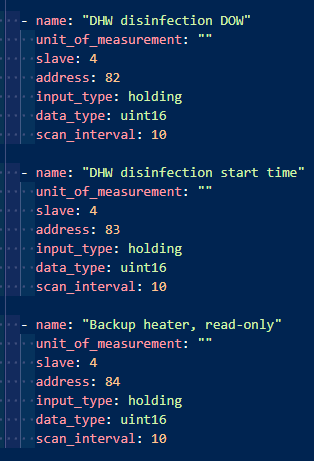
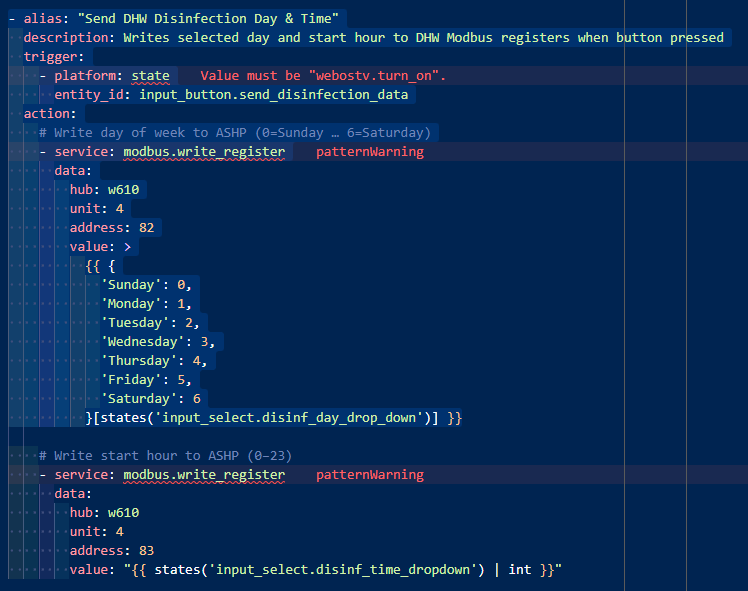
Now, referring to para 2, note 2 above, we finally use the formula 50 + ([IU of 0, in my case] X 50) + 32 = 82, in order to reference the first item in the list (Disinfect DOW), 83 for the second (Disinf time) etc etc.
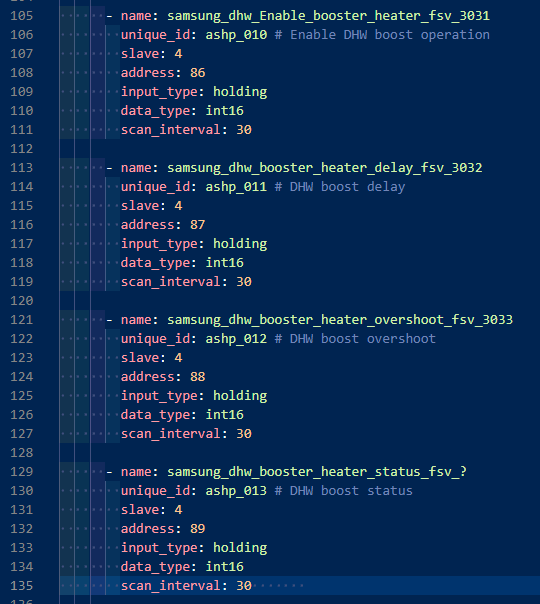
I appended the earlier ‘sensors list (see photo) with the appropriate additions (note the aforementioned addresses):
I use these sensors in my HA system to display the data - and for confirmation that the HP has the new data, if sent.
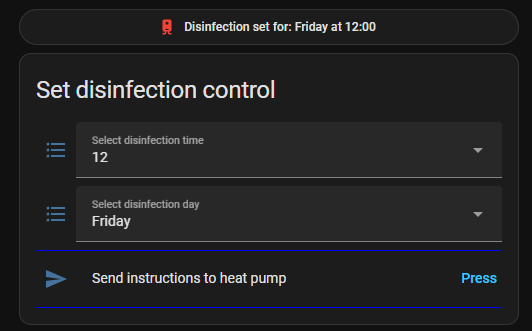
Finally, to write to these addresses, ol’ CHAT & I wrote some automations, which take inputs from my interface, and fire on the button-press…:
… from ‘Automations.yaml’ (once again, ignore red warnings)
Et voila!
Bit of a long post, but hopefully, it’ll de-fog the way for at least a few others.
Do let me know it it’s helped. Ta.
Come on CHAT, time for a beer…
 )
)
 …
…