@pb66 @Robert.Wall. Thank you much appreciated, i think i have opened the door to allot of work ,with the 20x4, but its worth the time,looks great and worth the effort.Thank you, to both off you, without your help, i would not have likely, in anytime soon, solved the mystery of the 20x4, high 5 
Hi @pb66 wonder if you may know off the top off your head.
 [mqtt]
mqtt_user = emonpi
mqtt_passwd = emonpimqtt2016
mqtt_host = 127.0.0.1
mqtt_port = 1883
mqtt_emonpi_topic = emonhub/rx/11/values
mqtt_feed1_topic = emon/emonpi/RP1
mqtt_feed2_topic = emon/emonpi/Vrms
that is working fine with the values, that’s in the lcd.cfg file emonhub/rx/11/values it displays 100% on page 3.
what i am trying to figure out is the following, as its coming from the RPI that is writing to mqtt is the temperatures it has no rx/values. So i cannot use a basedata[2,3,4…ect], if i use a number eg: 7 it does wright that value in, as the board has got 15 inputs being logged.
Obviously the script created a different node.
elif page == 5:
        basedata = r.get("basedata")
        if basedata is not None:
            basedata = basedata.split(",")
            lcd[0] = 'Temp 1: ' + basedata[5] + "C"
            lcd[1] = 'Temp 2: ' + basedata[6] + "C"
        else:
            lcd[0] = 'Connecting...'
            lcd[1] = 'Please Wait'
            page +=1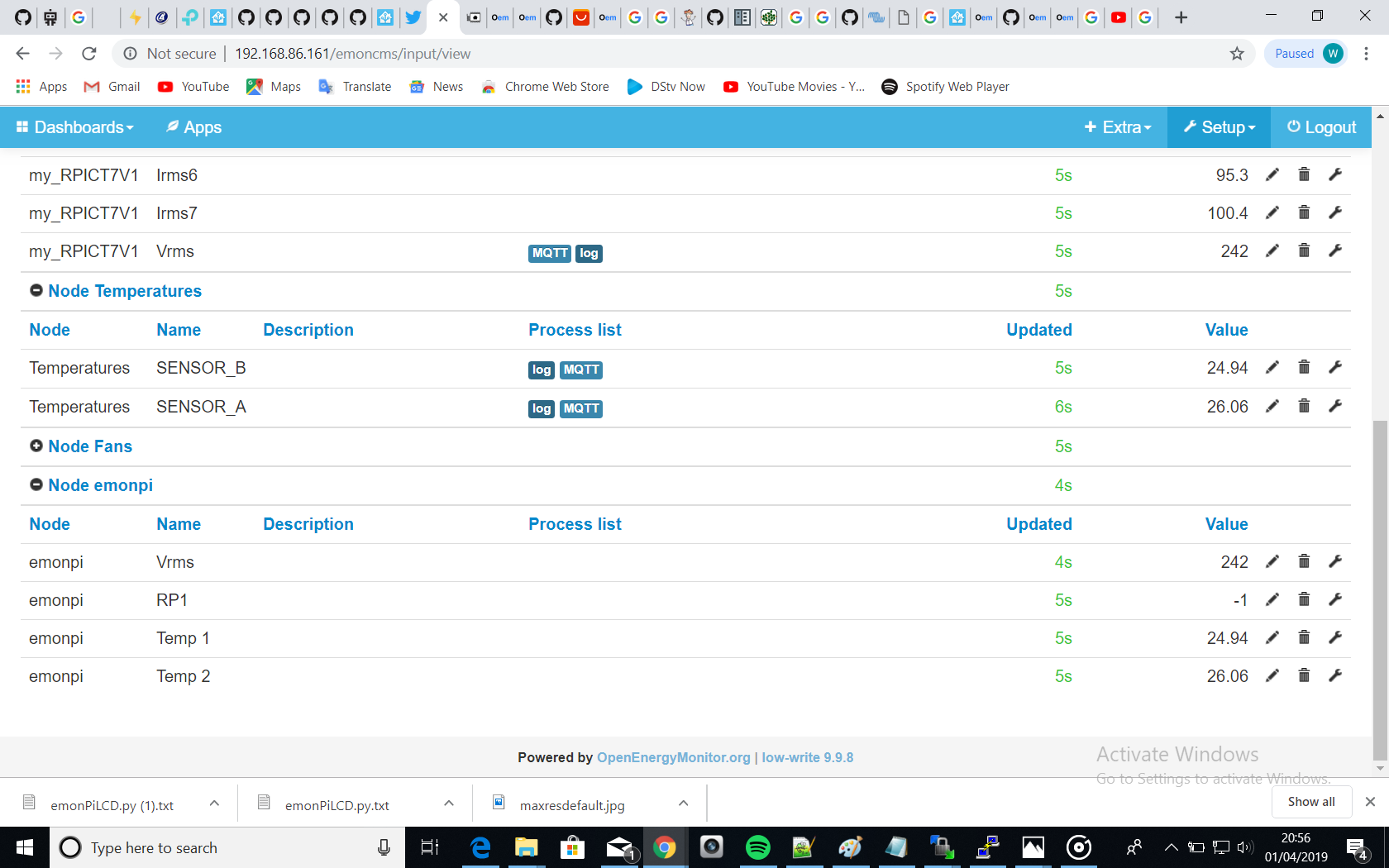
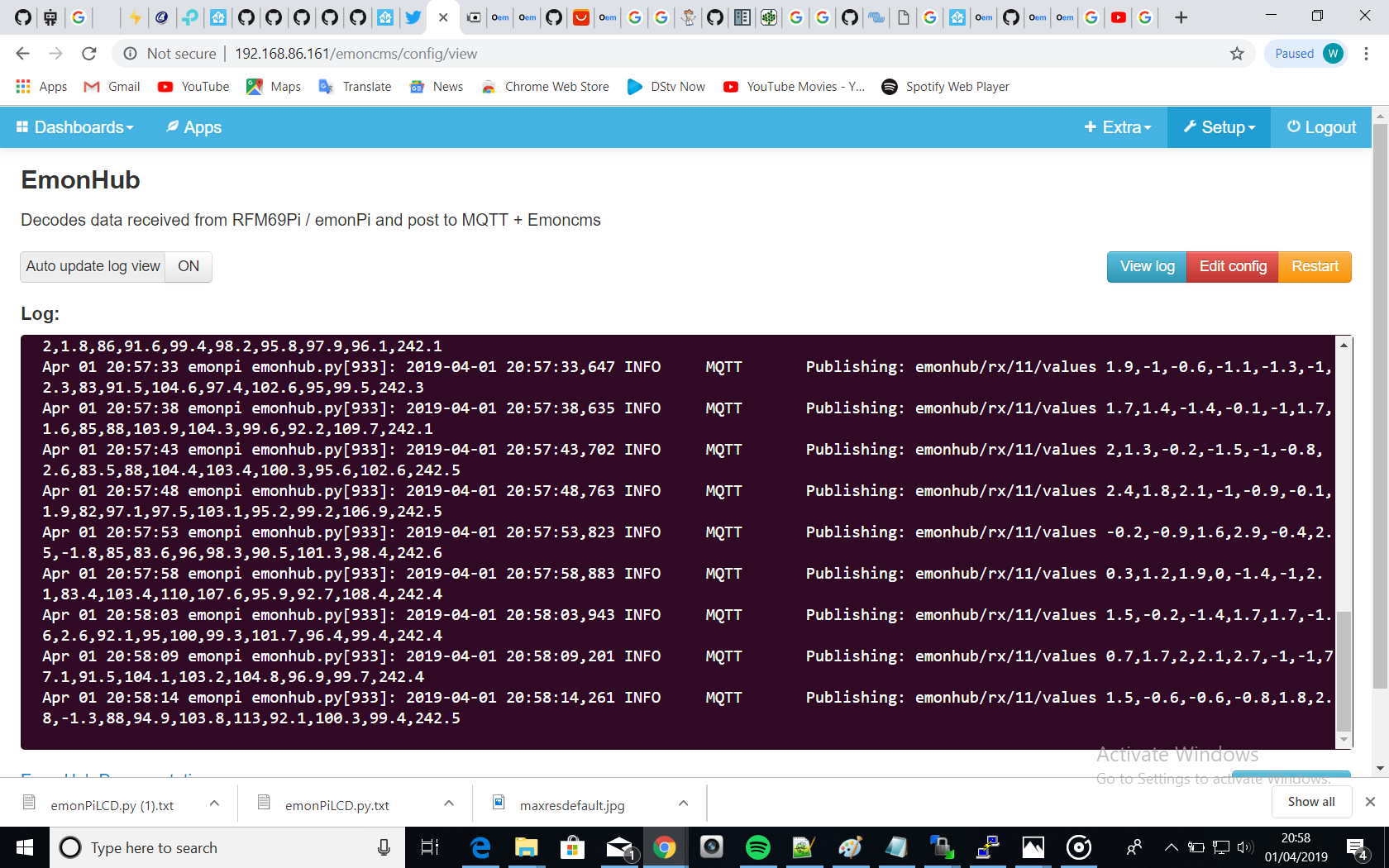
Mqtt:
pi@emonpi:~/emonpi/lcd $ mosquitto_sub -v -u 'emonpi' -P 'emonpimqtt2016' -t 'e                                                                                      mon/#'
emon/Temperatures/SENSOR_A/values 26.0
emon/Fans/SENSOR_A/values 0
emon/my_RPICT7V1/RP1 1.5
emon/my_RPICT7V1/RP2 0.1
emon/my_RPICT7V1/RP3 2.4
emon/my_RPICT7V1/RP4 -1
emon/my_RPICT7V1/RP5 -1.5
emon/my_RPICT7V1/RP6 -0.9
emon/my_RPICT7V1/RP7 2.9
emon/my_RPICT7V1/Irms1 79.9
emon/my_RPICT7V1/Irms2 86.5
emon/my_RPICT7V1/Irms3 111.2
emon/my_RPICT7V1/Irms4 100.6
emon/my_RPICT7V1/Irms5 98
emon/my_RPICT7V1/Irms6 94.8
emon/my_RPICT7V1/Irms7 96.3
emon/my_RPICT7V1/Vrms 234.7
emon/emonpi/Temp 2 26.0
emon/emonpi/RP1 1.5
emon/emonpi/Vrms 234.7
emon/Temperatures/SENSOR_B/values 24.875
emon/Fans/SENSOR_B/values 0
emon/emonpi/Temp 1 24.875
emon/my_RPICT7V1/RP1 -0.9
emon/my_RPICT7V1/RP2 1.2
emon/my_RPICT7V1/RP3 2.2
emon/my_RPICT7V1/RP4 1.3
emon/my_RPICT7V1/RP5 -1.8
emon/my_RPICT7V1/RP6 -0.8
emon/my_RPICT7V1/RP7 -0.1
emon/my_RPICT7V1/Irms1 79.9
emon/my_RPICT7V1/Irms2 88.7
emon/my_RPICT7V1/Irms3 101.3
emon/my_RPICT7V1/Irms4 96.1
emon/my_RPICT7V1/Irms5 94.9
emon/my_RPICT7V1/Irms6 97.4
emon/my_RPICT7V1/Irms7 94.2
emon/my_RPICT7V1/Vrms 234.9I’m not entirely sure I’m understanding your question 100%, but if you are asking how to display the temp values from the script we previously put together, I see 2 things that spring to mind from what you’ve said.
First, the basedata is the values from the emonpi add-on board, the temp sensors are handled by the RPi directly so they would not be in that payload. Therefore you must use the other “mqtt_feed_topic” method to get those values.
Secondly, the topic format you chose for the temperature value in the original script didn’t look right to me, but since you had it working and I just helped add more sensors, I stuck with it. IMO and now your MQTT printout sort of confirm my suspicions. The topic should be emon/Temperatures/SENSOR_B not emon/Temperatures/SENSOR_B/values. I’m not entirely sure where the /values part came from or what impact using it (or not using it) might be, I just didn’t recognise it and it now sticks out like a sore thumb in your MQTT output.
You will need to change the elif page == 5: code to resemble the elif page == 3: code and use a couple of new feeds to display the temp data eg
    elif page == 5:
        if r.get("feed1") is not None:
            lcd[0] = feed3_name + ':'  + r.get("feed3") + feed3_unit
        else:
            lcd[0] = feed3_name + ':'  + "---"

        if r.get("feed2") is not None:
            lcd[1] = feed4_name + ':'  + r.get("feed4") + feed4_unit
        else:
            lcd[1] = feed4_name + ':'  + "---"
for this to work you will need to add the 2 new feeds to the on_message and the on_connect functions as well as in the config parser section at the top of the script and of course, in the cfg file you will need to add the topic, name and units for both too.
There are of course many different variations on how you could do it.
Hi @pb66 just when i understand 90% of what you saying , you hit the ball out of the park.

Hi @pb66 wonder if you know how to round the feed1, tried a few combonations ,always getting errors.
pi@emonpi:~/emonpi/lcd $ sudo python  emonPiLCD1.py
emonPiLCD logging to: /var/log/emonpilcd/emonpilcd.log
I2C LCD DETECTED Ox27
emonSD-30Oct18
Traceback (most recent call last):
  File "emonPiLCD1.py", line 567, in <module>
    main()
  File "emonPiLCD1.py", line 563, in main
    updateLCD() ;
  File "emonPiLCD1.py", line 260, in updateLCD
    lcd[0] = feed1_name + ':'  + r.get(round("feed1", 1)) + feed1_unit
TypeError: a float is required
pi@emonpi:~/emonpi/lcd $ sudo python  emonPiLCD1.py


code

elif page == 3:
        if r.get("feed1") is not None:
lcd[0] = feed1_name + ':' + r.get(round("feed1" ,1) + feed1_unitThat is telling you that “feed1” is not a floating point number. You are trying to round the wrong thing, what you want to do is round the result of the “get”, what you are doing is rounding the name of the quantity you’re getting. That doesn’t work.
So round(r.get("feed1"),1)
I don’t think that’s likely to work either since the original code does error when you concatenate the feed name and the result of r.get. That suggests the result of r.get is a string and won’t round without being cast to a float first. Unless you can be sure the result of r.get will always successfully cast to a float (ie no Nones or strings etc) it will need to be wrapped in a try/except.
Trying to round the name of a record would never work. I was trying to explain to @tonertiffi why what he’d tried was fundamentally wrong.
Should I rather look at the original script, the one you created @pb66 mqtt-relay.py as the temperature readings give me way to manny decimal places, it would be nice to round to 1 place if possible
Round it off here?
#!/usr/bin/python3

import glob
import time
import paho.mqtt.publish as publish
import RPi.GPIO as gpio

Broker = '127.0.0.1'
auth = {
    'username': 'emonpi',
    'password': 'emonpimqtt2016',
}

Sensors = {{'name':'SENSOR_A','id':'28-800000abc123','pin':1,'on':20,'off':15},
           {'name':'SENSOR_B','id':'28-800000def456','pin':2,'on':20,'off':15},
           {'name':'SENSOR_C','id':'28-800000abc456','pin':3,'on':20,'off':15}}

def read_temp(sensorid):
    valid = False
    temp = 0
    device_file = '/sys/bus/w1/devices/' + sensorid + '/w1_slave'
    with open(device_file, 'r') as f:
        for line in f:
            if line.strip()[-3:] == 'YES':
                valid = True
            temp_pos = line.find(' t=')
            if temp_pos != -1:
                temp = float(line[temp_pos + 3:]) / 1000.0

    if valid:
        return temp
    else:
        return None

gpio.setmode(gpio.BOARD)Well that’s a pretty broad brush, but yes you can use round() there and if you want the rounding to apply globally it’s a better place to do it.
Since temp is initialised as an int temp = 0 you cannot round the return temp therefore you should do it where the temp is cast to a float eg
temp = round((float(line[temp_pos + 3:]) / 1000.0), 1)
This way also means the fan will still operate at the set/displayed temperature as well, If you had just rounded the emonPiLCD code it would appear that the fan switching was incredibly slow as (say) the fan was set to start at 40°C then the display would show 40°C from 39.625°C but the fan would still need go through 39.75, and 39.875 before hitting 40, ie the display would show 40.0° for a while before the fan cut in “at 40°C”. The same at the lower end to switch off.
Thank you @pb66 that did the trick, you awesome
Hi @pb66 hope you well, you guessed i found something else to mess with,below is the item, its a 3 way button push, i am sure by the picture you can determine what i plan to do with it.
i have been studying the lcd code, determined i would have to add a new gpio pin for the 3rd button, that would seem easy, i can also see the page +=1 that i assume, as the button is pressed, it goes to the next page, do you know off any easy way off achieving a back button?
elif page == 5:
        basedata = r.get("basedata")
        if basedata is not None:
            basedata = basedata.split(",")
            lcd[0] = 'Temp 1: ' + basedata[4] + "C"
            lcd[1] = 'Temp 2: ' + basedata[5] + "C"
        else:
            lcd[0] = 'Connecting...'
            lcd[1] = 'Please Wait'
            page +=1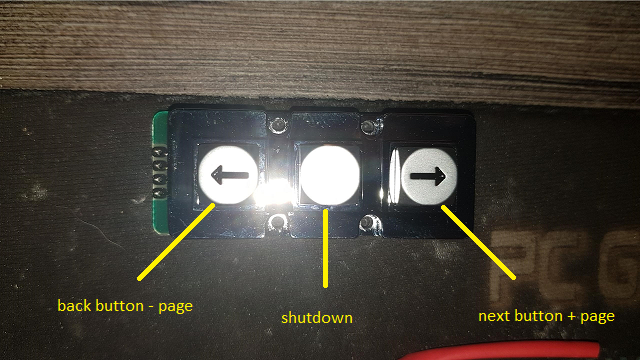
Hi, not offhand no sorry. I would need to study the code over again and to be honest, I would do it a completely different way. As I mentioned previously in response to you saying things go wrong if you press the button too fast, the button presses should be counted then executed, I’m not keen on every press opening a page, it’s too slow and error prone.
I Kinda agree with you on that, it makes 100 % what you saying, so far i must say you have added functionality to the product that that is mind blowing, i am sure a lot of readers have implemented the code that you have put together. what i love about your way, off doing it is, it works and keeps working, so if you can once again help me here, i would greatly appreciate any help or suggestions. Thank you again
If I get the time (and the urge) I might take a look, but please do not rely on me to do it, have a go yourself.