-
probably in1 is not wired for you. There’s a sensor in1, if it never generates demand, then nothing is wired
-
you can use the MRC, probably that’s what you are using. But when you set that in fixed flow, you cannot let it stop when it reached setpoint. So you need something else to stop the heatpump.
My thermostat is giving the on/off input to the pump and when it reaches the setpoint in the room it stops the pump so at this point I believe it’s wired but in Z1 themperature sensor I read the FTC6 controller temp which is installed in the heatpump internal unit in the external utility room
then its probably wired to in1. you can see status turning to on when theres demand ?
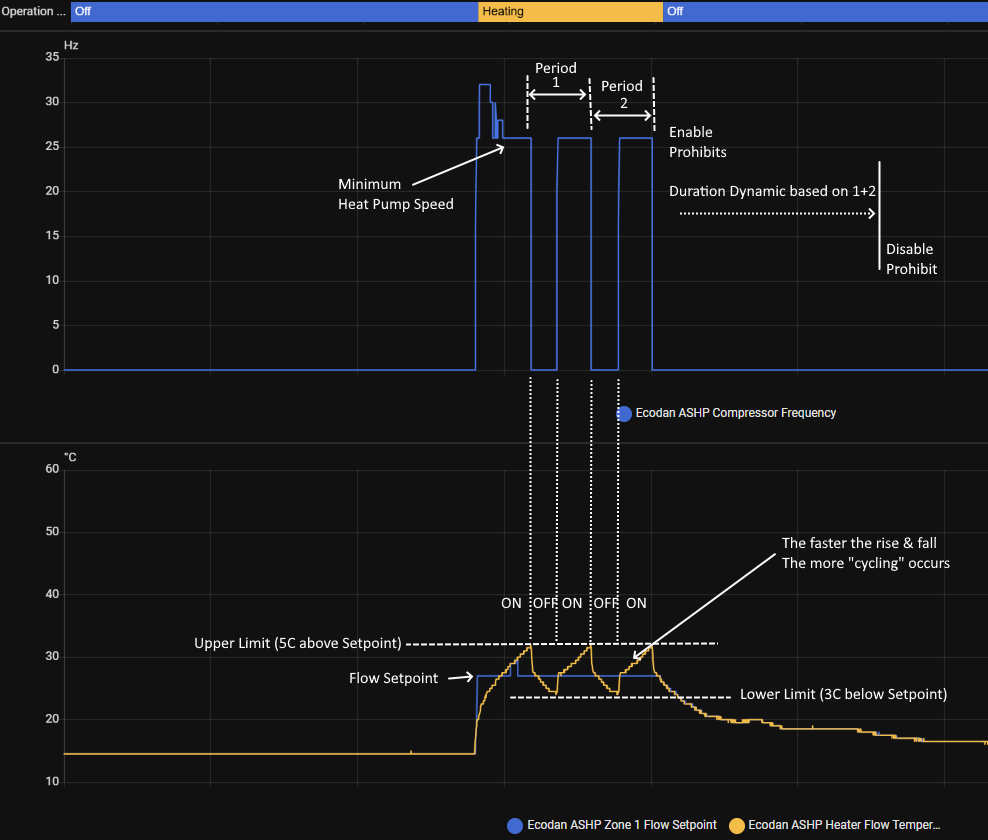
I am additionally adding Short Cycle detect & protect to my project & devices, for Beta testing as part of Active Control Feature 1.
With simple On/Off control it has been designed to use dynamic duration calculation - monitoring the Stop to Stop period of recent cycles to determine a prohibit duration.
Ok My setup is:
Bticino Smarther 2. thermostat –> DAB Evosta2 pump –> waterpump.
When the Smarther send the on signal then the DAB pump starts and after a couple of minutes also the waterpump starts and the IN1 turn on so I believe it’s wired.
So I can use the HA automation to use the Smarther as thermostat.
After setting this up should I use the time shcedule on the Smarther as I used to as set the target temp on it? Leaving the waterpump to fixed temp in a higher setpoint like 26° so the thermostar is soing it’s thing? Or am I interpreting wrong the auto adaptive curve?
I used to to be on a curve set on the FTC6.
Should also the serve mode be enabled all the time?
you need to do de temp feedback loop with the smater 2 temp (current and setpoint) See doc step 2+3
The idea is that you set a start flow, hand the system tries to learn and adjust the flow for your system. I would recommend to get the latest pre release
it has more settings and a few bugfixes
server control is independent, and can be on or off, does not matter.
New release with some additions for AA
- AA: Allow overshoot compensation. Use this setting to compensate for overshooting in your thermostat
- AA: Predictive Short-Cycle prevention. Heating offset will be raised by 0.5c when delta between requested and actual feed temp is above 1.0c for the min duration of 4 minutes. This mode is always enabled in Auto Adaptive. In fixed flow heating it can be enabled manually via the switch. the
High Delta detection durationis editable [1m-5m, default 4m] - AA: Only enforce saturation prevention when in active heating/cooling
- AA: Implement dual heating slope for heating. When it gets cold (
< 5c) an additional factor is multiplied with the slope. Setting can now be set in steps of 0.05c - AA: Allow adjustable min flow temp for heating. Override if you are hitting min output capacity during mild weather. [24.0c - 40.0c, default: 25c]
- Add floor dry up, cool compensation curve mode (only works for ftc7+)
- AA: Widen dead zone for UFH profiles during the night
But can I use the climate.smarther entity fot both the setpoint and current temp? Looks like the setpoint must be a sensor entity only
yes, setpoint can be sycned also. did you read the getting started section ? It is explained there
It’s explained as climate trigger, but you can trigger from everywhere.
so define on state change of your smarter entity and sync towards the esp. The smarter entity probably has attributes for current and setpoint
Yes I did. I think I finally made it. On the screenshot is everything set up correctly? Looks like the automation is taking the current temp. from the Smarther so it’s correct. I’ve no clue if also the other automation is getting the setpoint from the Smarther.
Apart this last one everything should be set up correctly or there’s something else to be done?
FTC6 set to fixed temp. (doesn’t matter how much if I understood well).
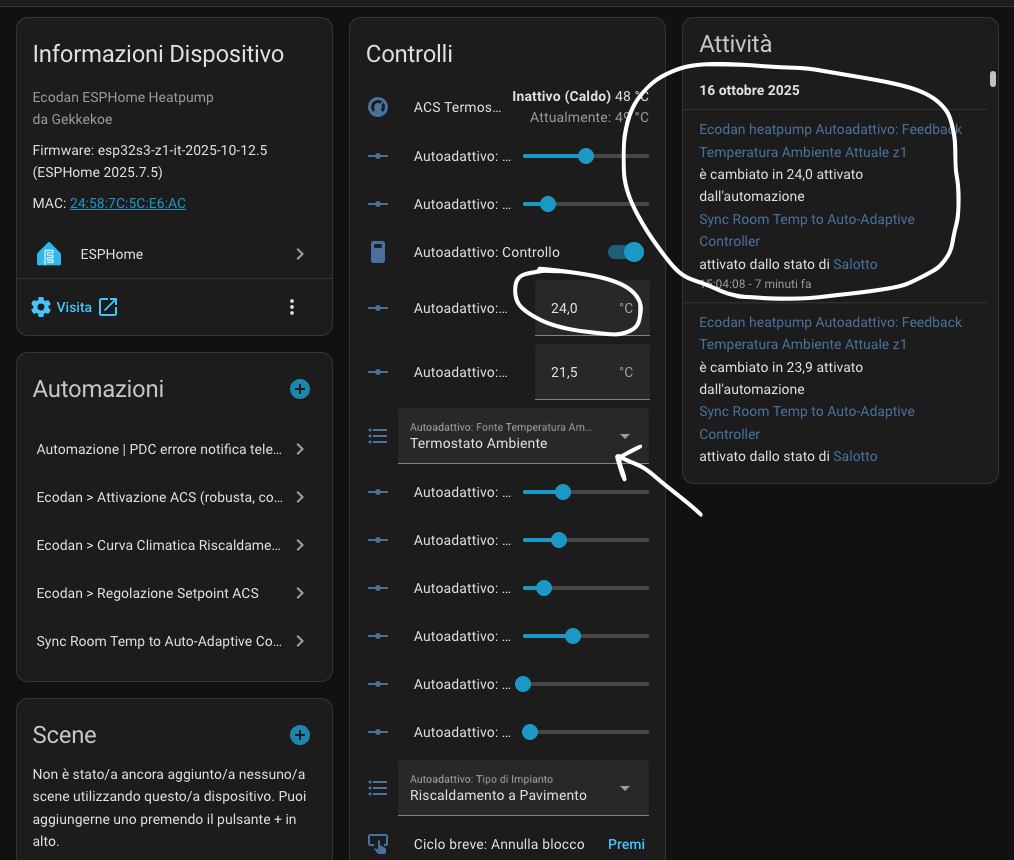
you need to select HA / REST api (arrow in your screenshot)
else it will not use it. I did a small write up about how it performed last week: Using Auto Adaptive (tips/tricks/feedback) · gekkekoe/esphome-ecodan-hp · Discussion #194 · GitHub
Cool so everything is fine. You basically have the same setting I normally use  I will start monitoring how it works in 2-3 weeks I believe as temp outside is still on 18+°C during the day and not under 10° at night while in the house I have 24.5° during the day and 23.5° at night. Then I will comment on Github
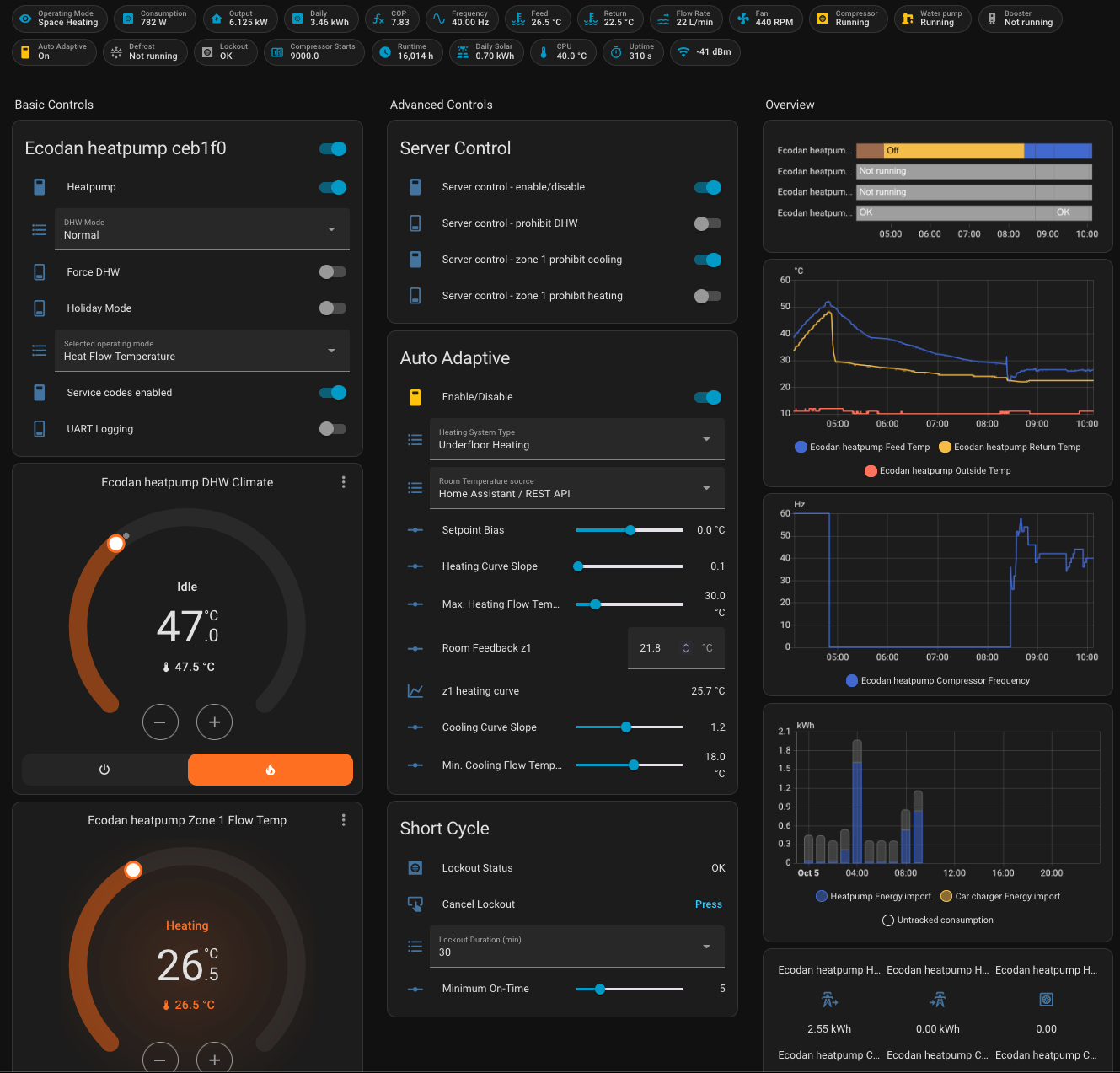
Super many thanks! I’ve added the dash. I put it here the code for the italian folks with all the corrected entities trsnlated.
2 things I noted:
-
I just have Thermostat or API REST but not HOME ASSISTANT/API REST. Is it just a display issue or is it affecting the logic?
-
what’s happening on the z1 heating curve reading? I got crazy values!
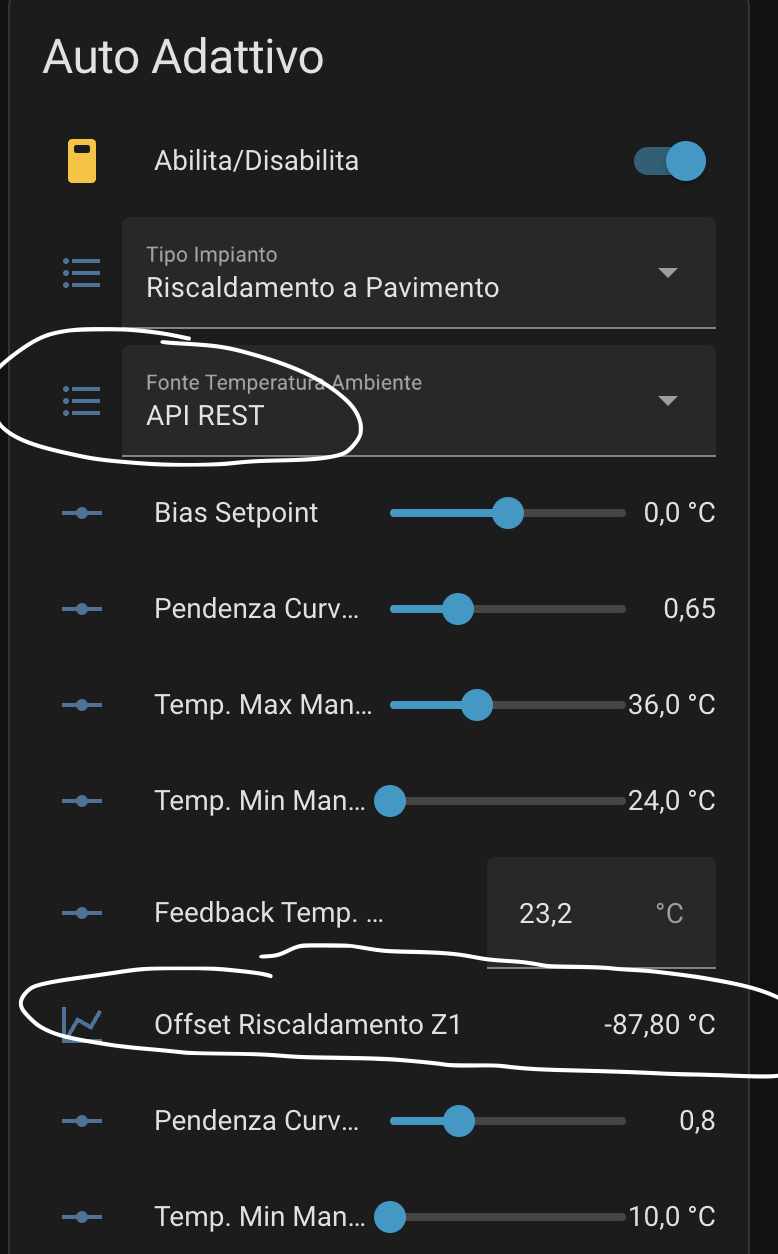
Hereunder the italian entities dashboard.
dashboard.txt (8.5 KB)
API REST is probably translation error on my side, you can ignore it for now I will correct it.
If you have underfloor heating, then the slope of 0.65 is too high, use something like 0.1-0.3
probably wrong feed back, thats not right. flash this pre-release it has safe limits:
For the offset to fail like this, I think you are sending it invalid data, can you plot the feedback temp graph ? You did do step 2+3 right ? (current temp and setpoint feedback?). It might have something to do with the comma or point for decimal. If you have some logging what it send it would be very helpful.
(settings > automations, find the automation, and select 3 dots, show traces, you should able to find what it did)
- Run serial IO on the
sparecore for low latency, refactor proxy - Add esp core 0 and 1 monitoring
- wifi: Remove
fast_connectoption - AA: Add efficiency probe during dead zone to find a more efficient offset (probe only active while heating)
- Use work around for espidf 5.4.2 UART issues. Upgrading to Esphome 2025.10.2
- Adds proper retry and timeout for cmd sent to the heatpump
- Throttle get service code results (less spamming)
changelog:
- Reverted uart workaround and upgraded to esphome 2025.10.3 (it has been fixed in esphome 2025.10.3)
- AA: Fixed enforcing safety cap of heating offset
- AA: Allow override of outdoor temp sensor
- AA: Allow predictive cycle prevention to be turned off during AA
- AA: Temporary allow manual editing of offsets (Don’t depend on this, will be removed when algorithm is working stable)
- AA: Increased efficiency probe from 0.01 to 0.02 (
speedupdecay) - Add 0x0f condensing temp fallback if we encounter stuck
40.57value - Proxy: handle 0x28 byte 11 clear when in proxy
- AA: Use multi zone status to ensure that zones are actually operating (for independent zones)
- Adjust timeout settings for heatpump and proxy to ensure there’s no overlapping
- Use controller day of the year to avoid double counting in the forever increasing counters
- Remove sntp usage in the
delta_energy_consumed_increasingsensor (use the controller day of the year instead) - Only handle Off → On and On → Off compressor transitions. Ignore the unknown states
- Remember states for
reported daily consumptionandestimated COP(will not be reset after reboot) - AA: adjust z1 and z2 offset independently when boosting
Found a regression, Estimated Total Daily Energy Produced was not reset properly.
- remove sntp requirement and use the time from the heatpump to detect day transitions (all external dependencies have been removed)
- fixed issue where
daily_computed_output_powersensor was not reset on day transition
Few questions about auto adaptive.
Got it set up and started off nicely. However the z1 heating curve just keeps on climbing.
Step 2: Set Up the Temperature Feedback Loop, have several sensors in an open area and the average of these is sent back. Very stable feedback loop.
Step 4: Set Outside temperature source, since last update I can easily confirm it’s using my external sensor.
Step 3: Set target temperatures (setpoint), I don’t have any thermostat connected to the heat pump’s FTC. Do I need to use the “ESPHome Ecodan Remote Thermostat”?
In Home assistant I set up a dummy thermostat that sends target temperature to “climate.ecodan_heatpump_zone_1_room_temp” and this entity “sensor.ecodan_heatpump_zone_1_room_setpoint_value” shows my value that is set at 21,3 °C.
However this “climate.ecodan_heatpump_zone_1_room_temp“ shows 0°C.

If I understand correctly, you do not have any thermostat wired to your heatpump ?
How do you normally stop heating ? The CNRF project can be used, but I did not verify the demand signal needed for this setup. You could do a prohibit on heating when your average room temp has reach your setpoint. But using prohibits turns off learning, so that’s also not ideal.
No thermostat, running fixed flow with my own curve and settings from Home assistant. Not really the most optimal to my house and that’s why I would like to use your AA. Currently using prohibit heating during high energy prices but would be smoother to use setpoint bias.