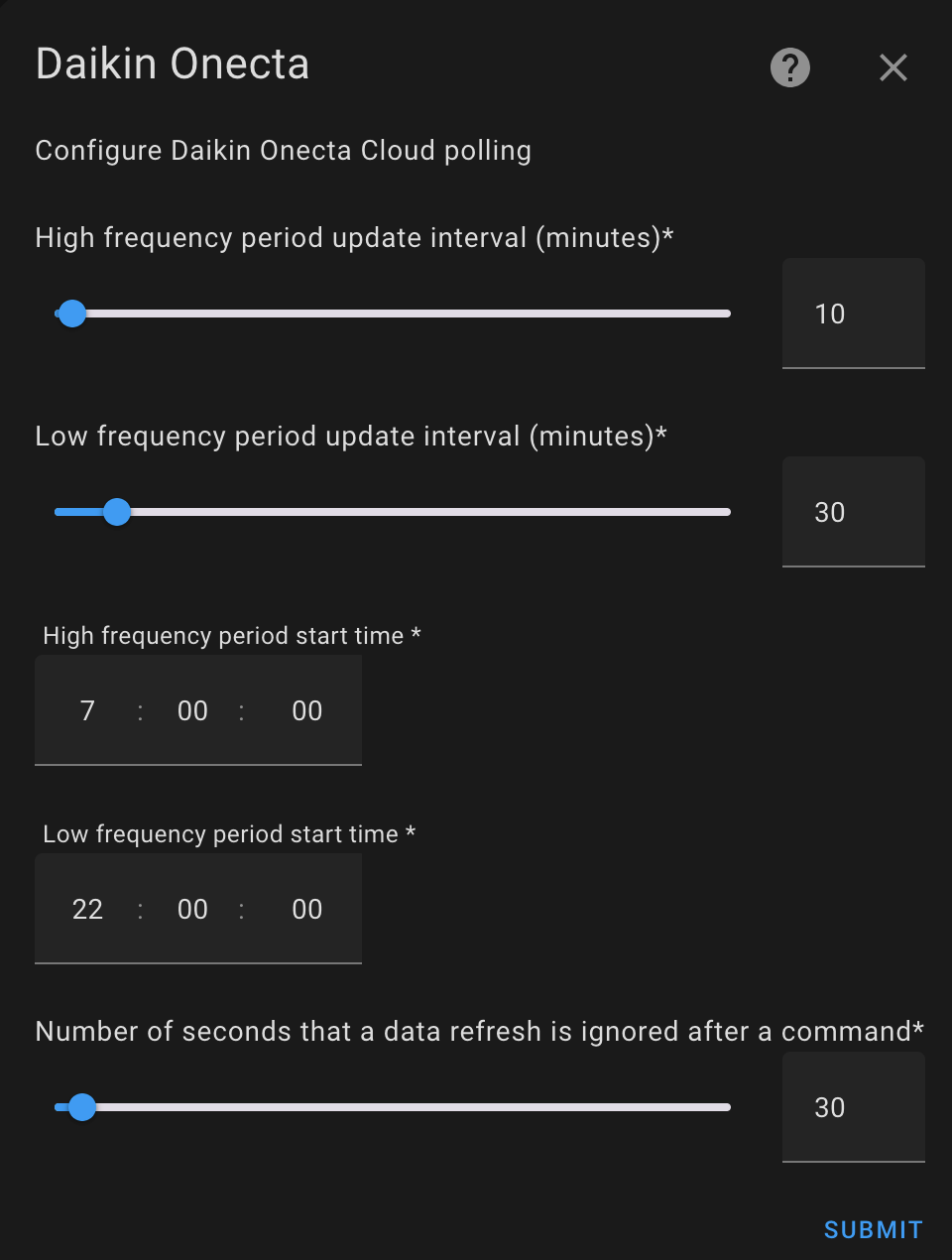
It all stopped working about 9:00pm…took me ages to figure out what was going on but I eventually identified the problem in homeassistant …
The Onecta integration had failed because of the poll count exceeding 200 (for the APIs). unlike the earlier integration that used to use reverse proxy access to the MMI, The latest and only integration is cloud-based and requires API calls but these are limited to 200 in a 24 period.
I had set , in the integration configuration, the priority polling to 5 minutes and the low priority to 10. I’ve now changed that to 10 and 20 respectively and will give that a go. I suspect because of this automation algorithm from @Chrisg, automation is constantly tweaking the numbers each of those tweaks will result in an API call.
Chris, Have you not run into this problem and what are your poll settings in the onecta integration?
EDIT @chrisg what is the purpose of the repeat for …on the automation. My climate device responds to demands with no issues… did you have a device that was temperamental?
I typically end each day with at least 80 API requests left.
The API update values here do not influence how responsive your automations are - merely how often they’ll gather values for the various sensors they give API access to. Anytime your automation fires and requests and offset, it’s actioned immediately.
For reference, I typically have 10 or fewer offset adjustments per day.
WRT your earlier question - it’s not really an algorithm, just a set of thresholds I chose based off my own personal comfort needs balanced with keeping the heat pump running if at all possible but wanting to shut it down if, as we are these days, warming easily from solar gain. I worked out through trial and error what level of offset was effective enough to curb the heat trending upwards without inducing a see-saw effect. -1c wasn’t enough, -3c was too much, -2c seemed just right. YMMV, of course, but here, in this house, the thresholds and offsets I’ve chosen work for me.
Writing the HA automation was the easy bit. Getting the WD curve right to minimise offset corrections has taken basically all winter, not helped by finding the ABV was wide open a couple of months ago which resulted in no longer needing the lockshields closed down to balance - fixing those things changed how the heat was delivered requiring a slight tweak to the WD curve.
appreciate that, thanks, I’ve adjusted my polling.
looking at your response one obvious question that presented itself was that if you’re polling every 10 minutes your automation is querying every 5 so as a minimum should it not be every 10? every 5 is pointless because you are only getting state changes every 10, less so for the 30 minute poll you have?
@chrisg what is the purpose of the repeat for …on the automation. My climate device responds to demands with no issues… did you have a device that was temperamental?
also, I copied that and modified it slightly to run an automation at night time to bring the temperature down but this doesn’t seem to fire at all and doesn’t turn off the heating if I turn it off manually , it doesn’t turn it on either or do anything
Any ideas ?
I did check the traces… there’s no traces.
I simply use a toggle switch for each automation to turn it on or off I’ll automate that eventually however for the moment I’m just trying to keep it simple so at night time I switch off the daytime automation and turn on the night one. the daytime works but the nighttime one doesn’t … it seems to me to be a copy albeit with different values?
The 5 minutes in the trigger instructs HA to wait 5 minutes before doing the action - this is to avoid actions firing too quickly. For example, if the thermostat hovers across a threshold, teetering back and forth. So to create some certainty that the action is good to fire, I have HA apply a wait of 5 minutes to ensure the temperature threshold crossed and remains crossed.
This is totally separate from the polling interval gathering data from the Onecta API.
The repeat is to ensure that the offset action to the API was received by the API successfully. Sometimes the API returns a failure code, for example, so the repeat fires the action, waits 10 minutes (to prevent using up a tonne of API requests) and checks to see if the offset changed. If it didn’t change the automation will retry the API command. If the offset did change, the automation run ends.
If you want a second automation for nighttime (it can be done in the same automation btw), you will need to put time of day constraints on the actions using if-then and create new triggers for times of day. Eg, at 9pm, if the temperature is above 19.5c, turn off the heat pump. Eg at 5am, if the temperature is below 20c, turn on the heat pump.
It does get a bit more complex but definitely do-able (indeed I used to do the same and might re-implement it for the upcoming shoulder months).
wow @chrisg@DrConradInTheHouse , you guys pre-empted all the next questions I was about to ask. As I mentioned I have the same pump as @DrConradInTheHouse . Can I know what you both have set the LWT curve (X1, Y1, X2, Y2) for now. I completely understand that this varies for everyone’s house/location profile. Just trying to optimise mine and references could help. I plan to go in similar direction with HA integration and using triggers to control the offsets from the curve.
Thanks again for the detailed sharing @chrisg … just a bit confused with your statements on the automation night and day
as I said in the post above not sure if you read but I have two automations two separate … I turn them on and off with a toggle so I only one enabled any one time
why would the nighttime one need times constraints where the daytime one doesn’t and works The night time is in fact just a straight copy but I’ve reduced the temperatures from 20 on to 18 for sleeping.
?
I still to ascertain why the night time one doesn’t work though even though it’s just a copy. and the daytime wanted disabled whilst that is enabled
@DrConradInTheHouse OIC - did the house get cool enough to fire the overnight automation? Unless the thermostat passes one of the thresholds, nothing will happen. You’d only need the time constraints if you were running a single automation.
@sunshine_rag As you say, it’s kinda irrelevant what my settings are but if yours was an Octopus install and you have something like 50c@-3c, 25c@22c (Y2/X1, Y1/X2), you may be able to drop a whole 10c off Y2 and perhaps set X2 to 15c and see how you go. Depends how much your home is overheating. It’s hard to judge at the moment if you have lots of sunny days like me at the mo. You really need gloomy days to ensure the house fabric doesn’t get heated externally to set the WD curve optimally, depending on your home’s insulation performance etc.
My system was commissioned with 50c@-3c, 25c@22c and after much testing and observations, I’ve settled on 42c@-8c, 26c@14c and this gives me minimal offset corrections unless I get a lot of solar gain (like now).
It’s utterly pointless you replicating anyone else’s settings there’s far too much going on this I’ve learnt over about the last 12 months… for example…
heating equipment
property structure size dimensions layout
number occupants
heating power requirements for each room
thermal heat mass of the property and its contents
thermal heat loss through windows roofs walls
solar gain
geographic location
ambient weather
You simply just need to do what me and everyone else has done which is adjust day by day week by week, each day, across the ambient range until you’re comfortable. very small tweaks is the key… each day… not major increases.
@DrConradInTheHouse when you transition to night time mode, you’ll need a trigger to fire to re-evaluate the house temperature otherwise it’ll just keep going as it was until a trigger threshold happens. I think you’ll have greater success adapting the second yaml I posted, so it’s all in one automation (no need to toggle between automations which is less admin overhead) as it has triggers for transitioning into night setback and coming back to daytime mode.
Thanks for sharing. I was about to say I was more interested in the reasoning behind why you modified the curve the way you did. I know I need to calibrate it for me. Your values and reasoning behind changing it is insightful. Also ACK. on using gloomy days (mild weather) for calibration.
hey, you are right. But I find this whole exercise whilst FUN in a sort of way, it is more frustrating that Daikin missed something obvious on how this should have been done. All insights are helpful. I am also trying to do minimal additional hardware additions and just use what came in the box. Hoping to configure the curve and offset automations with minimal fuss.
Totally agree. The heat pump has all the information it needs. It knows the outside temperature, it knows the inside temperature. It should be able to work out whether it needs to raise or lower the flow temperature to maintain your setpoint +/-0.5c IMO. We shouldn’t need to configure a WD curve at all for rads. Perhaps for UFH situations where the responsiveness of the slab is much much slower than rads, then you probably need to guide the heat pump with a weather curve. But hey, we have to deal with it.
Yep. Might I ask another question, how is the responsiveness of your system with your automations. Let’s say the indoor temperature drops because someone opened the door for sometime and you had a drop of 1deg. How long does it take for you to regain that (approximately) with your automations. Am asking as if I drop my Y2, it takes forever to climb even 1 degree. Not sure if it is due to that. My modulation is set to 5. Is that relevant here?
Also for whatever reason, Octopus set our system’s emitter type to FanCoil unit instead of radiators. is there any negative to that. ?
Modulation is indeed relevant, that’s the feature that allows the Madoka to adjust the flow temp based on the indoor room temp. The modulation with Madoka operates over a wider range +/-1c in 0.5c steps. So my automation narrows that down making it more responsive but I’ve only put in a 2c hike at the bottom end. I’d be reluctant to put in a big adjustment for an open door and just let the house recover on its own - at lot of which will happen from thermal mass of walls etc.
Fancoil sets the delta t to 5c and is adjustable. Radiator mode is fixed at 8c which isn’t desirable from what I understand.
@chrisg I have the daytime automation based on your latest code (thank you). I could not get your first automation working so I’ve ditched that. This daytime does work so I am going to leave it.
I hear you say that I need some triggers say for 5am and 9pm but I could not get that to work. What I have done is create another automation that enables the daytime automation at 5am and disables it at 9pm. This works fine with no other changes so code is as per below.
For nighttime, I copied the daytime automation, lowered the temps, created another automation to enable nighttime at 9pm and disable it at 5am and use that for night time - but it doesnt work. The heating just stays on. In the end I just turn of the onecta integration at 9pm and enable it at 5am and this just shuts the whole system down at night so the heat pump is not driven whatsoever by Homeassistant. This is an overkill and works now in milder temps but in winter when I need an ambient 18C at night this is going to need to be revisited.
Any ideas why the nighttime doesnt work when it’s just a copy of the daytime save the lower temps (recall, I cannot use your original code as doesnt work and it’s more complex than I need and generated errors too - I will just leave it what I have now which is working, well for daytime)
p.s. another issue, if offset values mean LWT demand goes below 30C, the pump system just maintains 30C and warms the house up … only disabling the onecta integration seems to “turn off” for nighttime but of course come freezing winter later this year this wont cut it and I need to maintain a house temp of around 18.5C at night - at the moment it drops to around that anyway due to ambient being around 4C now.
daytime automation: (enabled/disabled by another automation using time 5am/9pm)
@sunshine_rag … Fancoil…This is a limitation of the MMI firmware. Emitter is set to Fancoil to get the deltaT to 5C. When set to radiator, the deltaT is 10C. I think 15C for floor heating. The deltaT is the difference to be maintained by “the pump” between LWT and return flow temp. Low temp radiator heating - such as air heat pumps - has flow rate of 35-45C as opposed to gas boiler which is ~60C. Therefore deltaT needs to be lower, 5C instead of 10C. The only way you can do this is set the emitter type to Fancoil. I’m not sure what if any field codes/other settings are moded from Fancoil - hopefully nothing !
BTW, the “pump” will try to maintain the deltaT so that means it will adjust the temp or flow rate so that utlimately the rads emit less heat - which is not what you want !! so Fancoil/5C is spot on for Octopus installations - it’s about the few things that Octopus commissioning is correct in my view, so many other settings I have tweaked - hence my previous post to you about not seeking to copy our settings because you will need to tweak and adjust over time , yes a pain, yes it takes time, but you also learn things too. When I started a year ago I knew 0% about ASHPs , Daikin systems, and general operations.
So what does a higher or lower modulation value imply. Mine is set at 5 but I have no automations at the moment. Should I change it if I do go the route of HA+trigger automations. If so what would be a good value and it’s implications?
If you change from Roommode and use WD Curve driven leaving water temperature and home assistant to control , then modulation is disabled by default Tere’s no modulation on WD Curve mode … there’s only three modes on the controller WD Curve, Fixed setpoint or room thermostat. only room thermostat implements modulation