Grant R290 Fan Noise

Thanks to both of you - some useful information there..

I seem to be able to adjust fan speed through the H FAN SPEED settings and have dialled down the 0 setting to 575 and the 1 setting to 600. At present i haven’t adjusted the other 2 ( 2 and 3) but haven’t yet seen figures as high as their presets (700 & 850) under current operating conditions. The fan in normal mode has now modulated down to 575 in normal running conditions.

I wonder by altering these figure whether other parameters (Compressor HZ, pump speed, etc) modulate in line as I assume they do in silent mode or whether this is simply a blunt tool to reduce fan speed for reasons of noise.

I notice that altering the fan speeds (or at least the two I’ve adjusted) has no effect on calming down the units operation in defrost when the flow rate spins up to the noisy 36l/m and the fan ramps up to 650+ . I assume there is simply no way to modulate the units behaviour in defrost..?

Last night we turned blockade off for the first time and set a ‘decreasing fixed water temperature’ of 8 degrees. The unit gently lowered its heat pump target and the temperature gradually coasted down over night with reduced flow rate and compressor HZ. All was good until the dreaded defrost cycle with flow rate of 36l kicked in at 2.30am and again at 5.30 making an otherwise peaceful night difficult..

As of yet I haven’t played with the pump speed settings but again I’m guessing this won’t alter anything in defrost but might possibly make the unit ‘waking’ from a simple night set-back (with blockade on) less noisy..?

Oh that’s good news then, but strange @Dave_Storey that these settings don’t work for you, and they definitely don’t after your ASHP firmware update?

Unsure there, I’m assuming they are a blunt instrument but I may be wrong :slight_smile:

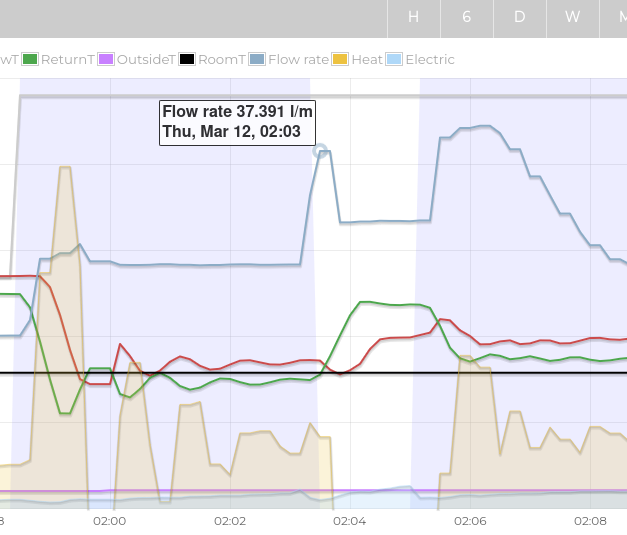
Are you definitely referring to defrosts? I’m surprised you got any last night! I didn’t but may be it’s milder here. Well, I did get one I suppose which is when the DHW was charging which does go high very briefly, see screenshot below:

You mentioned pipes reverberating, is it a banging noise? My installer fitted a three way valve which was not adequate so they had to replace it, if you’re getting banging then maybe read Grant R290 Noise During DHW.

Sorry to hear it, I hate things like that. Do you have the Open Energy Monitor? Would be interesting to look at your graphs.

Unsure there, I’ve not played with or worried about pump speeds, mine seem fine (pipe noise is tolerable or silent), re fan noise I assume (maybe incorrectly) that it uses one of the H FAN SPEED settings when doing a defrost, but I guess that doesn’t help with pump speed.

Re blockade - I don’t think that would affect anything, it just stops the pump when the circuit isn’t calling for heat I think.

i just checked again, and yes h fan speeds do now have an effect, but not in quiet mode which i was using. less reason for it now, since it was the fan which was obnoxious, not the compressor (which is the other thing quiet mode regulates).

As mentioned though, the fan always runs up to 650 on start up, which it does after a defrost (fan off until the end) or dhw end (when the compressor stops for no obvious reason). Chinee firmware folks got more work to do. :slightly_smiling_face:

mine set to 450, 550 .. left the 2 self destruct values at the end alone. 800 rpm?! better be well screwed down, and byebye quietmark…

The water pump DOES obey the max setting during defrost though .. if too noisy try winding max down to 75 or even lower.

1 Like

Maybe try changing H FAN SPEED 2 Dave, because I notice my fan actually goes to 700rpm on startup, so either mine is going to a hardcoded 700 rpm value or it is indeed going to the H FAN SPEED 2 value.

Whether you actually want to reduce that though is a question, because then if it gets to below ≈ -4°c you may not be getting enough airflow through the coil, though that said I know you change settings using HA so if bumping it down did indeed reduce the startup fan speed you could always reduce only when warm…

Again, i have been running in quiet mode, so i suspect h2 fan speed did not apply. Will look at what it does in ‘unquiet’ mode with h2 at 620.

Thanks you both for replies.

Mr W. You might be right - it might not be defrost, maybe oil recovery - a subject i knew nothing about until today! I understand these can happen every 3-4 hours particularly when the unit is idling, as it was last night with blockade turned off. Perhaps we’ll have to go back to a normal set back to get a good nights sleep. How do others run theirs to avoid noisy overnight oil recovery cycles.?

No banging noise just a choppy fan noise which is really quite loud at 650rpm (56-57db at 1m). I still wonder if I have a faulty fan but the installer just said ‘yep that’s what they sound like..!’

Unfortunately i don’t have open energy monitor just the included smart controller and econet24. i’m guessing it would be prohibitively expensive to retrofit..?
I was a little hesitant playing with the pump speeds but Dave’s comments gave me the confidence to give it a go. I changed the maximum to 80 and the minimum to 40 while leaving the standby as is so all pretty conservative for now..

Dave that good new’s that the heat pump does obey the max setting during defrost - i will leave it at 80 for the moment but might lower further if necessary. I will be interested to hear what yours does in ‘unquiet’ mode with h2 at 620..

Mine only goes to 30 L/min during oil recovery and is not loud enough to disturb me. I do hear it in certain rads but it’s fine. Maybe you have more 15mm pipework than me and it’s noisy?

I wouldn’t change pump blockade - the effect of enabling that is to stop the pump when not needed as opposed to running it at a low level, so that won’t be your issue here. I’d say changing the pump speed is your “lever” to sort this, unless it’s a pipework issue.

Exactly what mine sounds like. Choppy at 650rpm and audible about 8 metres away through a window.

I was only interested to see your flow rate, no need for it if you resolve the pump flow rate unless you are like me and like nerding out with stats! If you do and don’t want to spend the money you could always do what we’re doing and use home assistant coupled with some tricks to get some decent info from the system. All depends how much you want to tinker!

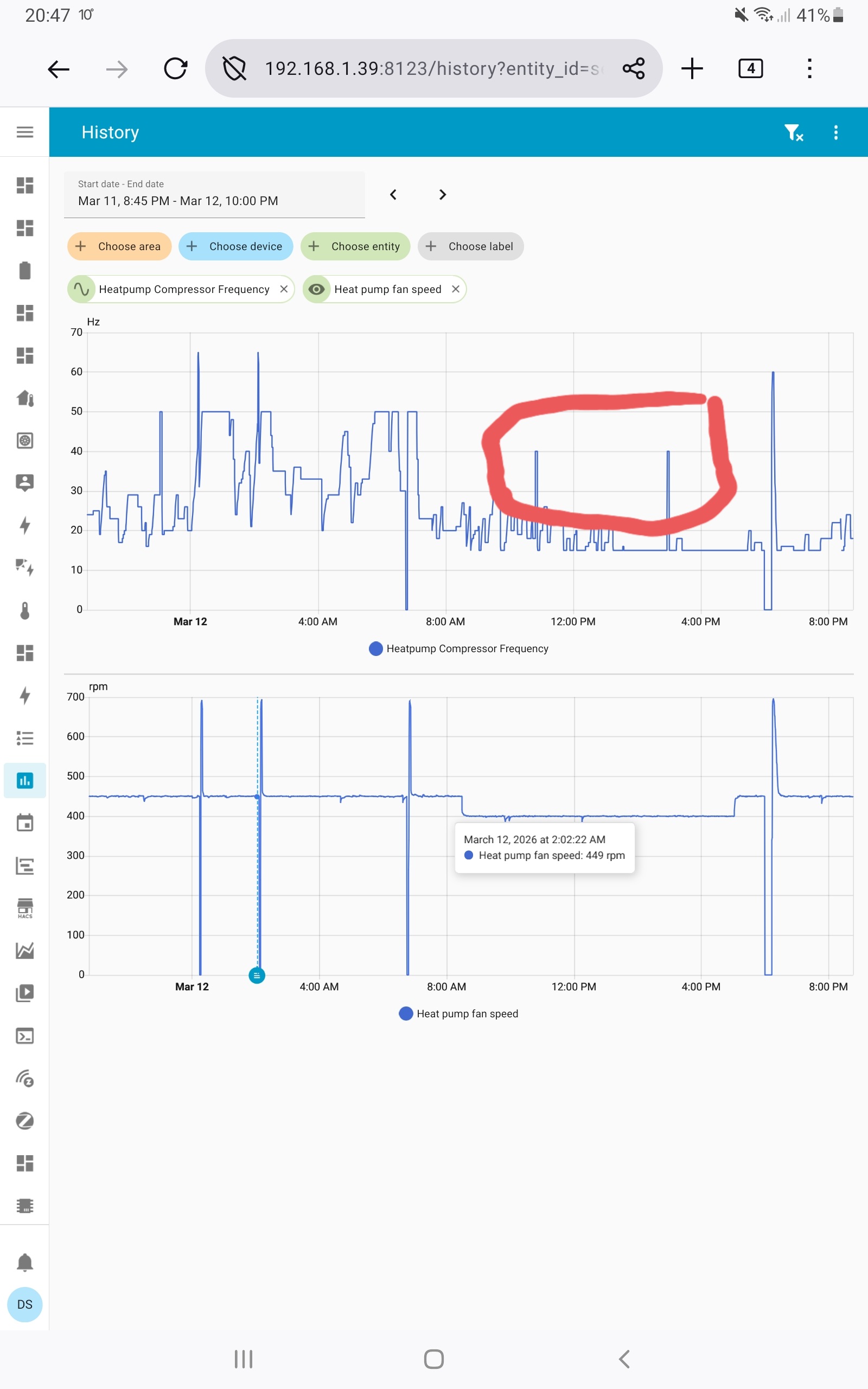
here is the home assistant graphs from mine. i had it in quiet mode 2 until tonight .. you see that the fan stayed at the desired q2 setting, 400 rpm, even during oil recovery (highlighted). the only high levels (700 it seems) were when it was starting up from off. maybe setting hfan2 will stop that too. i can run quiet2, which is fan 400,compressor 40hz or less, down to about 4 or 5c outside. Quiet1 works down to around zero. below that, quiet off (but now looks like hfan0,1 can even tame it down there?).

by the way, the first two spikes (in fan) were defrosts, the others two are restart after dhw, and compressor off.

If you want to mess with the water pump and fan speeds, or just look at them, they are in the editparams endpoint of the econet local api, at parameters {data ..

“1439”:{“name”: “HoldingRegister6050”, “minv”: 0, “edit”: true, “maxv”: 100, “value”: 25, “mult”: 1, “unit”: 0},“1440”:{“name”: “HoldingRegister6061”, “minv”: 0, “edit”: true, “maxv”: 100, “value”: 30, “mult”: 1, “unit”: 0},“1441”:{“name”: “HoldingRegister6271”, “minv”: 0, “edit”: true, “maxv”: 100, “value”: 70, “mult”: 1, “unit”: 0},“1443”:{“name”: “HFANSPEED06244”, “minv”: 0, “edit”: true, “maxv”: 1000, “value”: 450, “mult”: 1, “unit”: 0},“1444”:{“name”: “HFANSPEED16231”, “minv”: 0, “edit”: true, “maxv”: 1000, “value”: 550, “mult”: 1, “unit”: 0},“1445”:{“name”: “HFANSPEED26232”, “minv”: 0, “edit”: true, “maxv”: 1000, “value”: 600, “mult”: 1, “unit”: 0},“1446”:{“name”: “HFANSPEED36233”, “minv”: 0, “edit”: true, “maxv”: 1000, “value”: 800, “mult”: 1, “unit”: 0}

Firefox does .json prettyprint by default (on PC, the tablet/phone version sucks)

I note that minv for the water pump claims to be zero in the standby and min cases, but my system wont let me set anything that low. Someone upstream is forcing it back to 25 and 30.

Fan speed goes up to 1000, in theory, not that I tried. 650 is already too loud for me.

Ah, fwiw, oil recovery is still running the fan at 700 rpm, regardless of the hfan 2 setting of 620, so I guess back to quiet mode for me!

I have a terrible memory so perhaps I am wrong but I don’t recall oil recovery ran the fan at high speeds, odd. Perhaps I’ve just forgotten as oil recovery only runs I think if the compressor has stayed below a certain level (40hz?) for a while and I guess that’s not been the case in winter.

oil recovery is compressor to 60hz if if has not been there in last 4 hours (was 3, with older firmware). in quiet modes is 40 or 50hz instead. I think fan speed does the same thing .. certainly limited to 400 or 450 rpm in the quiet modes, but i believe used to be max (ie 500 or 650, depending on temp?) when not quiet. Maybe 700 now? Will have to see, but as you say if i am not in quiet mode, ambient is zero or less, and compressor unlikely to stay under 60hz for 3 or 4 hours.

Thanks again for all the replies - really useful stuff..

Still playing around, but like you Dave I noticed the fan did spin up to 700rpm after oil recovery in normal mode regardless of hfan02 setting.

It would be helpful if econet24 had a graph readout for fan speed - seems a pretty strange omission.

From your comments Dave it seems silent modes might be the way to go for everyday operation unless it get’s down to around 0c. Looking at your graph showing fan speed it looks like Home assistant might also be useful.. How difficult is it to set up and do you need to install extra sensors etc.?

*As an aside i notice that in econet24 under ‘Controller Sotftware Versions’ the ‘Module ecoNET version’ is offering an update. Is this sort of update usually a smooth process or one of those better left alone..?

the econet update (which is just the interface to wifi) was painless, tbough i was nervous too. does nothing obvious though.

Yes, try quiet mode. You can set a schedule for it overnight, but i have a 24/7 schedule and just toggle it on/off as desired (also toggle mode 1, or 2).

home assistant needs no extra hardware to read the pump data, just a pc or similar (raspberry pi works) on the same home network, running the HA software. Is much simpler to use dedicated pc running the home assistant os (chopped down linux) but if you really want you can run HA under a vm, or on a regular linux machine using docker. For a simple life you can buy a preconfigured box.

Danger is once you have HA you will shortly have it reading weather, opening blinds, making coffee, and feeding the cat. Some of that will require extra hardware (and a cat). :slightly_smiling_face:

You dont need HA though, you can access the local econet api by whatever your favourite method is, and store / play with the .json data that comes back. HA just makes storing ang graphing easier. Some programming expertise helpful, but there is a big HA user base, mostly friendly.

Thanks Dave

Econet update was as you said painless but as predicted no obvious changes..

Already set quiet mode to be in 24/7 schedule and toggling on and off which seems to work well.

Between myself and my son we’ll get HA up and running probably via the preconfigured box and then see if it can help with remembering to let the dog in and out!

Thanks very much for that. Very handily your outdoor temp was 7°C during that time, and for that Grant quote the max power output for the “9 kW unit” (35 °C flow temperature and 7°C outdoors) as 9.38 kW. On that basis, that gives power outputs of:

Silent mode 1 ≈ 68%

It was a bit warmer during your silent mode 2 run (10°C) but it looks something like:

Silent mode 2 ≈ 56%

If the 4 kW unit does the same amount of modulation, then I’d get:
Silent mode1 ≈ 2.8 kW

Silent mode2 ≈ 2.3 kW

with water flow rates of about 25 to 26 litres per minute for both (flow rate creeps up gradually during the cycle, probably due to water viscosity dropping as the temperature increases).