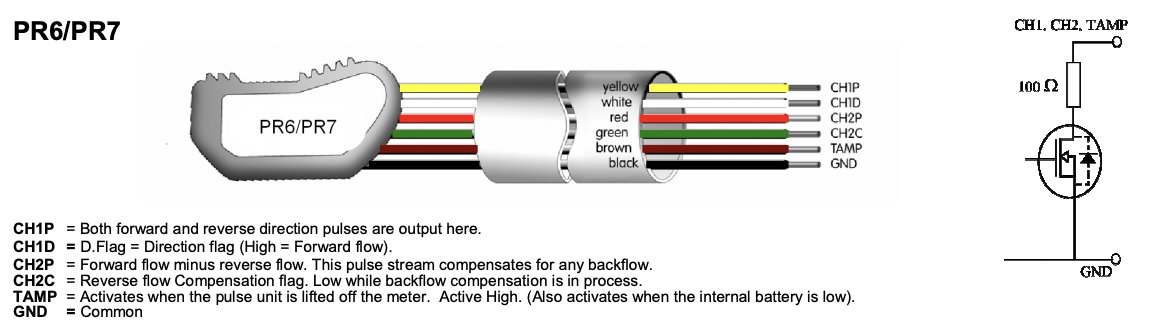
Sorry to resurrect an ancient thread, but in case it’s relevant to anyone else, I have this exact setup (Elster water meter with PR6 pulse counter). I had it setup with an emonPi counting pulses but was getting quite a few spurious pulses (think the PR6 is susceptible to noise). I tried various resistors but eventually fixed it with a cheap ESP32 board (Waveshare ESP32-S3-GEEK). Had one lying around but this would work with others. It has a tiny LCD screen where we can display the running pulse total and the total of discarded pulses. Plugs directly into the Pi’s USB. Just two connections:
- black wire from PR6 → GND of ESP32
- red wire from PR6 → GPIO6 of ESP32
Downloaded micropython binary and flashed it to ESP32 using esptool. Here’s the micropython I used. It only counts a pulse of at least 40ms; it persists the total to memory every 10 valid pulses; it prints litres:XX over serial every 10s for easy inclusion in emonHub; and a 2s hold of the little boot button resets the counters. It displays the running totals on its screen
from machine import Pin, SPI
import framebuf, time, json, array

# ── Hardware ──────────────────────────────────────────────────────────────────
PULSE_PIN = 6
LCD_SCLK, LCD_MOSI, LCD_CS, LCD_DC, LCD_RST = 12, 11, 10, 8, 9

# ── Config ────────────────────────────────────────────────────────────────────
DEBOUNCE_US    = 40_000   # ignore pulses shorter than 40 ms
SAVE_EVERY     = 10       # persist to flash every N valid pulses
SERIAL_EVERY_S = 10       # serial output interval

STATE_FILE = '/state.json'

# ── Colors — RGB565 byte-swapped for MicroPython framebuf ────────────────────
def _rgb(r, g, b):
    v = ((r & 0xF8) << 8) | ((g & 0xFC) << 3) | (b >> 3)
    return ((v & 0xFF) << 8) | (v >> 8)

BLACK = 0x0000; WHITE = 0xFFFF
DARK  = _rgb(0,   0,  48); GRAY  = _rgb(120,120,120)
GREEN = _rgb(80, 220,  80); RED   = _rgb(220, 60,  60)

# ── ISR state — pre-allocated, no heap allocation in handler ─────────────────
_fall_us    = array.array('l', [0])
_ev_valid   = array.array('i', [0])
_ev_discard = array.array('i', [0])

def _isr(pin):
    if pin.value() == 0:                      # falling edge — pulse starts
        _fall_us[0] = time.ticks_us()
    else:                                      # rising edge — pulse ends
        t0 = _fall_us[0]
        if t0:
            dur = time.ticks_diff(time.ticks_us(), t0)
            if dur >= DEBOUNCE_US:
                _ev_valid[0]   += 1
            else:
                _ev_discard[0] += 1
            _fall_us[0] = 0

# ── Persistence ───────────────────────────────────────────────────────────────
def load_state():
    try:
        with open(STATE_FILE) as f:
            d = json.load(f)
        return int(d.get('count', 0)), int(d.get('discarded', 0))
    except:
        return 0, 0

def save_state(count, discarded):
    with open(STATE_FILE, 'w') as f:
        json.dump({'count': count, 'discarded': discarded}, f)

# ── ST7789 240×135 LCD driver (Waveshare ESP32-S3-GEEK) ──────────────────────
class Display:
    W, H   = 240, 135
    X0, Y0 = 40, 52     # hardware offsets for this specific panel

    def __init__(self):
        spi = SPI(1, baudrate=40_000_000,
                  sck=Pin(LCD_SCLK), mosi=Pin(LCD_MOSI),
                  polarity=1, phase=1)
        self._spi = spi
        self._cs  = Pin(LCD_CS,  Pin.OUT, value=1)
        self._dc  = Pin(LCD_DC,  Pin.OUT, value=0)
        self._rst = Pin(LCD_RST, Pin.OUT, value=1)

        self._cs.value(0);  time.sleep_ms(20)
        self._rst.value(0); time.sleep_ms(20)
        self._rst.value(1); time.sleep_ms(50)

        def r(c, *a):
            self._cmd(c, bytes(a) if a else None)

        r(0x36, 0x70); r(0x3A, 0x05)
        r(0xB2, 0x0C,0x0C,0x00,0x33,0x33); r(0xB7, 0x35)
        r(0xBB, 0x19); r(0xC0, 0x2C); r(0xC2, 0x01)
        r(0xC3, 0x12); r(0xC4, 0x20); r(0xC6, 0x0F)
        r(0xD0, 0xA4,0xA1)
        r(0xE0, 0xD0,0x04,0x0D,0x11,0x13,0x2B,0x3F,0x54,0x4C,0x18,0x0D,0x0B,0x1F,0x23)
        r(0xE1, 0xD0,0x04,0x0C,0x11,0x13,0x2C,0x3F,0x44,0x51,0x2F,0x1F,0x1F,0x20,0x23)
        self._cmd(0x21); self._cmd(0x11); time.sleep_ms(120)
        self._cmd(0x29); time.sleep_ms(20)

        self._buf = bytearray(self.W * self.H * 2)
        self._fb  = framebuf.FrameBuffer(self._buf, self.W, self.H, framebuf.RGB565)

    def _cmd(self, cmd, dat=None):
        self._dc.value(0); self._cs.value(0)
        self._spi.write(bytes([cmd])); self._cs.value(1)
        if dat is not None:
            self._dc.value(1); self._cs.value(0)
            self._spi.write(dat if isinstance(dat, (bytes, bytearray)) else bytes([dat]))
            self._cs.value(1)

    def show(self):
        x0, x1 = self.X0, self.X0 + self.W - 1
        y0, y1 = self.Y0, self.Y0 + self.H - 1
        self._cmd(0x2A, bytes([x0>>8, x0&0xFF, x1>>8, x1&0xFF]))
        self._cmd(0x2B, bytes([y0>>8, y0&0xFF, y1>>8, y1&0xFF]))
        self._dc.value(0); self._cs.value(0)
        self._spi.write(b'\x2C'); self._dc.value(1)
        mv = memoryview(self._buf)
        for i in range(0, len(self._buf), 4096):
            self._spi.write(mv[i:i+4096])
        self._cs.value(1)

    def text_s(self, s, x, y, fg, bg, scale=2):
        bw = len(s) * 8; stride = (bw + 7) // 8
        mono = bytearray(stride * 8)
        mfb  = framebuf.FrameBuffer(mono, bw, 8, framebuf.MONO_HLSB)
        mfb.fill(0); mfb.text(s, 0, 0, 1)
        for cy in range(8):
            row = cy * stride
            for cx in range(bw):
                bit = (mono[row + cx // 8] >> (7 - cx % 8)) & 1
                c   = fg if bit else bg
                px, py = x + cx * scale, y + cy * scale
                for sy in range(scale):
                    for sx in range(scale):
                        nx, ny = px + sx, py + sy
                        if 0 <= nx < self.W and 0 <= ny < self.H:
                            self._fb.pixel(nx, ny, c)

    def draw(self, count, discarded):
        self._fb.fill(DARK)
        self.text_s("Valid",        8,   8, GRAY,  DARK, scale=2)
        self.text_s(f"{count} L",   8,  30, GREEN, DARK, scale=3)
        self.text_s("Discarded",    8,  88, GRAY,  DARK, scale=2)
        self.text_s(str(discarded), 8, 110, RED,   DARK, scale=2)
        self.show()

# ── Main ──────────────────────────────────────────────────────────────────────
RESET_HOLD_MS = 2000

def main():
    count, discarded = load_state()
    unsaved = 0

    disp = Display()
    disp.draw(count, discarded)

    pin = Pin(PULSE_PIN, Pin.IN, Pin.PULL_UP)
    pin.irq(trigger=Pin.IRQ_RISING | Pin.IRQ_FALLING, handler=_isr)

    btn = Pin(0, Pin.IN, Pin.PULL_UP)   # BOOT button, active-low
    btn_down_ms = None

    last_serial = time.time()
    dirty       = False

    print(f"Water meter started — count={count} discarded={discarded}")

    while True:
        now_ms = time.ticks_ms()
        if btn.value() == 0:
            if btn_down_ms is None:
                btn_down_ms = now_ms
            elif time.ticks_diff(now_ms, btn_down_ms) >= RESET_HOLD_MS:
                count = 0; discarded = 0; unsaved = 0
                save_state(0, 0)
                _ev_valid[0] = 0; _ev_discard[0] = 0
                btn_down_ms = None
                print("litres:0")
                disp._fb.fill(DARK)
                disp.text_s("RESET!", 40, 55, WHITE, DARK, scale=4)
                disp.show(); time.sleep_ms(1000)
                dirty = True
        else:
            btn_down_ms = None

        nv = _ev_valid[0];   _ev_valid[0]   = 0
        nd = _ev_discard[0]; _ev_discard[0] = 0

        if nv or nd:
            count += nv; discarded += nd; unsaved += nv; dirty = True
            if unsaved >= SAVE_EVERY:
                save_state(count, discarded); unsaved = 0

        if dirty:
            disp.draw(count, discarded); dirty = False

        now = time.time()
        if now - last_serial >= SERIAL_EVERY_S:
            print(f"litres:{count}")
            last_serial = now

        time.sleep_ms(50)

main()
Quite a niche, but for ~£10 of hardware it’s worth it for anyone else looking at pulses counted getting ahead of the meter reading..